6DOF Hydrostatic (Standard Shape)
R2026bSimulate six-degrees-of-freedom hydrostatic motion of standard shape in fluid environment
Since R2026b
6DOF Hydrostatic (Standard Shape) block
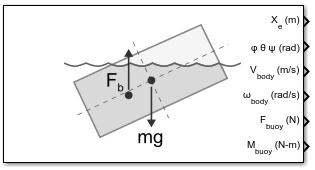
To add a block to a model, double-click the canvas and start typing the block name. Then, select the block from the list.
Libraries:
Aerospace Blockset Maritime Applications Library /
Hydrostatic Systems
Description
Add-On Required: This feature requires the Aerospace Blockset Maritime Applications Library add-on.
The 6DOF Hydrostatic (Standard Shape) block models the six-degrees-of-freedom hydrostatic buoyant motion of a rigid, homogeneous body considering the rotation of a body-fixed coordinate frame (Xb, Yb, Zb) about a flat Earth reference frame (Xe, Ye, Ze). The block computes buoyancy forces and moments from the submerged volume of the body at each time step using Archimedes' principle, and integrates the resulting equations of motion including gravity, linear damping, and optional external forces or wave effects.
The 6DOF Hydrostatic (Standard Shape) block discretizes these standard shapes using surface mesh representation.
Cuboid
Cylinder
Sphere
When the block does not have wave elevation input the block assumes a calm water plane
at Z=0.
Use the 6DOF Hydrostatic (Standard Shape) block to analyze and predict the motion of unpowered marine bodies in realistic sea states. This block does not account for propulsion, active control surfaces, or nonlinear hydrodynamic effects.
Ports
Input
Wave elevation throughout the domain, specified as a real finite N-by-M matrix.
Dependencies
To enable this port, select the Input wave elevation parameter.
Data Types: double
Fluid density, specified as a real finite scalar value.
Dependencies
To enable this port, select the Input fluid density parameter.
Data Types: double
Velocity of water currents affecting body, specified as 3-by-1 vector of real finite values in the flat Earth reference frame.
Dependencies
To enable this port, select the Input water current velocity parameter.
Data Types: double
External forces in the x-, y-, and z-directions about the center of gravity, specified as a 3-by-1 vector of real finite values and specified in the body-fixed frame.
Dependencies
To enable this port, select the Input external forces and moments parameter.
Data Types: double
External moments in the x-, y-, and z-directions about the center of gravity, specified as a 3-by-1 vector of real finite values and specified in the body-fixed frame.
Dependencies
To enable this port, select the Input external forces and moments parameter.
Data Types: double
Output
Position in flat Earth reference frame, returned as a 3-by-1 vector.
Data Types: double
Euler rotation angles for the output orientation of the body in water (roll, pitch, yaw), returned as a 3-by-1 vector, in radians.
Yaw, pitch, and roll angles are applied using the
z-y-x
right-hand intrinsic passive transformation from frame A to frame B,
such as angle2dcm(yaw,pitch,roll,"ZYX").
Data Types: double
Velocity in the body-fixed frame, returned as a 3-by-1 vector.
Data Types: double
Angular rates in the body-fixed axes, returned as a 3-by-1 vector in the body-fixed frame.
Data Types: double
Buoyancy force in the x-, y-, and z-directions, returned as a 3-by-1 vector.
Dependencies
To enable this parameter, select the Output buoyancy forces and moments parameters.
Data Types: double
Buoyancy moment in the x-, y-, and z-directions, returned as a 3-by-1 vector in the body-fixed frame.
Dependencies
To enable this parameter, select the Output buoyancy forces and moments parameters.
Data Types: double
Parameters
To edit block parameters interactively, use the Property Inspector. From the Simulink® Toolstrip, on the Simulation tab, in the Prepare gallery, select Property Inspector.
Main
Parameter and port units, specified as one of these values:
| Units | Acceleration | Length | Mass | Center of Gravity | Heightmap | Density/ρ | Translational Damping Coefficient | Rotational Damping Coefficient | M | V | F | ω |
|---|---|---|---|---|---|---|---|---|---|---|---|---|
| m/s2 | m | kg | m | m | kg/m3 | N-s/m | N-s/rad | N-m | m/s | N | rad/s |
| ft/s2 | ft | slugs | ft | ft | slugs/ft3 | lbf-s/ft | lbf-ft-s/rad | lb-ft | ft/s | lbf | rad/s |
| ft/s2 | ft | slugs | ft | ft | slugs/ft3 | lbf-s/ft | lbf-ft-s/rad | lb-ft | kts | lbf | rad/s |
Programmatic Use
To set the block
parameter value programmatically, use the set_param
function.
To get the block
parameter value programmatically, use the get_param
function.
| Parameter: | units |
| Values: | Metric
(MKS) (default) | English (velocity in
ft/s) | English (velocity in
kts) |
Example: set_param(gcb,"units","Metric
(MKS)")
Initial position of body center in inertial axis (Xe, Ye, Ze), specified as a finite 3-by-1 vector.
Programmatic Use
To set the block parameter value programmatically, use
the set_param function.
To get the block parameter value
programmatically, use the get_param function.
| Parameter: | initialPosition |
| Values: | [0 0 0] (default) | finite 3-by-1 vector |
| Data Types: | double |
Example: set_param(gcb,"initialPosition","[0 0
0]")
Initial velocity of body center in the body axis (u, v, w), specified as a finite 3-by-1 vector.
Programmatic Use
To set the block parameter value programmatically, use
the set_param function.
To get the block parameter value
programmatically, use the get_param function.
| Parameter: | initialVelocity |
| Values: | [0 0 0] (default) | finite 3-by-1 vector |
| Data Types: | double |
Example: set_param(gcb,"initialVelocity","[0 0
0]")
Initial Euler orientation (roll, pitch, yaw), specified as a finite 3-by-1 vector.
Programmatic Use
To set the block parameter value programmatically, use
the set_param function.
To get the block parameter value
programmatically, use the get_param function.
| Parameter: | initialEulerAngles |
| Values: | [0 0 0] (default) | finite 3-by-1 vector |
| Data Types: | double |
Example: set_param(gcb,"initialEulerAngles","[0 0
0]")
Initial body rotation rates, specified as a finite 3-by-1 vector.
Programmatic Use
To set the block parameter value programmatically, use
the set_param function.
To get the block parameter value
programmatically, use the get_param function.
| Parameter: | initialBodyRates |
| Values: | [0 0 0] (default) | finite 3-by-1 vector |
| Data Types: | double |
Example: set_param(gcb,"initialBodyRates","[0 0
0]")
Acceleration from gravity, specified as a finite positive scalar, in the units specified in Units.
Programmatic Use
To set the block parameter value programmatically, use
the set_param function.
To get the block parameter value
programmatically, use the get_param function.
| Parameter: | gravity |
| Values: | 9.81 (default) | finite positive scalar |
| Data Types: | double |
Example: set_param(gcb,"gravity","9.81")
To enable the wave elevation inputwave port Heightmap, select this parameter. Otherwise, clear this parameter.
Programmatic Use
To set the block parameter value programmatically, use
the set_param function.
To get the block parameter value
programmatically, use the get_param function.
| Parameter: | inputSurfaceWave |
| Values: | off (default) | on |
Example: set_param(gcb,"inputSurfaceWave","off")
Wave grid resolution, specified as a finite positive scalar.
Dependencies
To enable this parameter, select the Input wave elevation parameter.
Programmatic Use
To set the block parameter value programmatically, use
the set_param function.
To get the block parameter value
programmatically, use the get_param function.
| Parameter: | gridResolution |
| Values: | 1 (default) | finite positive scalar |
Example: set_param(gcb,"inputSurfaceWave","off")
To enable the fluid density input port ρ, select this parameter. Otherwise, clear this parameter.
Programmatic Use
To set the block parameter value programmatically, use
the set_param function.
To get the block parameter value
programmatically, use the get_param function.
| Parameter: | inputDensity |
| Values: | off (default) | on |
Example: set_param(gcb,"inputDensity","off")
To enable the water current velocity input port V, select this parameter. Otherwise, clear this parameter.
Programmatic Use
To set the block parameter value programmatically, use
the set_param function.
To get the block parameter value
programmatically, use the get_param function.
| Parameter: | inputVcurrent |
| Values: | off (default) | on |
Example: set_param(gcb,"inputVcurrent","off")
To enable the external forces and moments input ports Fext and Mext, select this parameter. Otherwise, clear this parameter.
Programmatic Use
To set the block parameter value programmatically, use
the set_param function.
To get the block parameter value
programmatically, use the get_param function.
| Parameter: | inputForces |
| Values: | off (default) | on |
Example: set_param(gcb,"inputForces","off")
To enable the buoyancy forces and moments output ports Fbuoy and Mbuoy, select this parameter. Otherwise, clear this parameter.
Programmatic Use
To set the block parameter value programmatically, use
the set_param function.
To get the block parameter value
programmatically, use the get_param function.
| Parameter: | outputForces |
| Values: | on (default) | off |
Example: set_param(gcb,"outputForces","on")
Body
Shape of body, specified as one of these values:
Cuboid — Rectangular box defined by length (x), width (y), and height (z).
Cylinder — Right circular cylinder defined by diameter and length.
Sphere — Sphere defined by radius.
Programmatic Use
To set the block parameter value programmatically, use
the set_param function.
To get the block parameter value
programmatically, use the get_param function.
| Parameter: | Shape |
| Values: | Forward (default) | Cylinder | Sphere |
Example: set_param(gcb,"Shape","Cylinder")
Surface mesh resolution, specified as Coarse,
Medium, Fine,
or Custom.
Programmatic Use
To set the block parameter value programmatically, use
the set_param function.
To get the block parameter value
programmatically, use the get_param function.
| Parameter: | Mesh |
| Values: | Coarse (default) | Medium | Fine | Custom |
Example: set_param(gcb,"Mesh","Coarse")
Cuboid forward length along the x-axis, specified as a finite positive scalar in the units specified in Units.
Dependencies
To enable this parameter, set the Shape of the
body parameter to
Cuboid.
Programmatic Use
To set the block parameter value programmatically, use
the set_param function.
To get the block parameter value
programmatically, use the get_param function.
| Parameter: | cuboidLength |
| Values: | 1 (default) | finite positive scalar |
| Data Types: | double |
Example: set_param(gcb,"cuboidLength","1")
Cuboid lateral width along the y-axis, specified as a finite positive scalar in the units specified in Units.
Dependencies
To enable this parameter, set the Shape of the
body parameter to
Cuboid.
Programmatic Use
To set the block parameter value programmatically, use
the set_param function.
To get the block parameter value
programmatically, use the get_param function.
| Parameter: | cuboidWidth |
| Values: | 1 (default) | finite positive scalar |
| Data Types: | double |
Example: set_param(gcb,"cuboidWidth","1")
Cuboid vertical height along the z-axis, specified as a finite positive scalar in the units specified in Units.
Dependencies
To enable this parameter, set the Shape of the
body parameter to
Cuboid.
Programmatic Use
To set the block parameter value programmatically, use
the set_param function.
To get the block parameter value
programmatically, use the get_param function.
| Parameter: | cuboidHeight |
| Values: | 1 (default) | finite positive scalar |
| Data Types: | double |
Example: set_param(gcb,"cuboidHeight","1")
Custom mesh resolution, specified as a positive scalar between 10 and
100, inclusive.
Dependencies
To enable this parameter:
Set Shape of the body to
Forward.Set Mesh resolution to
Custom.
Programmatic Use
To set the block parameter value programmatically, use
the set_param function.
To get the block parameter value
programmatically, use the get_param function.
| Parameter: | cuboidMeshScaling |
| Values: | 10 (default) | positive scalar between 10 and
100, inclusive |
| Data Types: | double |
Example: set_param(gcb,"cuboidMeshScaling","10")
Cylinder lateral diameter, specified as a finite positive scalar.
Dependencies
To enable this parameter, set the Shape of the
body parameter to
Cylinder.
Programmatic Use
To set the block parameter value programmatically, use
the set_param function.
To get the block parameter value
programmatically, use the get_param function.
| Parameter: | cylinderDiameter |
| Values: | 1 (default) | finite positive scalar |
| Data Types: | double |
Example: set_param(gcb,"cylinderDiameter","1")
Cylinder forward length, specified as a finite positive scalar.
Dependencies
To enable this parameter, set the Shape of the
body parameter to
Cylinder.
Programmatic Use
To set the block parameter value programmatically, use
the set_param function.
To get the block parameter value
programmatically, use the get_param function.
| Parameter: | cylinderLength |
| Values: | 1 (default) | finite positive scalar |
| Data Types: | double |
Example: set_param(gcb,"cylinderLength","1")
Custom radial mesh resolution, specified as a finite positive scalar between 20 and 300, inclusive.
Dependencies
To enable this parameter:
Set Shape of the body to
Cylinder.Set Mesh resolution to
Custom.
Programmatic Use
To set the block parameter value programmatically, use
the set_param function.
To get the block parameter value
programmatically, use the get_param function.
| Parameter: | cylinderMeshScaling |
| Values: | 20 (default) | finite positive scalar between 20 and 300,
inclusive |
| Data Types: | double |
Example: set_param(gcb,"cylinderMeshScaling","20")
Number of recursive icosahedron subdivisions, specified as a finite positive scalar,
between 2 and 6, inclusive.
Dependencies
To enable this parameter:
Set Shape of the body to
Sphere.Set Mesh resolution to
Custom.
Programmatic Use
To set the block parameter value programmatically, use
the set_param function.
To get the block parameter value
programmatically, use the get_param function.
| Parameter: | sphereMeshScaling |
| Values: | 3 (default) | finite positive scalar, between 2 and
6, inclusive |
| Data Types: | double |
Example: set_param(gcb,"sphereMeshScaling","3")
Sphere radius, specified as a finite positive scalar in the units specified in Units.
Dependencies
To enable this parameter, set Shape of the
body to Sphere.
Programmatic Use
To set the block parameter value programmatically, use
the set_param function.
To get the block parameter value
programmatically, use the get_param function.
| Parameter: | sphereRadius |
| Values: | 0.5 (default) | finite positive scalar |
| Data Types: | double |
Example: set_param(gcb,"sphereRadius","0.5")
Body mass, specified as a finite positive scalar.
Programmatic Use
To set the block parameter value programmatically, use
the set_param function.
To get the block parameter value
programmatically, use the get_param function.
| Parameter: | Mass |
| Values: | 500 (default) | finite positive scalar |
| Data Types: | double |
Example: set_param(gcb,"Mass","500")
Center of gravity of body in body axes, specified as a finite 3-by-1 vector.
Programmatic Use
To set the block parameter value programmatically, use
the set_param function.
To get the block parameter value
programmatically, use the get_param function.
| Parameter: | CG |
| Values: | [0 0 0] (default) | finite 3-by-1 vector |
| Data Types: | double |
Example: set_param(gcb,"CG","[0 0
0]")
Fluid
Fluid density, specified as a finite positive scalar in the units specified in Units.
Dependencies
To enable this parameter, clear the Input fluid density parameter.
Programmatic Use
To set the block parameter value programmatically, use
the set_param function.
To get the block parameter value
programmatically, use the get_param function.
| Parameter: | fluidDensity |
| Values: | 1025 (default) | finite positive scalar |
| Data Types: | double |
Example: set_param(gcb,"fluidDensity","1025")
Linear translational damping coefficient, specified as a finite positive scalar or 3-by-1 vector in the units specified in Units.
Programmatic Use
To set the block parameter value programmatically, use
the set_param function.
To get the block parameter value
programmatically, use the get_param function.
| Parameter: | translationalDamping |
| Values: | 500 (default) | finite positive scalar | 3-by-1 vector |
| Data Types: | double |
Example: set_param(gcb,"translationalDamping","500")
Linear rotational damping coefficient, specified as a finite positive scalar or 3-by-1 vector in the units specified in Units.
Programmatic Use
To set the block parameter value programmatically, use
the set_param function.
To get the block parameter value
programmatically, use the get_param function.
| Parameter: | rotationalDamping |
| Values: | 500 (default) | finite positive scalar | 3-by-1 vector |
| Data Types: | double |
Example: set_param(gcb,"rotationalDamping","500")
Version History
Introduced in R2026b
MATLAB Command
You clicked a link that corresponds to this MATLAB command:
Run the command by entering it in the MATLAB Command Window. Web browsers do not support MATLAB commands.


选择网站
选择网站以获取翻译的可用内容,以及查看当地活动和优惠。根据您的位置,我们建议您选择:。
您也可以从以下列表中选择网站:
如何获得最佳网站性能
选择中国网站(中文或英文)以获得最佳网站性能。其他 MathWorks 国家/地区网站并未针对您所在位置的访问进行优化。
美洲
- América Latina (Español)
- Canada (English)
- United States (English)
欧洲
- Belgium (English)
- Denmark (English)
- Deutschland (Deutsch)
- España (Español)
- Finland (English)
- France (Français)
- Ireland (English)
- Italia (Italiano)
- Luxembourg (English)
- Netherlands (English)
- Norway (English)
- Österreich (Deutsch)
- Portugal (English)
- Sweden (English)
- Switzerland
- United Kingdom (English)