在命令行中生成 C++ 可执行文件
R2026b此示例说明如何使用 codegen 命令从 MATLAB® 函数生成 C++ 可执行文件。在此示例中,您准备用于代码生成的入口函数,确定输入类型,然后生成 MEX 函数、示例 C++ main 函数和简单的 C++ 可执行文件。要学习代码生成的基础知识,请参阅Generate Deployable Standalone Code by Using the MATLAB Coder App。
检查 MATLAB 函数并生成示例数据
检查 MATLAB 函数 averagingFilterML。此函数使用平均值滤波器对输入信号进行去噪。它接受一个由信号值组成的输入向量,并返回与输入向量大小相同的由滤波后的值组成的输出向量。averagingFilterML 函数使用变量 slider 来表示包含 16 个信号值的滑动窗,并计算每个窗位置的平均信号值。
type averagingFilterMLfunction y = averagingFilterML(x)
slider = zeros(16,1);
for i = 1:numel(x)
slider(2:end) = slider(1:end-1); % move one position in the buffer
slider(1) = x(i); % Add a new sample value to the buffer
y(i) = sum(slider)/numel(slider); % write the average of the current window to y
end
end
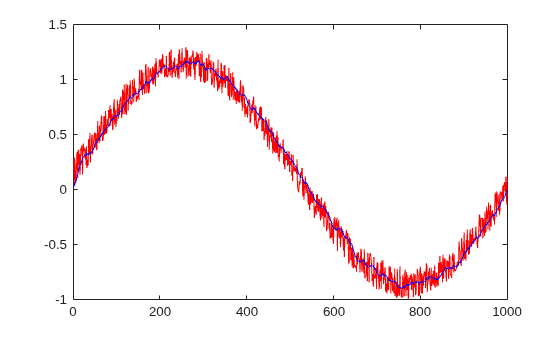
生成含噪正弦波,并使用 averagingFilterML 进行滤波并绘制含噪数据。
v = 0:0.00614:2*pi;
x = sin(v) + 0.3*rand(1,numel(v));
filtered_ML = averagingFilterML(x);
plot(x,"red");
hold on
plot(filtered_ML,"blue");
xlim([0 1000])
hold off;
准备用于代码生成的入口函数
准备用于代码生成的入口函数。入口函数是顶层函数,它调用您要为其生成代码的所有其他 MATLAB 函数。在此示例中,您使用 averagingFilterML 作为入口函数。
要为代码生成准备 averagingFilterML,请编辑该函数。
edit averagingFilterML在 averagingFilterML 函数声明后面添加 %#codegen 指令。此指令提示 MATLAB 代码分析器识别特定于代码生成的警告和错误。在此示例中,代码分析器指示您必须先完全定义输出参量 y,然后才能使用它。有关代码分析器执行的检查的详细信息,请参阅MATLAB for Code Generation Messages。

代码生成器必须能够在访问数组元素之前确定数组的大小和类型。在此示例中,在更新元素 y(i) 之前,您必须定义数组 y 的大小和类型。您可以使用 zeros 函数来指示 y 是 1×x 双精度数组。在函数声明后添加以下代码行:
y = zeros(size(x));
在您进行此更改后,代码分析器不会在代码中识别出其他潜在代码生成错误。文件 averagingFilterCG.m 包含更新后的代码。
使用 coder.screener 函数运行代码生成就绪工具。使用此工具检查 MATLAB 代码是否包含代码生成不支持的函数或功能。有关此工具执行的检查的详细信息,请参阅代码生成就绪工具。
在此示例中,代码生成就绪工具不会在 averagingFilterCG 函数中发现不支持的函数或功能。
coder.screener("averagingFilterCG")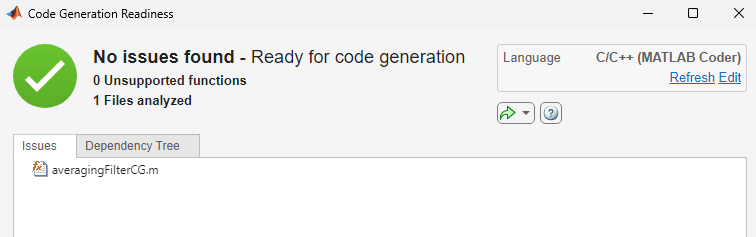
指定输入类型
指定入口函数的输入的类型。由于 C 和 C++ 是静态类型语言,因此代码生成器必须在代码生成过程中确定生成代码中所有变量的类和大小。指定输入类型的方法之一是使用 arguments 模块。要了解其他输入类型指定方法,请参阅指定入口函数输入的类型。
在函数声明后添加以下代码,以将输入参量 x 定义为无界双精度行向量:
arguments
x (1,:) double
end
文件 averagingFilter.m 包含更新后的代码:
type averagingFilterfunction y = averagingFilter(x) %#codegen
arguments
x (1,:) double
end
y = zeros(size(x));
slider = zeros(16,1);
for i = 1:numel(x)
slider(2:end) = slider(1:end-1); % move one position in the buffer
slider(1) = x(i); % Add a new sample value to the buffer
y(i) = sum(slider)/numel(slider); % write the average of the current window to y
end
end
生成并运行 MEX 函数
从入口函数生成 MEX 函数。MEX 函数是您可以在 MATLAB 内部运行的 C 或 C++ 可执行文件。运行生成的 MEX 函数以检查生成代码是否与原始 MATLAB 代码具有相同的行为。
执行此步骤是最佳做法,因为您可以运行生成的 MEX 函数来检测在独立代码中更难诊断出来的运行时错误。例如,MEX 函数默认包含内存完整性检查。这些检查执行数组边界和维度检查,以在为 MATLAB 函数生成的代码中检测内存完整性违规情况。
默认情况下,codegen 命令在工作文件夹中生成以 C 语言编写的 MEX 函数。使用 -lang:C++ 选项指示代码生成器生成 C++ MEX 函数。
codegen averagingFilter -lang:c++
Code generation successful.
使用传递给原始 MATLAB 函数的相同输入来测试 MEX 函数。在此示例中,两个函数的输出在机器精度范围内是等效的。
filtered_MEX = averagingFilter_mex(x);
all(abs(filtered_ML-filtered_MEX)) < eps
ans = logical
   1
生成示例 C++ main 函数
生成示例 C++ main 函数。当您生成独立代码时,代码生成器会生成示例 C 或 C++ main 函数。由于示例 main 函数说明如何调用生成的 C 或 C++ 函数,您可以将其用作应用程序的模板。使用带 codegen 和 -config:lib 选项的 -lang:c++ 命令生成独立 C++ 静态库。
codegen -config:lib -lang:c++ averagingFilter
Code generation successful.
检查示例 C++ main 函数。代码生成在文件夹 codegen/lib/averagingFilter/examples 中创建示例 CPP 和 H 文件。
type(fullfile("codegen","lib","averagingFilter","examples","main.cpp"))
//
// File: main.cpp
//
// MATLAB Coder version            : 26.2
// C/C++ source code generated on  : 06-Aug-2026 22:59:57
//

/*************************************************************************/
/* This automatically generated example C++ main file shows how to call  */
/* entry-point functions that MATLAB Coder generated. You must customize */
/* this file for your application. Do not modify this file directly.     */
/* Instead, make a copy of this file, modify it, and integrate it into   */
/* your development environment.                                         */
/*                                                                       */
/* This file initializes entry-point function arguments to a default     */
/* size and value before calling the entry-point functions. It does      */
/* not store or use any values returned from the entry-point functions.  */
/* If necessary, it does pre-allocate memory for returned values.        */
/* You can use this file as a starting point for a main function that    */
/* you can deploy in your application.                                   */
/*                                                                       */
/* After you copy the file, and before you deploy it, you must make the  */
/* following changes:                                                    */
/* * For variable-size function arguments, change the example sizes to   */
/* the sizes that your application requires.                             */
/* * Change the example values of function arguments to the values that  */
/* your application requires.                                            */
/* * If the entry-point functions return values, store these values or   */
/* otherwise use them as required by your application.                   */
/*                                                                       */
/*************************************************************************/

// Include Files
#include "main.h"
#include "averagingFilter.h"
#include "averagingFilter_initialize.h"
#include "averagingFilter_terminate.h"
#include "coder_array.h"

// Function Declarations
static coder::array<double, 2U> argInit_1xUnbounded_real_T();

static double argInit_real_T();

// Function Definitions
//
// Arguments    : void
// Return Type  : coder::array<double, 2U>
//
static coder::array<double, 2U> argInit_1xUnbounded_real_T()
{
  coder::array<double, 2U> result;
  // Set the size of the array.
  // Change this size to the value that the application requires.
  result.set_size(1, 2);
  // Loop over the array to initialize each element.
  for (int idx1{0}; idx1 < result.size(1); idx1++) {
    // Set the value of the array element.
    // Change this value to the value that the application requires.
    result[idx1] = argInit_real_T();
  }
  return result;
}

//
// Arguments    : void
// Return Type  : double
//
static double argInit_real_T()
{
  return 0.0;
}

//
// Arguments    : int argc
//                char **argv
// Return Type  : int
//
int main(int, char **)
{
  // Initialize the application.
  // You do not need to do this more than one time.
  averagingFilter_initialize();
  // Invoke the entry-point functions.
  // You can call entry-point functions multiple times.
  main_averagingFilter();
  // Terminate the application.
  // You do not need to do this more than one time.
  averagingFilter_terminate();
  return 0;
}

//
// Arguments    : void
// Return Type  : void
//
void main_averagingFilter()
{
  coder::array<double, 2U> x;
  coder::array<double, 2U> y;
  // Initialize function 'averagingFilter' input arguments.
  // Initialize function input argument 'x'.
  x = argInit_1xUnbounded_real_T();
  // Call the entry-point 'averagingFilter'.
  averagingFilter(x, y);
}

//
// File trailer for main.cpp
//
// [EOF]
//
修改示例 C++ main 函数
将示例 main.cpp 文件复制到工作目录,并根据您的应用进行修改。使用生成的示例主函数作为创建主函数的起点。示例主函数说明如何将输入传递给生成代码以及如何从生成代码获取输出。
不要修改 examples 子文件夹中的 main.c 和 main.h 文件。在使用示例主函数之前,将示例主函数源文件和头文件复制到编译文件夹以外的某个位置。修改新位置的文件以满足您的应用程序的要求。
对于此示例,工作目录中的文件 main.cpp 包含简化的 C++ main 函数。
type main.cpp#include "averagingFilter.h"
#include "averagingFilter_initialize.h"
#include "averagingFilter_terminate.h"
#include "coder_array.h"
#include <iostream>
int main()
{
coder::array<double, 2U> x = {1.0, 2.0};
coder::array<double, 2U> y;
averagingFilter_initialize();
averagingFilter(x, y);
averagingFilter_terminate();
std::cout << "Execution completed";
return 0;
}
生成并测试 C++ 可执行文件
使用带 -config:exe 和 -lang:c++ 选项的 codegen 命令,指示代码生成器生成 C++ 可执行文件。通过在命令行中指定文件名,指示 codegen 命令包含自定义 main.cpp 源代码文件。代码生成器在工作文件夹中创建 averagingFilter 可执行文件。
codegen -config:exe -lang:c++ averagingFilter main.cpp
Code generation successful.
要在 MATLAB 中运行可执行文件,请使用 system 命令。使用 ispc 函数选择适当的 system 命令。
if ispc
    system("averagingFilter.exe")
else
    system("./averagingFilter")
end
Execution completed
ans =
0

