Diagnose Common Code Generation Errors and Warnings
R2026bThis example shows how to diagnose and resolve common errors and warnings you encounter when generating C or C++ code from MATLAB® code. Generating working, optimized C and C++ code from MATLAB code can require multiple cycles of troubleshooting and code generation.
To generate C and C++ code, the code generator converts dynamically typed MATLAB code to statically typed C and C++ code. In dynamically typed languages, the class and size of a variable can change at run time. In statically typed languages, the code generator must determine the variable types when you generate code. Many code generation errors occur when the code generator attempts to convert dynamically typed MATLAB variables to statically typed C or C++ variables. You can avoid the most common code generation errors by following these best practices when you write MATLAB code for code generation:
Define the class and size of all variables before using them.
Preallocate arrays before indexing.
Use only MATLAB functions and language features that are supported for code generation.
In this example, you generate code for the MATLAB function fibonacciPrimes and fix the errors that you
encounter. To learn about the basics of code generation, see Generate Deployable Standalone Code by Using the MATLAB Coder App.
Examine and Run MATLAB Function
Write the MATLAB function fibonacciPrimes. This function
calculates the first n numbers in the Fibonacci sequence by using
a temporary array of 64-bit integers. It returns an array of the prime numbers in
the calculated
sequence.
function out = fibonacciPrimes(n) %#codegen
temp(1) = uint64(1);
temp(2) = uint64(1);
for idx = 3:n
    temp(idx) = temp(idx-1) + temp(idx-2);
end
out = temp(isprime(temp));
end
Test the function in MATLAB by using a sample input value.
F_Primes_ML = fibonacciPrimes(50)
F_Primes_ML = 1×11 uint64 row vector
            2            3            5           13           89          233         1597        28657       514229    433494437   2971215073
Prepare Entry-Point Function for Code Generation
Next, prepare the entry-point function for code generation.
An entry-point function that you want to access directly from your custom C or C++
code. Often, this function is a top-level function that calls
all of the other MATLAB functions in your application. In this example, you use
fibonacciPrimes as the entry-point function.
To prepare fibonacciPrimes for code generation, edit the
function.
edit fibonacciPrimes %#codegen directive after the
fibonacciPrimes function declaration.In this example, the Code Analyzer indicates that you must fully define the
temporary array temp before you subscript into it.
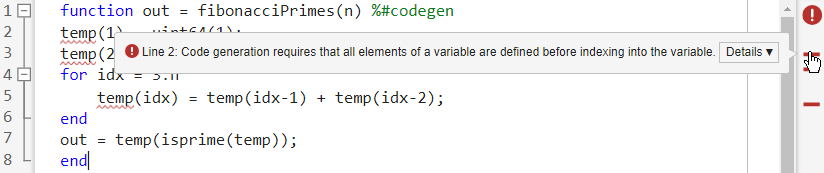
The Code Analyzer displays this warning because the code generator must be able to determine the size and type of an array before you access any of its elements. To fix this warning, preallocate the temp array by using a single assignment. Identify the lines of code that assign the two elements of the temp array:
temp(1) = uint64(1);
temp(2) = uint64(1);
Replace these lines with this single assignment:
temp = [uint64(1) uint64(1)];
After you make this change, the Code Analyzer does not identify potential code generation errors in the function.
Next, check whether the MATLAB code includes functions or features that are not supported for code
generation by using the code generation readiness tool. Use the coder.screener function to run the code generation readiness tool.
For more information about the checks performed by this tool, see Code Generation Readiness Tool.
coder.screener("fibonacciPrimes")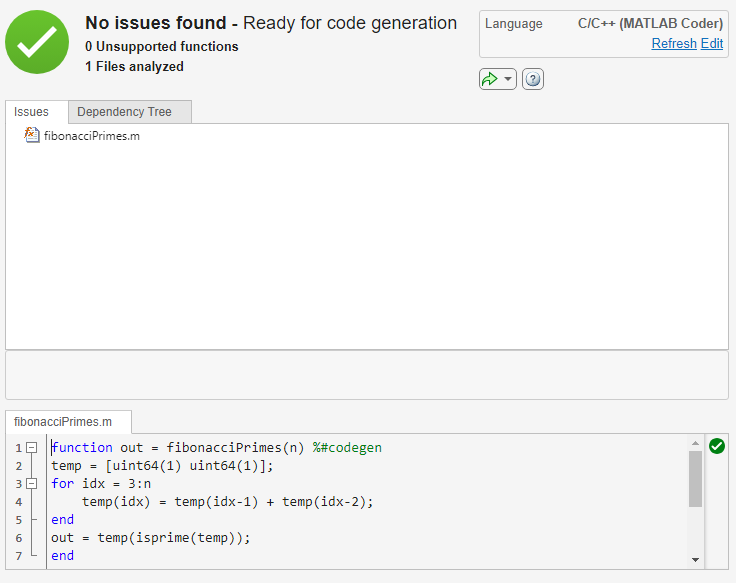
In this example, the code generation readiness tool does not find unsupported
functions or features in the fibonacciPrimes function.
Check for Issues by Generating and Running a MEX Function
Next, identify code generation errors in the entry-point function by generating and running a MEX function. When you generate and run a MEX function before generating standalone code, you can:
Detect and fix run-time errors that are more difficult to diagnose in the generated standalone code. For example, when you generate and run a MEX function, the MEX function checks for memory integrity issues, such as out-of-bounds array access, by default. These checks can be more difficult to implement in the standalone code.
Verify that the generated code provides the same functionality as your original MATLAB function. If you write a script to test your MATLAB code, you can use the same script to test the generated MEX function.
Completing this step without errors can require multiple iterations of generating and executing a MEX function.
Generate MEX Function and Fix Code Generation Error
To check for code generation errors, generate a MEX function. Use the
codegen command with the
-args option to specify that the input to the entry-point
function is a scalar double. By default, the code generator generates a MEX
function in C in the working
folder.
codegen fibonacciPrimes -args {0}
This
                        function does not support inputs with type 'uint64' or 'int64'. Cast the
                        argument(s) to another integer type or a floating point type prior to the
                        function call.
Code generation fails because the code generator does not support isprime for inputs of type
int64.
To resolve this error, in the function fibonacciPrimes,
identify this line of
code:
temp = [uint64(1) uint64(1)];
Replace it with this code:
temp = [uint32(1) uint32(1)];
Save the revised function:
function out = fibonacciPrimes(n) %#codegen
temp = [uint32(1) uint32(1)];
for idx = 3:n
    temp(idx) = temp(idx-1) + temp(idx-2);
end
out = temp(isprime(temp));
end
Generate a MEX function for the revised version of
fibonacciPrimes. Use the same -args
syntax that you used to generate code previously. Code generation
succeeds.
codegen fibonacciPrimes -args {0}
Code generation successful.
Run MEX Function and Fix Run-Time Error
To detect run-time errors, run the generated MEX function.
F_Primes_MEX = fibonacciPrimes_mex(50)
Index exceeds array dimensions. Index value 3 exceeds valid range
                        [1-2] for array 'temp'.
The MEX function produces an error because the generated code violates array
bounds. The code generator defines temp as a fixed-size 1-by-2 array. However,
for inputs greater than 2, the second dimension of temp is
greater than 2. One way to resolve this issue is to explicitly define temp as a
1-by-n array by using the ones function.
In the function fibonacciPrimes, identify this line of
code:
temp = [uint32(1) uint32(1)];
Replace it with this code:
temp = ones(1,n,"uint32");
Save the revised function:
function out = fibonacciPrimes(n) %#codegen
temp = ones(1,n,"uint32");
for idx = 3:n
    temp(idx) = temp(idx-1) + temp(idx-2);
end
out = temp(isprime(temp));
end
Generate a MEX function for fibonacciPrimes. Use the same
-args syntax that you used previously. To investigate the
size of the temp array, use the -report
option to produce a code generation report. Code generation
succeeds.
codegen fibonacciPrimes -args {0} -report
Code generation successful: View reportClick the link to open the report and point to temp. The size of this variable
is 1x:?, which means that it is an unbounded row
vector.
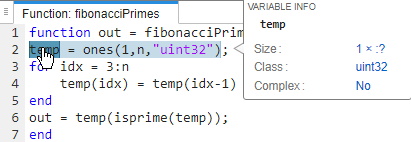
Run the MEX function. MEX execution succeeds and produces the same output as the MATLAB function.
F_Primes_MEX = fibonacciPrimes_mex(50)
 ans =

  1×11 uint32 row vector

            2            3            5           13           89          233         1597        28657       514229    433494437   2971215073
isequal(F_Primes_ML,F_Primes_MEX)
ans =

  logical

   1
In this example, identifying and fixing errors in the MATLAB function requires only two cycles of MEX generation and execution. When generating code for real-world functions, it is common for functions to require several iterations of generating and running MEX functions.
Generate Standalone Code
When the MEX function runs without errors and
outputs the same results as the original MATLAB function, you can generate standalone C or C++ code. For this example,
generate a C static library by using the -config:lib
option.
codegen -config:lib fibonacciPrimes -args {0}
Code generation successful.

