Compare Performance of Generated C++ Code and MATLAB Code for Fog Rectification
R2026bThis example shows how to compare the execution time of generated C++ code with the execution time of the source MATLAB® code. You generate C++ code from a MATLAB entry-point function that implements a fog rectification algorithm and verify that the output image is a defogged version of the input image. You then generate code that uses the OpenMP library and code that does not use the OpenMP library and compare the performance of the generated code with MATLAB.
Prerequisites
Your compiler must support MATLAB Coder™ and the OpenMP library. If the compiler does not support OpenMP, the code that MATLAB Coder generates runs serially. For more information on OpenMP, see the OpenMP website.
Examine the Entry-Point Function
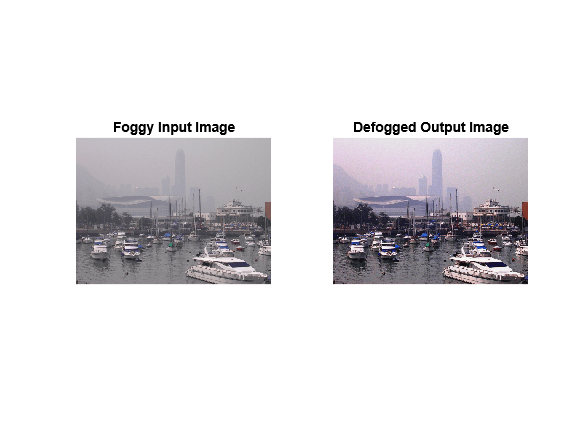
The fog_rectification_MLC entry-point function accepts an input image, performs fog removal by using dark channel estimation, and refines the image by using filters. It then enhances the contrast and returns the defogged image.
type fog_rectification_MLCfunction [out] = fog_rectification_MLC(input) %#codegen
%
% Copyright 2025 The MathWorks, Inc.
% restoreOut is used to store the output of restoration
restoreOut = zeros(size(input),"double");
% Changing the precision level of input image to double
input = double(input)./255;
%% Dark channel Estimation from input
darkChannel = min(input,[],3);
% diff_im is used as input and output variable for anisotropic
% diffusion
diff_im = 0.9*darkChannel;
num_iter = 3;
% 2D convolution mask for Anisotropic diffusion
hN = [0.0625 0.1250 0.0625; 0.1250 0.2500 0.1250;
0.0625 0.1250 0.0625];
hN = double(hN);
%% Refine dark channel using Anisotropic diffusion.
for t = 1:num_iter
diff_im = conv2(diff_im,hN,"same");
end
%% Reduction with min
diff_im = min(darkChannel,diff_im);
diff_im = 0.6*diff_im ;
%% Parallel element-wise math to compute
% Restoration with inverse Koschmieder's law
factor = 1.0./(1.0-(diff_im));
restoreOut(:,:,1) = (input(:,:,1)-diff_im).*factor;
restoreOut(:,:,2) = (input(:,:,2)-diff_im).*factor;
restoreOut(:,:,3) = (input(:,:,3)-diff_im).*factor;
restoreOut = uint8(255.*restoreOut);
%%
% Stretching: performs the histogram stretching of the image.
% im is the input color image and p is cdf limit.
% out is the contrast stretched image and cdf is the cumulative
% prob. density function and T is the stretching function.
% RGB to grayscale conversion
im_gray = im2gray(restoreOut);
[row,col] = size(im_gray);
% histogram calculation
count = calcHistogram(im_gray);
prob = count'/(row*col);
% cumulative sum calculation
cdf = cumsum(prob(:));
% find less than particular probability.
p = 5/100;
i1 = length(find(cdf <= p));
i2 = 255 - length(find(cdf >= (1-p)));
o1 = floor(255*.10);
o2 = floor(255*.90);
t1 = (o1/i1)*[0:i1];
t2 = (((o2-o1)/(i2-i1))*[i1+1:i2])-(((o2-o1)/(i2-i1))*i1)+o1;
t3 = (((255-o2)/(255-i2))*[i2+1:255])-(((255-o2)/(255-i2))*i2)+o2;
T = (floor([t1 t2 t3]));
restoreOut(restoreOut == 0) = 1;
u1 = (restoreOut(:,:,1));
u2 = (restoreOut(:,:,2));
u3 = (restoreOut(:,:,3));
% replacing the value from look up table
out1 = T(u1);
out2 = T(u2);
out3 = T(u3);
out = zeros([size(out1),3], "uint8");
out(:,:,1) = uint8(out1);
out(:,:,2) = uint8(out2);
out(:,:,3) = uint8(out3);
end
function count = calcHistogram(im_gray)
% histogram calculation
count = zeros(256,1);
for i=1:numel(im_gray)
curr = double(im_gray(i));
hi = curr*(255-1)/255+1;
bin = round(hi);
count(bin) = count(bin)+1;
end
end
Generate and Test a C++ MEX Function
Before measuring the performance, generate a C++ MEX function from the entry-point function and test the MEX function with the input image. To generate a C++ MEX function from the fog_rectification_MLC function, load the input image and create a code configuration object for C++ MEX code generation.
inputImage = imread("FoggyMarina.png");
cfg = coder.config("mex");
cfg.TargetLang = "C++";
Generate a MEX file by using the codegen command and specifying the image as the input argument.
codegen -args {inputImage} -config cfg fog_rectification_MLC.m
Run the generated fog_rectification_MLC_mex function with a foggy input image, and then show the foggy and defogged images.
[outputImage] = fog_rectification_MLC_mex(inputImage);

p1  = subplot(1,2,1);
p2 = subplot(1,2,2);
imshow(inputImage,"Parent",p1);
imshow(outputImage,"Parent",p2);
title(p1,"Foggy Input Image");
title(p2,"Defogged Output Image");
Generate Code and Compare Code Execution Times
You can compare the execution times of the MATLAB code and the generated C++ MEX function by using the coder.perfCompare function. The coder.perfCompare function generates code, profiles it, and compares the performance to the MATLAB code. You can also use the coder.perfCompare function to compare code generated with two different code configurations. For this example, compare two MEX functions: A MEX function generated with the Enable OpenMP library if possible parameter enabled, and another MEX function generated with this parameter disabled.
To make the performance differences between generated code and MATLAB easier to measure, resize the image so that the computation time is greater.
scaleFactor = 3;
upscaledImage = imresize(inputImage,scaleFactor,"bicubic");
Create a code configuration object, cfgOpenMPOn. By default, the setting for the EnableOpenMP property of the object is true.
cfgOpenMPOn  = coder.config("mex");
cfgOpenMPOn.TargetLang = "C++";
Create a second code configuration object, cfgOpenMPOff. Disable the OpenMP library by setting the EnableOpenMP property to false.
cfgOpenMPOff = coder.config("mex");
cfgOpenMPOff.EnableOpenMP = false;
cfgOpenMPOff.TargetLang = "C++";
Use the coder.perfCompare function to generate code with both configurations and compare MATLAB, generated code that uses OpenMP, and generated code that does not use OpenMP. Use the configuration objects as arguments. The function returns a table that contains an overview of the execution times. The execution times depend on your hardware configuration. This code was timed using a Debian 12 machine with an AMD® Epyc® 7513 32-core CPU.
t = coder.perfCompare("fog_rectification_MLC.m",1,{upscaledImage},{cfgOpenMPOn,cfgOpenMPOff})==== Running (fog_rectification_MLC.m, MATLAB) ==== - Running MATLAB script. TimingResult with 10 Runtime Sample(s) Statistical Overview: mean = 8.25e-01 s max = 9.25e-01 s sd = 8.53e-02 s median = 8.39e-01 s min = 6.89e-01 s 90th = 9.22e-01 s ==== Running (fog_rectification_MLC.m, Coder Config 1) ==== - Generating code and building MEX. - Running MEX. TimingResult with 10 Runtime Sample(s) Statistical Overview: mean = 3.88e-01 s max = 4.44e-01 s sd = 3.47e-02 s median = 3.74e-01 s min = 3.50e-01 s 90th = 4.40e-01 s ==== Running (fog_rectification_MLC.m, Coder Config 2) ==== - Generating code and building MEX. - Running MEX. TimingResult with 10 Runtime Sample(s) Statistical Overview: mean = 4.35e-01 s max = 5.04e-01 s sd = 3.59e-02 s median = 4.18e-01 s min = 3.97e-01 s 90th = 4.89e-01 s
t = 1×3 table
    0.8388    0.3740    2.2426    0.4184    2.0050
When OpenMP is enabled, the generated code is approximately 2.24 times faster than the MATLAB code. When OpenMP is disabled, the generated code is approximately 2.01 times faster than the original MATLAB code.
See Also
coder.perfCompare | coder.timeit | Enable OpenMP library if
possible

