MATLAB Performance Improvements
R2026bVector-Based Processing
Use large vectors of data to minimize the function call overhead.
Background Processing
Use background processing to run transmission or reception on a separate thread while the foreground remains available for signal processing and visualization. This approach reduces the processing overhead and helps minimize the data underruns and overflows.
Transmit in the Background
Use the transmitRepeat function to continuously transmit a waveform in the
background. The function sends the waveform data to the radio, which transmits it
repeatedly without further interaction from MATLAB®.
Transmit Data in Background and Receive in Foreground Using a Single USRP Radio
Create and initialize the transmitter System object. Set the interpolation factor.
sampleRate = 1e6;
tx = comm.SDRuTransmitter(Platform="B210",SerialNum='3136D08',...
                   CenterFrequency=2e9,MasterClockRate=50e6,...
                   Gain=30);
tx.InterpolationFactor = tx.MasterClockRate/sampleRate;
Create and initialize the receiver System object. Set the decimation factor.
rx = comm.SDRuReceiver(Platform="B210",SerialNum='3136D08',...
                CenterFrequency=2e9,MasterClockRate=50e6,...
                Gain=45);
rx.DecimationFactor = rx.MasterClockRate/sampleRate;
Generate a sine wave for transmission.
sinewave = dsp.SineWave(1,50e3);
sinewave.SampleRate = sampleRate ;
sinewave.SamplesPerFrame = 2e4;
sinewave.OutputDataType = 'double';
sinewave.ComplexOutput = true;
txData = sinewave();
Initialize the timescope and spectrum analyzer for visualization at the receiver.
timeScope = timescope(SampleRate=sampleRate);
spectrumScope = spectrumAnalyzer(SampleRate=sampleRate);
spectrumScope.ViewType="spectrum";
spectrumScope.PeakFinder.Enabled = true;
Transmit the sine wave in the background using the transmitRepeat function.
samplePerFrame = 2e4;
stopTime = 1;
transmitRepeat(tx,txData);
## Setting up radio for repeated transmission.
## Waveform transmission has started successfully and will repeat indefinitely. Call the stopTransmission() method to stop the transmission.
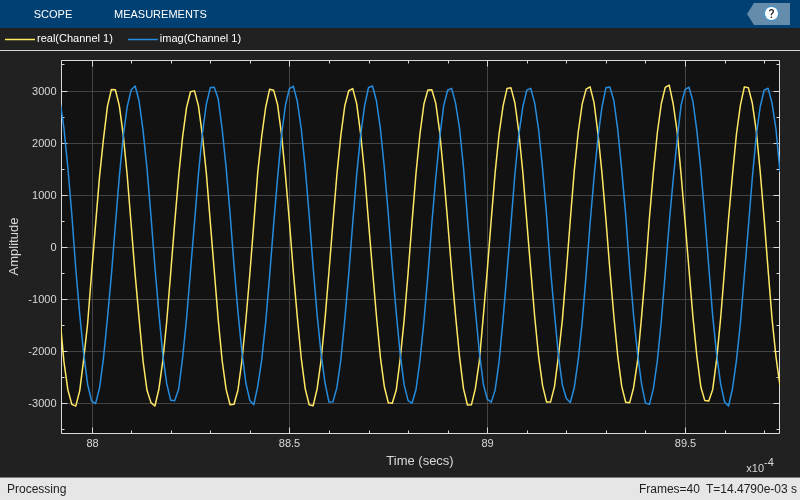
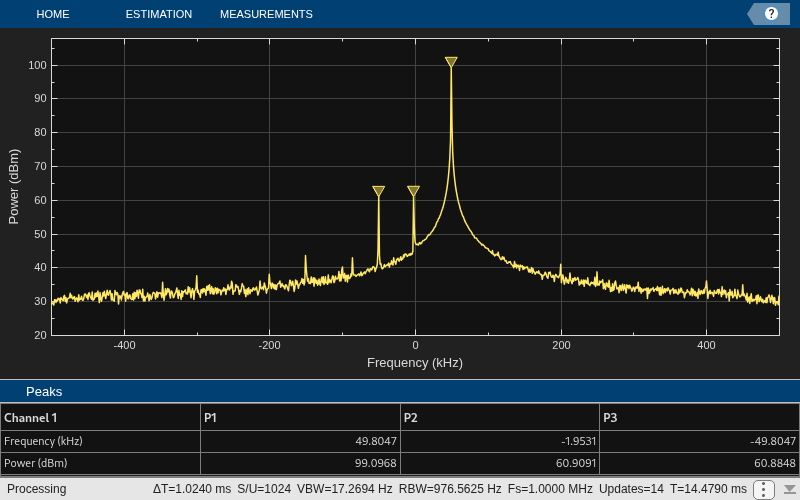
Receive the sine wave in the foreground. Use the isTransmitting function to check if the transmitter is transmitting in the background.
if isTransmitting(tx)
    for i = 1:40
        [data, ~] = rx();
timeScope(data)
spectrumScope(data)
    end
end
Stop the background transmission and release the transmitter and receiver System objects.
stopTransmission(tx);
disp('Transmission ended')
Transmission ended
release(tx);
release(rx);
Receive in the Background
Use parfeval with backgroundPool to receive data on a
background thread. Transfer received frames to the foreground using a parallel.pool.PollableDataQueue, then process or visualize the data
without blocking reception.
Receive USRP Data in Background and Display Spectrum
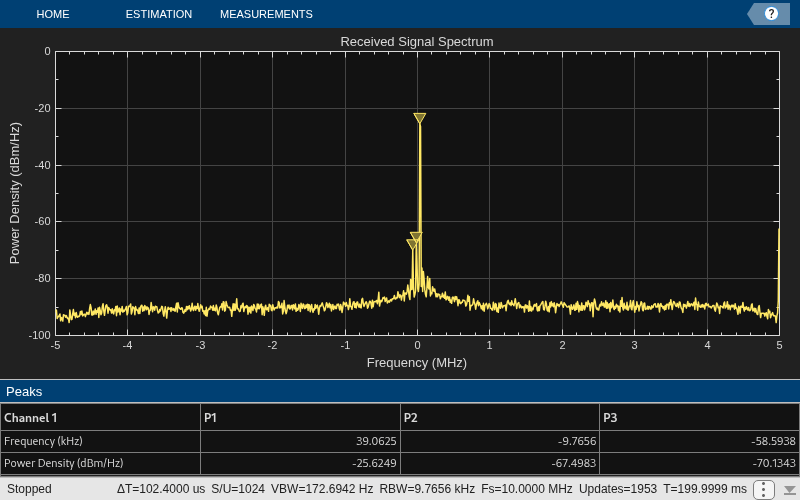
Receive IQ data from a USRP™ radio on a background thread and display the live spectrum on a spectrum analyzer in the foreground.
This example requires a transmitter running in a separate MATALB® session. Run the transmitter.m script to transmit a 50 KHz sine wave from a B210 radio.
Define the receiver parameters for a B210 radio.
radioParams.platform        = "B210";
radioParams.serialNum       = "3136D08";
radioParams.centerFreqs     = 1915e6;
radioParams.sampleRate      = 10e6;
radioParams.gain            = 50;
radioParams.decimationFactor = 2;
radioParams.samplesPerFrame = 1e5;
rxnumFrames = 20;
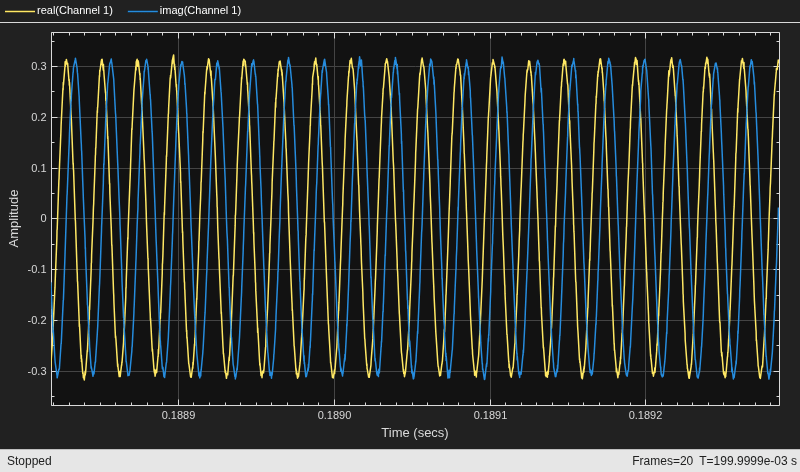
Create a spectrum analyzer and timescope to display the received signal.
scope = spectrumAnalyzer( ...
    SampleRate=radioParams.sampleRate, ...
    Title="Received Signal Spectrum", ...
    YLimits=[-100 0], ...
    SpectrumType="Power density");
scope2 = timescope(SampleRate=radioParams.sampleRate,TimeSpan = 200e-6);
Create a PollableDataQueue to transfer received data from the background thread to the foreground. Launch the receiver function in the background using parfeval on backgroundPool. The background function initializes the radio and streams frames back through the queue.
dataQueue = parallel.pool.PollableDataQueue;
future = parfeval(backgroundPool,@receiveInBackground,0, ...
    dataQueue,radioParams,rxnumFrames);
Poll the data queue in the foreground and display each received frame on the spectrum analyzer. The 15-second timeout accounts for radio startup latency.
% out = zeros(samplesPerFrame,rxnumFrames);
for k = 1:rxnumFrames
    [rxResult,ok] = poll(dataQueue,15);
    if ~ok
        warning("Poll timed out waiting for frame %d.",k);
        if ~isempty(future.Error)
            error(future.Error.message);
        else
            continue;
        end
    end
    data = rxResult.data;
    overflow = rxResult.overflow;
    if overflow
        warning('Overflow detected in frame %d',k);
        % continue;
    end
    % out(:,k) = data;
    scope(data)
    scope2(data)
end
Release the scopes.
release(scope);
release(scope2);
The receiveInBackground function creates the comm.SDRuReceiver System object on the background thread, receives frames, and sends each frame back to the foreground through the data queue.
function receiveInBackground(queue,radioParams,rxnumFrames)
radio = comm.SDRuReceiver(Platform=radioParams.platform, ...
    SerialNum=radioParams.serialNum, ...
    CenterFrequency=radioParams.centerFreqs, ...
    Gain=radioParams.gain, ...
    MasterClockRate=radioParams.sampleRate*radioParams.decimationFactor, ...
    DecimationFactor=radioParams.decimationFactor, ...
    SamplesPerFrame=radioParams.samplesPerFrame, ...
    OutputDataType="double");
rxData = struct('data',[],'overflow',false,'frameNum',0);
for i = 1:rxnumFrames
    [data,~,overflow] = radio();
    rxData.data = data;
    rxData.overflow = overflow;
    rxData.frameNum = i;
    send(queue,rxData);
end
cleanupObj = onCleanup(@() release(radio)); %#ok<NASGU>
end

