启用 HTTPS
R2026b
导航到 MATLAB® Web App Server™ 安装位置并运行服务器应用程序。
平台 步骤 Windows®
(管理员)
应用程序的默认位置为:
C:\Program Files\MATLAB\MATLABWebAppServer\R2026b\application右键点击
MATLABWebAppServer.exe并选择以管理员身份运行。Linux®
应用程序的默认位置为:
/usr/local/MATLAB/MATLABWebAppServer/R2026b/application在 shell 提示符下输入:
run_MATLABWebAppServer.sh <MATLAB_Runtime_Location>macOS
应用程序的默认位置为:
/Applications/MATLAB/MATLABWebAppServer/R2026b/application双击 App
MATLABWebAppServer.app选择配置和运行选项卡。
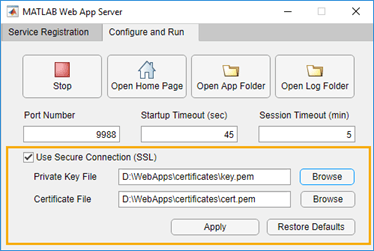
在 MATLAB Web App Server 中选中使用安全连接 (SSL) 选项。
输入私钥文件和证书文件的位置。点击应用。
浏览器将使用 HTTPS 打开 Web App 主页。

