connection
R2026bDescription
Create a connection to a DuckDB™ database by using the DuckDB native interface.
Creation
Create a DuckDB database connection object by using the duckdb function.
After creating the connection object, you can use the connection object functions to perform
common database operations such as importing and exporting data.
Properties
Object Functions
Examples
Use the duckdb function to create a transient, in-memory DuckDB™ database connection.
conn = duckdb()
conn =
  connection with properties:

                    Database: "memory"

  Database Properties:

                    ReadOnly: false
                  AutoCommit: "on"

  Catalog and Schema Information:

              DefaultCatalog: "memory"
                    Catalogs: "memory"
                     Schemas: "main"

  Database and Driver Information:

         DatabaseProductName: "DuckDB"
      DatabaseProductVersion: "v1.4.2"
Confirm the connection is in‑memory by checking that conn.Database is "memory".
Close the database connection.
close(conn);
Create a connection to a DuckDB™ database file, import data, and perform some data analysis.
Connect to the DuckDB™ database file nyctaxi.db, which is located in the matlabroot/toolbox/database/dbdata folder, by using the duckdb function. Because nyctaxi.db is read-only, open the database file in read‑only mode by specifying ReadOnly=true.
filePath = fullfile(matlabroot,"toolbox","database","dbdata","nyctaxi.db");
conn = duckdb(filePath,ReadOnly=true);
Inspect the structure of the nyctaxi database by using the sqlfind function to return a table of metadata. The database contains a table named "demo".
pattern = "";
data = sqlfind(conn,pattern)
data = 1×5 table
Catalog Schema Table Columns Type
_________ ______ ______ _____________________________________________________________________________________________________________________________________________________________________________________________________________________________________________________________________________________________________________________________________________________________________________________ ____________
"nyctaxi" "main" "demo" {["vendorid" "tpep_pickup_datetime" "tpep_dropoff_datetime" "passenger_count" "trip_distance" "pickup_longitude" "pickup_latitude" "ratecodeid" "store_and_fwd_flag" "dropoff_longitude" "dropoff_latitude" "payment_type" "fare_amount" "extra" "mta_tax" "tip_amount" "tolls_amount" "improvement_surcharge" "total_amount"]} "BASE TABLE"
Display the variable names.
data.Columns{1}ans = 1×19 string
"vendorid" "tpep_pickup_datetime" "tpep_dropoff_datetime" "passenger_count" "trip_distance" "pickup_longitude" "pickup_latitude" "ratecodeid" "store_and_fwd_flag" "dropoff_longitude" "dropoff_latitude" "payment_type" "fare_amount" "extra" "mta_tax" "tip_amount" "tolls_amount" "improvement_surcharge" "total_amount"
Import the "demo" data table into MATLAB®.
sqlQuery = 'SELECT * FROM main.demo';
data = fetch(conn,sqlQuery)
data = 10000×19 table
vendorid tpep_pickup_datetime tpep_dropoff_datetime passenger_count trip_distance pickup_longitude pickup_latitude ratecodeid store_and_fwd_flag dropoff_longitude dropoff_latitude payment_type fare_amount extra mta_tax tip_amount tolls_amount improvement_surcharge total_amount
________ ____________________ _____________________ _______________ _____________ ________________ _______________ __________ __________________ _________________ ________________ ____________ ___________ _____ _______ __________ ____________ _____________________ ____________
2 09-Jun-2015 14:58:55 09-Jun-2015 15:26:41 1 2.63 -73.983 40.73 1 "N" -73.977 40.759 2 18 0 0.5 0 0 0.3 18.8
2 09-Jun-2015 14:58:55 09-Jun-2015 15:02:13 1 0.32 -73.997 40.732 1 "N" -73.994 40.731 2 4 0 0.5 0 0 0.3 4.8
1 09-Jun-2015 14:58:56 09-Jun-2015 16:08:52 2 20.6 -73.983 40.767 2 "N" -73.798 40.645 1 52 0 0.5 10 5.54 0.3 68.34
1 09-Jun-2015 14:58:57 09-Jun-2015 15:12:00 1 1.2 -73.97 40.762 1 "N" -73.969 40.75 1 9 0 0.5 1.96 0 0.3 11.76
2 09-Jun-2015 14:58:58 09-Jun-2015 15:00:49 5 0.49 -73.978 40.786 1 "N" -73.972 40.785 2 3.5 0 0.5 0 0 0.3 4.3
2 09-Jun-2015 14:58:59 09-Jun-2015 15:42:02 1 16.64 -73.97 40.757 2 "N" -73.79 40.647 1 52 0 0.5 11.67 5.54 0.3 70.01
1 09-Jun-2015 14:58:59 09-Jun-2015 15:03:07 1 0.8 -73.976 40.745 1 "N" -73.983 40.735 1 5 0 0.5 1 0 0.3 6.8
2 09-Jun-2015 14:59:00 09-Jun-2015 15:21:31 1 3.23 -73.982 40.767 1 "N" -73.994 40.736 2 16.5 0 0.5 0 0 0.3 17.3
1 09-Jun-2015 14:59:01 09-Jun-2015 15:08:17 1 1.1 -73.949 40.788 1 "N" -73.954 40.775 1 7.5 0 0.5 0 0 0.3 8.3
2 09-Jun-2015 14:59:02 09-Jun-2015 15:19:34 6 1.79 -73.993 40.747 1 "N" -73.972 40.76 1 13.5 0 0.5 2.86 0 0.3 17.16
1 09-Jun-2015 14:59:02 09-Jun-2015 15:28:12 2 4.8 -73.984 40.756 1 "N" -73.916 40.764 1 22 0 0.5 5 0 0.3 27.8
2 09-Jun-2015 14:59:03 09-Jun-2015 15:09:21 1 0.96 -73.962 40.776 1 "N" -73.969 40.766 1 8 0 0.5 2.2 0 0.3 11
2 09-Jun-2015 14:59:03 09-Jun-2015 15:11:48 5 1.12 -73.978 40.753 1 "N" -73.99 40.747 2 9 0 0.5 0 0 0.3 9.8
1 09-Jun-2015 14:59:04 09-Jun-2015 15:04:12 1 0.7 -73.978 40.767 1 "N" -73.981 40.774 1 5.5 0 0.5 1.55 0 0.3 7.85
2 09-Jun-2015 14:59:01 09-Jun-2015 15:21:56 1 2.06 -73.969 40.786 1 "N" -73.961 40.765 1 15 0 0.5 3.95 0 0.3 19.75
1 09-Jun-2015 14:59:04 09-Jun-2015 15:17:55 1 1.6 -73.977 40.784 1 "N" -73.954 40.772 2 12.5 0 0.5 0 0 0.3 13.3
⋮
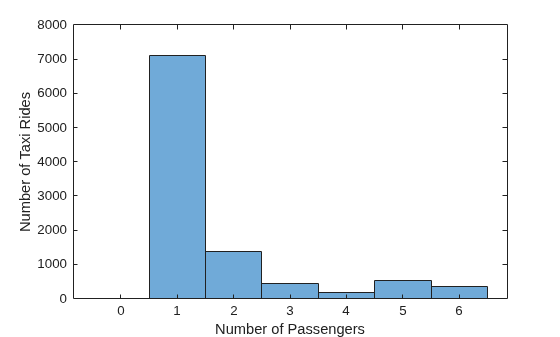
Find the minimum and maximum passenger counts per taxi ride and visualize the distribution by plotting a histogram of the passenger_count variable. Close the connection after you create the plot.
histogram(data.passenger_count)
xlabel('Number of Passengers')
ylabel('Number of Taxi Rides')
close(conn);

