PWM Fast Shutoff Release Peripheral Configuration
R2026bMap PWM block to PWM Fast Shutoff Release block in the Infineon AURIX model
Since R2026b
Description
Add-On Required: This feature requires the Embedded Coder Support Package for Infineon AURIX TC4x Microcontrollers add-on.
Use the Hardware Mapping tool to view and map the PWM block to the PWM Fast Shutoff Release block in the Infineon® AURIX™ model.
Before you configure PWM Fast Shutoff Release peripherals, select the target hardware board for the model.
Open the PWM Fast Shutoff Release Peripheral Configuration
Follow these steps to Map PWM block to PWM Fast Shutoff Release block in the Hardware Mapping tool.
To access the configuration parameters, in the model, on the Modeling tab, click Model Settings. In the Hardware Implementation pane, set Hardware board to
Infineon AURIX TC4x.To open the Hardware Mapping tool, in the Simulink editor, on the Hardware tab, click Hardware Mapping.

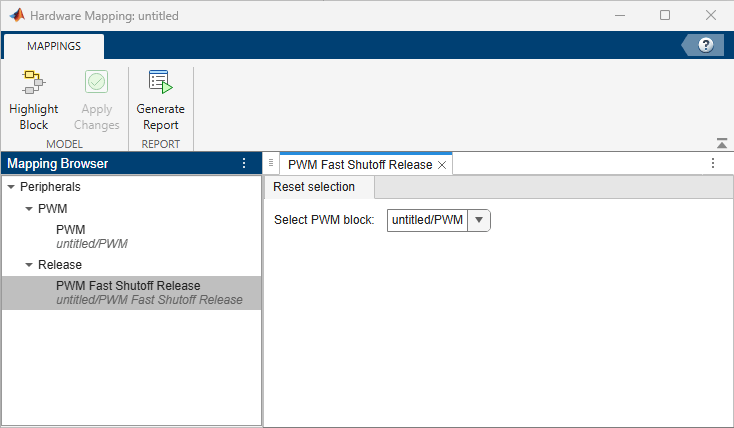
In the Mapping Browser pane, navigate to Peripherals > Release > PWM Fast Shutoff Release.
Parameters
Reset selection
Select the PWM block to release the fast shutoff state and restart PWM generation.
For example, the screenshot shows the configuration where you select the PWM block and choose the shutoff reset mode to release the selected PWM block from the fast shutoff state. When the release port receives a non-zero value, TOM channels 0-3 resume PWM generation. The duty cycle depends on the value you specify at the duty port.

Version History
Introduced in R2026b

