主要内容

Receivers Service Interface Properties

R2026b

Configure receiver service interface definitions for port elements of In Bus Element blocks

Since R2026b
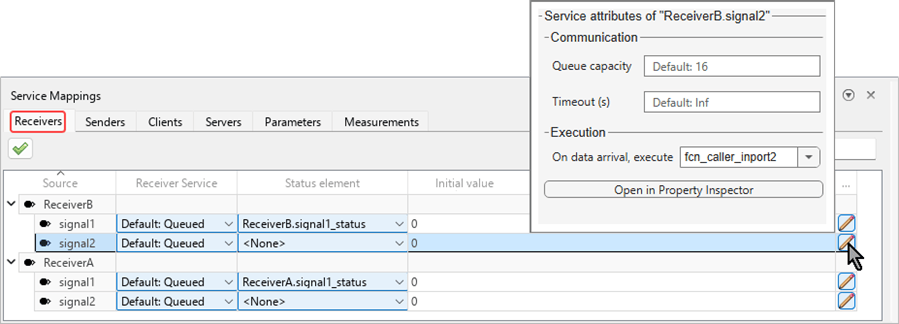
Service Mappings editor with the Receivers tab selected. The dialog box where you can set additional properties is open.

Use the Receivers tab of the Service Mappings editor to map port elements of In Bus Element blocks to receiver service interface definitions

A receiver service is the endpoint of a communication service. It delivers data elements from other components in the system to receiver port elements, which are individual signals of In Bus Element blocks. Receiver service definitions determine how input data elements are delivered to model port elements.

Properties

expand all

The table entries in the Receivers tab are organized as parent entries and child entries. Each parent entry corresponds to an In Bus Element block of the top model. Each child entry corresponds to a single port element of the In Bus Element block. Use the table entries to configure receiver service definitions for each port element.

This property is read-only.

Name of the model element that corresponds to the table entry.

Communication

Use these properties to configure communication related service definitions.

Select the type of receiver service for the port element:

LatestValue

The receiver service keeps only the last received data element. Any older data element that has not been delivered to the port element is discarded upon arrival of a new element.

Queued

The receiver service keeps incoming data elements in a queue, and delivers each of them to the port element in turn.

Default:Queued or Default:LatestValue

Use the predefined default value, LatestValue or Queued, as the type of service. Select this option for model elements that need to use the predefined value regardless of its value, for example, when you need your model behavior to be consistent with other models.

An additional, optional port element of the same In Bus Element block, coupled with the data receiving port element. The Status element port provides the delivery status of the port it is coupled with.

From the list, select:

<None>

Do not use a status element with this data port element.

<Add Status Element>

Create a new port element in the same In Bus Element block. The newly created port element is automatically assigned as the status element. To use this option, first set Status element to <None>. Then, select <Add Status Element>.

other ports of the same In Bus Element block

The rest of the options in the list are port elements of the same In Bus Element block that are not designated as status elements of other ports and do not have a designated status element.

Fallback value the port delivers before receiving the first data element, specified as one of these values:

0

Zero-filled array with same dimensions as the signal of the signal

scalar

Array with the same dimensions as the signal filled with the specified scalar value

array

User-specified array with the same dimensions as the signal

Maximum number of data elements in the receive queue. When a data element is received while the queue is full, the oldest element is overwritten.

This property applies only to queued receivers.

The maximum number of seconds allowed without receiving a data element, specified as a positive integer. Specify the timeout with one of these values:

Inf

Wait indefinitely.

positive scalar

Wait the specified number of seconds.

Execution

expand all

The configuration of the Execution section determines when the receiver port element executes for periodic systems, or which exported function to execute upon data arrival for aperiodic systems.

This property is applicable only in periodic systems with fixed-step size.

Seconds between consecutive sampling of the receiver port element by the generated code.

-1

Inherit the sample time from the system the receiver is a part of. The generated code reads from the receiver port element once every system step.

positive scalar

Number of seconds between one sample and the next. The value must be an integer multiple of the fixed-step size of the model.

This property is applicable only in export function models.

Select the function-call inport to invoke upon data element arrival.

Version History

Introduced in R2026b