主要内容

PWM Output

Generate Pulse Width Modulation (PWM) signals on the specified output pins

Since R2026a

  • PWM Output block

Libraries:
Embedded Coder Support Package for Renesas RA Microcontrollers / Renesas RA6 Based

Description

The PWM Output block generates Pulse Width Modulation (PWM) signals using the General PWM Timer (GPT) stack of Renesas RA microcontrollers. The block allows you to configure the PWM period and duty cycle, and select the output pins for signal generation.

The block provides several key features for PWM signal generation.

  • The GPT stack name parameter lets you select the GPT stack instance.

  • The Select output pins parameter allows you to choose whether the PWM signal is output on GTIOCA, GTIOCB, or both pins simultaneously. When you select both pins, the block applies the same duty cycle and enable/disable value to both outputs.

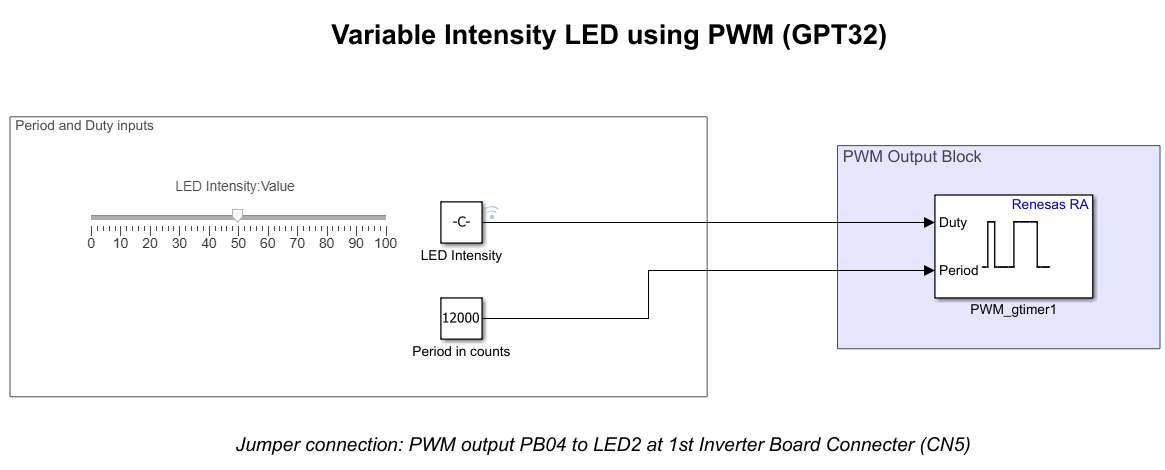
  • Optionally, you can add input ports to dynamically set the PWM period, duty ratio, or enable or disable channel outputs during simulation.

Examples
Ports

Input

expand all

The input value specifies the duty ratio of the PWM signal. The range and interpretation of the input depend on the Specify duty ratio as parameter:

  • Percentage: Input range is 0–100. An input value of 0 produces a 0% duty cycle, and 100 produces a 100% duty cycle.

  • Raw counts: Input range is 0–PWM period (in counts).

Any out-of-range values are saturated to the minimum or maximum allowed values.

Dependencies

Select the Add an input port to set duty ratio parameter to enable this port.

Data Types: single | double | int8 | int16 | int32 | uint8 | uint16 | uint32

The input value specifies the PWM period. The unit depends on the Add an input port to set PWM period parameter:

  • Seconds: Provide the period in seconds.

  • Counts: Provide the period in timer counts.

Dependencies

Select the Specify PWM period as parameter to enable this port.

Data Types: single | double | int8 | int16 | int32 | uint8 | uint16 | uint32

Input value to enable or disable the PWM channel output.

Dependencies

Select the Add an input port to enable/disable channel outputs parameter to enable this port.

Data Types: Boolean | double | int8 | uint8

Output

expand all

Outputs the status of the PWM module/channel.

Dependencies

Select the Get PWM module/channel status parameter to enable this port.

Data Types: Boolean

Parameters

expand all

Specify the name of the GPT stack instance used for PWM signal generation.

Click Get Stack Info to query the active RA Smart Configurator (RASC) project and retrieve the list of available GPT timer instances and their current configuration. To use Get Stack Info, first apply all pending changes in the block dialog.

Programmatic Use

Block Parameter: PwmModule

Select the pin(s) on which the PWM signal is generated. Options include GTIOCA, GTIOCB, or GTIOCA and GTIOCB.

Programmatic Use

Block Parameter: PinSelect

Select to add an input port for dynamically specifying the PWM period. When you select this parameter, the block configures Period input port.

Programmatic Use

Block Parameter: InportForPwmPeriod

Choose the unit for the PWM period:

  • Seconds

  • Raw counts

Dependencies

To enable this parameter, select the Add an input port to set PWM period parameter.

Programmatic Use

Block Parameter: PwmPeriodUnit

Select to add an input port to set PWM duty ratio. When you select this parameter, the block configures Duty input port. The Duty port specifies the duty ratio of the PWM signal.

Dependencies

To enable this parameter, select the Add an input port to enable/disable channel outputs parameter.

Programmatic Use

Block Parameter: InportForDutyRatio

Choose how to specify the duty ratio:

  • Percentage (0–100)

  • Raw counts (0–PWM period)

Dependencies

To enable this parameter, select the Add an input port to set duty ratio parameter.

Programmatic Use

Block Parameter: DutyRatioUnit

Select this option to add an input port for enabling or disabling the PWM channel outputs. When you enable this parameter, the block adds an Enable input port to control the output state of the selected channel(s).

If GTIOCA or GTIOCB is selected individually in the Output pins parameter, the Enable input controls the corresponding channel independently. If GTIOCA and GTIOCB is selected, the Enable input controls both outputs simultaneously using a single input signal.

Programmatic Use

Block Parameter: InportToEnableDisableChn

Select to add an output port for retrieving the PWM module and channel status. When you select this parameter, the block configures a Status output port. The Status port indicates whether the PWM module/channel is enabled and operating correctly, and reports error conditions, if any.

Programmatic Use

Block Parameter: OutputChannelStatus

Version History

Introduced in R2026a