Install Embedded Coder Support Package for Renesas RA Microcontrollers
R2026bUsing this installation process, you can download and install the following items on your host computer:
Support for Renesas RA microcontrollers and its features.
Examples that show you how to use the Renesas RA Microcontrollers.
Install, Update, or Uninstall Support Package
Install Support Package
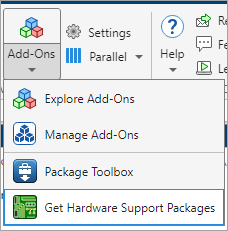
On the MathWorks® Home tab, in the Environment section, select Add-Ons > Get Hardware Support Packages.
In the Add-On Explorer window, click the Embedded Coder® Support Package for Renesas® RA Microcontrollers and then click Install.
Update Support Package
On the MathWorks Home tab, in the Resources section, select Help > Check for Updates.
Uninstall Support Package
To uninstall the support package, in the Add-Ons
panel, click the Options button  next to the installed support package, and then
click Uninstall.
next to the installed support package, and then
click Uninstall.
To open the Add-Ons panel, click the Add-Ons icon
 on the left sidebar.

