Represent Integer and Fixed-Point Data Using Bit Field Storage Class
R2026bThis example shows how to assign integer and fixed-point data to an Embedded Coder® Dictionary storage class that packages data into bit fields. This operation can conserve memory usage and create more compact data structures in your generated code.
Open Example Model
Open the example model ConfigSetCodegenTargetTop. The single model inport top_in is of type int32, and feeds into the model reference ConfigSetCodegenTargetRef.
model = "ConfigSetCodegenTargetTop";
open_system(model)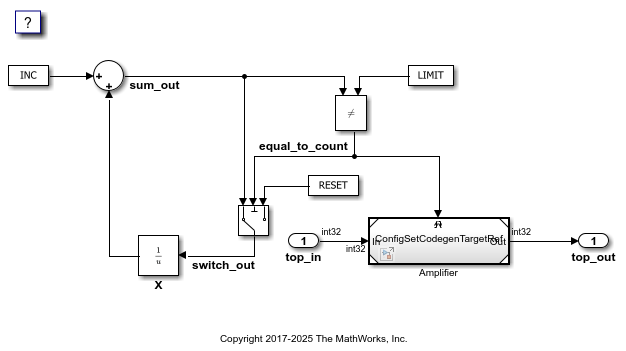
Generate Code Without Bit Fields
Examine Code Mappings
Open the Code Mappings Editor. In the Simulink® toolstrip, under the Apps tab, open the Embedded Coder app. On the C Code tab, select Individual Element Code Mappings.
In the Inports tab, verify that the storage class for Input is set to Auto.
Generate Code
Build the model.
evalc("slbuild(model)");Examine the generated header file. The structure ExternalInputs_ConfigSetCodegen corresponds to the model inports. The element top_in, corresponding to the single model inport, is of type int32.
file = fullfile("ConfigSetCodegenTargetTop_ert_rtw","ConfigSetCodegenTargetTop.h");
coder.example.extractLines(file,"/* External inputs (root inport signals with default storage) */",...
    "ExternalInputs_ConfigSetCodegen;",1,1)
/* External inputs (root inport signals with default storage) */
typedef struct {
  int32_T top_in;                      /* '<Root>/top_in' */
} ExternalInputs_ConfigSetCodegen;
Generate Code With Bit Fields for Integer Data
Create New Storage Class
Open the Embedded Coder Dictionary. On the C Code tab, select Code Interface > Embedded Coder Dictionary (Model).
In the Storage Class section, under the list of storage classes, select Create. Name the new storage class myBitField.
For the Storage Type property, select Structured. Under Structure Properties, select Use bit fields.
Click Save, then close the Embedded Coder Dictionary.
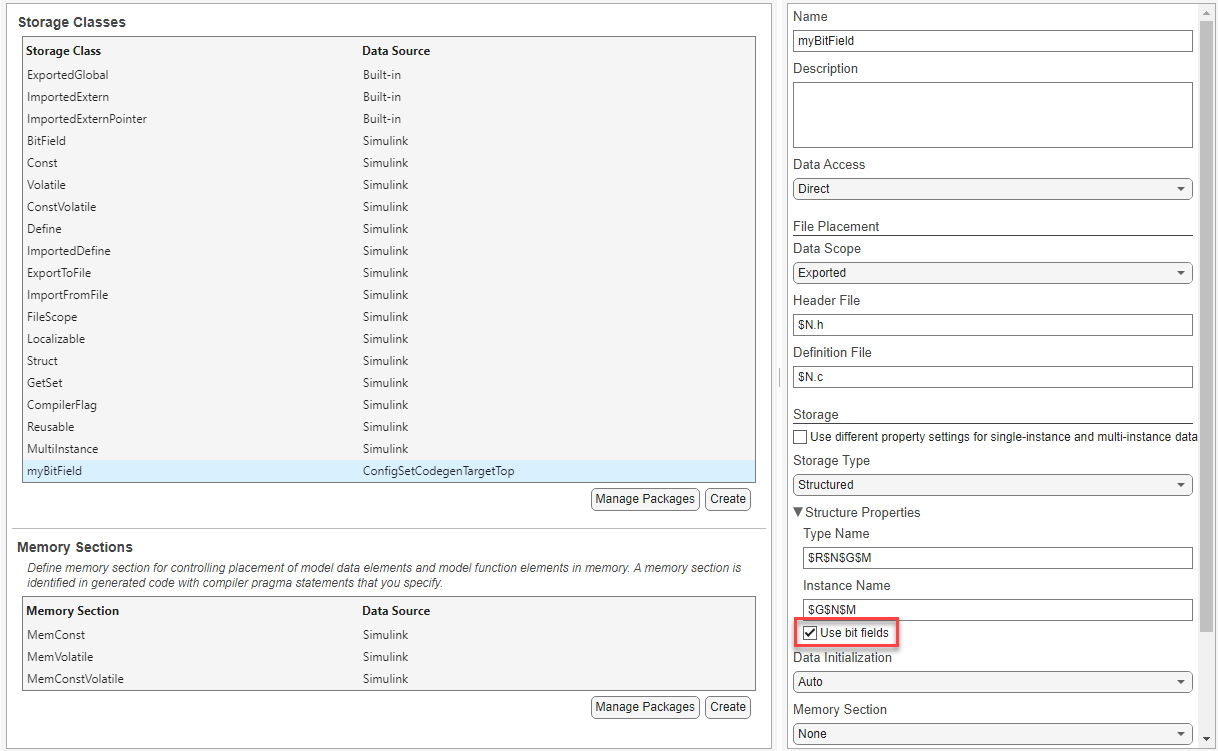
Alternatively, enter these commands at the MATLAB command prompt.
dict = coder.dictionary.create(model);
SCSec = dict.getSection("StorageClasses");
SC = SCSec.addEntry("myBitField");
SC.set(StorageType="Structured");
SC.set(StructureBitFields=1);
Configure Code Mappings
In the Code Mappings editor, in the Inports tab, set the storage class for Input to myBitField. Alternatively, enter these commands at the MATLAB command prompt.
cm = coder.mapping.utils.create(model);
inHdl  = find(cm,"Inports");
setInport(cm,inHdl,StorageClass="myBitField");
Generate Code
Build the model.
evalc('slbuild(model)');Examine the generated header file. top_in now appears as an element of a structure of bit fields.
coder.example.extractLines(file,"/* Storage class 'myBitField', for system '<Root>' */",...
    "ConfigSetCodegenTarg_myBitField;",1,1)
/* Storage class 'myBitField', for system '<Root>' */
typedef struct {
  int_T top_in : 32;                   /* '<Root>/top_in' */
} ConfigSetCodegenTarg_myBitField;
Generate Code With Bit Fields for Fixed-Point Data
Assume that your integer input takes on a maximum value of 63 and can be represented using only six bits. To conserve memory, change the data type of the input and subsequent signals to the fixed-point data type fixdt(1,6,0).
Open the Block Parameters dialog box for the Inport block. In the Signal Attributes tab, for the Data type property, select fixdt(1,16,0).
Click the >> button to show the data type assistant. For the Word length property, enter 6.
Click OK to save your changes.
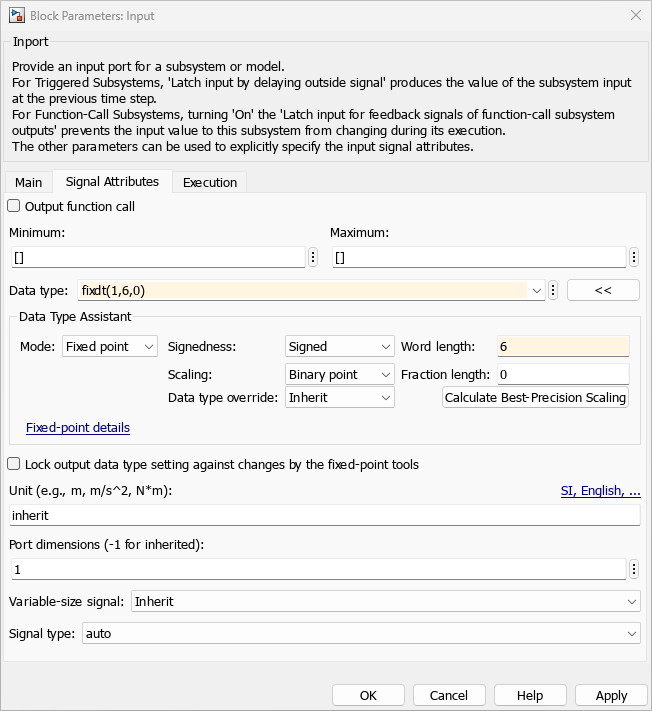
Repeat the above procedure for the Inport block and Outport block of the model reference ConfigSetCodegenTargetRef.
Alternatively, enter these commands at the MATLAB command prompt.
fi = "fixdt(1,6,0)";
set_param(inHdl,OutDataTypeStr=fi);
load_system("ConfigSetCodegenTargetRef");
set_param("ConfigSetCodegenTargetRef/In",OutDataTypeStr=fi);
set_param("ConfigSetCodegenTargetRef/Out",OutDataTypeStr=fi);
Build the model.
evalc('slbuild(model)');Examine the generated header file. top_in now appears as an element of a structure of bit fields with six bits.
coder.example.extractLines(file,"/* Storage class 'myBitField', for system '<Root>' */",...
    "ConfigSetCodegenTarg_myBitField;",1,1)
/* Storage class 'myBitField', for system '<Root>' */
typedef struct {
  int_T top_in : 6;                    /* '<Root>/top_in' */
} ConfigSetCodegenTarg_myBitField;

