Resolve Issues with Reusable Subsystems Generating Separate Functions
R2026bIssue
When you generate code for a model that contains multiple reusable subsystems for which you intend to generate a single shared function, you might encounter one of these behaviors:
The generated code contains separate functions for the subsystems instead of a single shared function.
The code generator throws an error because the subsystems generate separate functions that have the same name in the same file.
Which of these behaviors you encounter depends on whether you configure the subsystems to generate the same function name and whether the subsystems are library-linked. If you specify the same name and the subsystems are not library-linked, the code generator throws an error. Otherwise, the code generator produces separate functions.
In either case, the root cause is that the code generator does not consider the reusable subsystems to be equal to each other. To generate a single shared function, you need to resolve the inequality between the subsystems.
Some of the possible solutions require you to generate code. If you are experiencing the
code generation error behavior, you can generate code for troubleshooting purposes by
temporarily setting the Function name options and File name
options block parameters for each reusable subsystem to
Auto.
Possible Solutions
Modify Model Configuration Parameters
These model configuration parameter values increase the likelihood that the code generator considers subsystems to be equal:
Select Pass fixed-size scalar root inputs by value for code generation.
Set Shared code placement to
Shared location.Set Pass reusable subsystem outputs as to
Individual arguments.
If your use case allows for any of these settings, try generating code after applying them to the models in your model hierarchy. For information about how to apply the same configuration set to the top model and referenced models in a model reference hierarchy, see Share a Configuration Across Referenced Models.
Inspect Generated Function Interfaces
When the code generator determines whether two subsystems are equal, it compares both their contents and their interfaces. You can compare the interfaces of generated functions to determine why the code generator considers two subsystems to be unequal.
For example, consider this model, Demo:
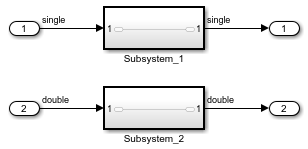
The subsystems have identical contents and are each configured to generate a shared reusable function, but the code generator generates this code:
/* Output and update for atomic system: '<Root>/Subsystem_1' */
real32_T Demo_Subsystem_1(real32_T rtu_In1)
{
  /* SignalConversion generated from: '<S1>/In1' */
  return rtu_In1;
}

/* Output and update for atomic system: '<Root>/Subsystem_2' */
real_T Demo_Subsystem_2(real_T rtu_In1)
{
  /* SignalConversion generated from: '<S2>/In1' */
  return rtu_In1;
}
The input arguments and return types of the generated functions do not match:
real_32T for Demo_Subsystem_1 and
real_T for Demo_Subsystem_2. This is because the
subsystems in the model are connected to different signal types: single
for Subsystem_1 and double for
Subsystem_2. If you want to generate a shared function, you need to
change the input and output signal types to match between the subsystems.
If your generated code is too complex to manually examine for interface differences, see Compare Checksums to Determine Why Generated Code Is Not Reused for an example of how to programmatically check differences between subsystems, including differences between their interfaces.
Insert Signal Conversion or Bias Blocks
You can use Signal Conversion or Bias blocks to isolate subsystems and referenced models to determine which parts of your model reference hierarchy contain differences that prevent the code generator from generating reusable functions. Use Bias blocks to isolate subsystems that contain a Merge block that has initial conditions. In other circumstances, use Signal Conversion blocks.
For example, consider a referenced model that contains multiple instances of a reusable subsystem. If you generate code for the top model and the code generator does not generate a shared function for the reusable subsystems, this means that a difference exists between the top and referenced models or between the reusable subsystem instances. If you surround the reusable subsystems inside the referenced model with Signal Conversion blocks and the code generator still produces separate functions, then there is a difference between the subsystem instances. Otherwise, there is a difference between the top model and referenced model.
For more information, see Use Signal Conversion or Bias Blocks to Resolve Issues with Reusable Code Generation.
Compute Checksum Differences
The code generator uses subsystem checksums to determine whether to generate reusable code. If two subsystems have different checksums, the code generator generates separate functions for each subsystem. The value of a subsystem checksum depends on the parameters and contents of a subsystem as well as how the subsystem interacts with other blocks. This means that two instances of the same reusable subsystem might generate separate functions if they, for example, receive inputs that have different data types or dimensions.
You can use the Simulink.SubSystem.getChecksum method to get the checksum for a subsystem.
Compare checksums to determine why subsystems generate separate functions. For more
information, see Compare Checksums to Determine Why Generated Code Is Not Reused.
See Also
Simulink.SubSystem.getChecksum

