Reduce Memory Footprint Using Shared Lookup Tables
R2026bThis example shows how to find Simulink® lookup table blocks with shared inputs, optimize them to share one set of breakpoint vectors, and validate the lookup table approximation using the downstream outputs of the model. Sharing breakpoints can speed up optimization and reduce total memory footprint. The example uses an interior permanent magnet synchronous motor (IPMSM) controller. You use a variant subsystem to implement the optimized lookup tables and compare their memory footprint and behavior to the originals.
Open the model.
open_system("IPMSMTorqueWithVariant")Find Lookup Tables with Shared Inputs
Use the findSharedInputLUTGroups function to scan the model for Lookup_n-D blocks with input ports that use shared signals. The function returns a table that ranks the groups of lookup tables by memory usage, measured in bits.
sharedLUTGroups = findSharedInputLUTGroups("IPMSMTorqueWithVariant")sharedLUTGroups = 3×3 table
NumLUTs TotalBits Blocks
_______ __________ ____________
2 7.3574e+05 {2×1 string}
3 2880 {3×1 string}
3 1536 {3×1 string}
Row 1 has the largest memory footprint. Select this group for multi-function lookup table approximation.
groupToOptimize = sharedLUTGroups.Blocks{1}groupToOptimize = 2×1 string
"IPMSMTorqueWithVariant/Control/FOC/Outer loop control/PMSM Current Reference Generator/CurrentRefVariant/Original/Lookup Table id reference"
"IPMSMTorqueWithVariant/Control/FOC/Outer loop control/PMSM Current Reference Generator/CurrentRefVariant/Original/Lookup Table iq reference"
The selected lookup tables are Lookup Table id reference and Lookup Table iq reference, separate d-axis and q-axis current lookup tables that produce idRef and iqRef signals from the same three inputs: speed, torque demand, and DC bus voltage. These lookup tables are in the Control subsystem, which uses an open-loop approach to control the IPMSM torque. The signals from the current controller drive the motor. You use the measured electrical torque output torque_meas to compare the lookup table approximations.
Create Optimized Lookup Tables with Shared Breakpoints
Define the approximation problem using the selected group of lookup tables. The solver uses the input ranges and dimensions specified in the block parameters.
problem = FunctionApproximation.Problem(groupToOptimize)
problem =
  1×1 FunctionApproximation.Problem with properties:

    FunctionToApproximate: {1×2 cell}
           NumberOfInputs: 3
          NumberOfOutputs: 2
               InputTypes: ["numerictype('double')"    "numerictype('double')"    "numerictype('double')"]
         InputLowerBounds: [0 -205 275]
         InputUpperBounds: [8000 205 350]
               OutputType: ["numerictype('double')"    "numerictype('double')"]
                  Options: [1×1 FunctionApproximation.Options]
Configure even-spacing breakpoints, linear interpolation, and a 32-bit word length. To speed up optimization, even spacing makes the prelookup on the target a single subtract-and-multiply rather than a per-axis search. Linear interpolation matches the original lookup table setting and preserves the smoothness of the d and q current surfaces. The 32-bit word lengths match existing fixed-point strategy of the controller.
problem.Options.BreakpointSpecification = "EvenSpacing";
problem.Options.Interpolation = "Linear";
problem.Options.WordLengths = 32;
Set the approximation error tolerances. AbsTol and RelTol bound the absolute and relative error between the optimized lookup table and the original function. The solver accepts a table only if the table meets both tolerances. For more information, see the AbsTol and RelTol properties of FunctionApproximation.Options.
problem.Options.AbsTol = 1e-2;
problem.Options.RelTol = 5e-3;
Solve the problem. The solver searches for the smallest shared-breakpoint table that meets the tolerances. To load a previously saved solution, set doOptimization to false. To run the optimization, set doOptimization to true.
doOptimization =false; if doOptimization solution = solve(problem); save("solution.mat","solution") else load("solution.mat","solution") end
Display the feasible solutions that meet both the error and memory constraints.
solution.displayFeasibleSolutions
|  ID | Total Memory (bits) | Feasible | Table Size | Breakpoints WLs | TableData WL | BreakpointSpecification | Normalized error (%) |
|   0 |              729088 |        1 |  [17 83 4] |      [64 64 64] |      [64 64] |          ExplicitValues |              0.0000% |
|   1 |              725760 |        1 |  [17 83 4] |      [32 32 32] |      [64 64] |          ExplicitValues |              0.0000% |
|   2 |              361408 |        1 |  [17 83 4] |      [32 32 32] |      [32 32] |             EvenSpacing |              0.0003% |

Best Solution
|  ID | Total Memory (bits) | Feasible | Table Size | Breakpoints WLs | TableData WL | BreakpointSpecification | Normalized error (%) |
|   2 |              361408 |        1 |  [17 83 4] |      [32 32 32] |      [32 32] |             EvenSpacing |              0.0003% |
Compare Memory Usage
Compare the memory used by the shared-breakpoint table against the original lookup tables.
fprintf("Original: %d bits | Optimized: %d bits | Reduction: %.2f%%\n", ...
    sharedLUTGroups.TotalBits(1), totalMemoryUsage(solution, "bits"), solution.PercentReduction);
Original: 735744 bits | Optimized: 361408 bits | Reduction: 50.88%
Populate Variant Subsystem with Optimized Lookup Tables
The lookup tables are wrapped in the variant subsystem CurrentRefVariant which has two children. The Original child holds the existing lookup tables, and the Optimized child is empty. Populate the empty Optimized child of CurrentRefVariant with the shared-breakpoint table approximation.
populateOptimizedVariant(solution);
The variant subsystem uses the variable useOptimized to pick its active variant: 0 selects Original, and 1 selects Optimized. Simulate the model once for each value. Each simulation output logs the idRef, iqRef, and torque_meas signals.
simIn = Simulink.SimulationInput("IPMSMTorqueWithVariant");
simOrig = sim(simIn.setVariable("useOptimized", 0));
simOpt = sim(simIn.setVariable("useOptimized", 1));
Compare Current Reference Outputs
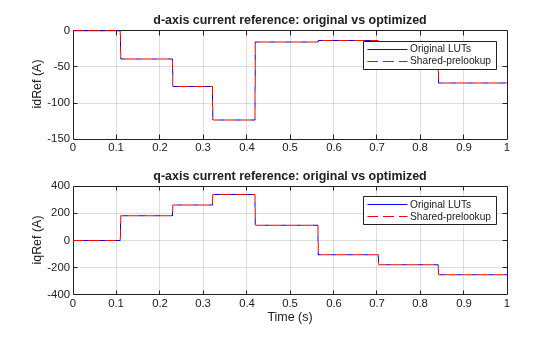
The shared-prelookup approximation changes the idRef and iqRef outputs of the PMSM Current Reference Generator block. Both variants use the same fixed-step solver, and their logged signals share a time vector so you can compare them point by point. The plotCurrentReferenceComparison function reports the maximum absolute difference for each current reference and overlays the two runs.
plotCurrentReferenceComparison(simOrig, simOpt)
idRef: max |err| = 2.686e-08 A
iqRef: max |err| = 8.878e-08 A
Compare Measured Torque
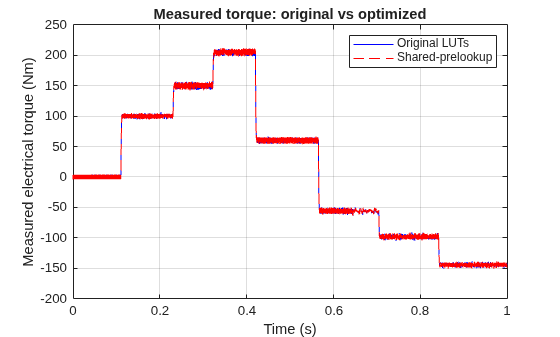
The measured electrical torque torque_meas carries the downstream effect of the approximation through the current controller and motor. The inner current controller and motor model apply their own quantization, so a small deviation on the current references might not produce an observable difference in the measured torque. The plotTorqueComparison function reports the maximum absolute difference and overlays the two runs.
plotTorqueComparison(simOrig, simOpt)
torque_meas: max |err| = 0 Nm
Helper Functions
The findSharedInputLUTGroups function scans a model for Lookup_n-D blocks whose input ports are driven by the same source signals and returns those groups ranked by total memory. Only lookup tables that share input signals can share a prelookup.
function groupTable = findSharedInputLUTGroups(model)
% Measure the memory of every lookup table in the model. Searching inside
% library links reaches the tables nested in the PMSM controller libraries.
memoryCalculator = FunctionApproximation.LUTMemoryUsageCalculator;
memoryCalculator.FindOptions.SearchInsideLibraryLinks = true;
memoryTable = lutmemoryusage(memoryCalculator, model);
lutPaths = string(memoryTable.BlockPath);

% For each lookup table, record the source port that drives each of its
% inputs. Two tables share inputs when these source ports match. Unused
% input slots stay at -1 so tables with different input counts never match.
inputPortsPerLUT = arrayfun(@(p) get_param(p,"PortHandles").Inport, lutPaths, "UniformOutput", false);
sourcePortMatrix = -ones(numel(lutPaths), max(cellfun(@numel, inputPortsPerLUT)));
for k = 1:numel(lutPaths)
    for j = 1:numel(inputPortsPerLUT{k})
        % Trace the input line back to the port that drives it.
        sourcePortMatrix(k,j) = get_param(get_param(inputPortsPerLUT{k}(j), "Line"), "SrcPortHandle");
    end
end

% Group tables whose source-port rows are identical. Count the tables and
% total the memory per group. lutmemoryusage reports bytes, so scale by 8.
[~, ~, groupIndex] = unique(sourcePortMatrix, "rows");
lutsPerGroup = accumarray(groupIndex, 1);
totalBitsPerGroup = accumarray(groupIndex, memoryTable.MemoryUsage) * 8;
blockGroups = splitapply(@(p) {p}, lutPaths, groupIndex);

% Keep only groups of two or more tables and rank them by memory so the
% heaviest candidate is the first row.
keepGroup = lutsPerGroup >= 2;
groupTable = table(lutsPerGroup(keepGroup), totalBitsPerGroup(keepGroup), blockGroups(keepGroup), ...
    VariableNames=["NumLUTs","TotalBits","Blocks"]);
groupTable = sortrows(groupTable, "TotalBits", "descend");
end
The populateOptimizedVariant function generates the shared-prelookup subsystem from the solution and wires it into the empty Optimized child of CurrentRefVariant, matching the input order used by the Original child.
function populateOptimizedVariant(solution)
optimizedPath = 'IPMSMTorqueWithVariant/Control/FOC/Outer loop control/PMSM Current Reference Generator/CurrentRefVariant/Optimized';

% Generate the approximation as a subsystem in a throwaway model, and close
% that model automatically when this function returns.
[approximationModel, approximationBlock] = solution.approximate(false, false);
cleanupApproximationModel = onCleanup(@() close_system(approximationModel.Name, 0));

% Copy the generated subsystem into the Optimized variant.
add_block(approximationBlock.getFullName, [optimizedPath '/Approximation']);

% Wire the three inputs and two outputs. The Optimized inputs In1-In3 do not
% map one-to-one onto the approximation inputs, so set each connection
% explicitly (In2->1, In1->2, In3->3).
wires = ["In2/1", "Approximation/1"
         "In1/1", "Approximation/2"
         "In3/1", "Approximation/3"
         "Approximation/1", "Out1/1"
         "Approximation/2", "Out2/1"];
for k = 1:size(wires, 1)
    add_line(optimizedPath, wires(k,1), wires(k,2), "autorouting","on");
end

% Arrange the subsystem so the added blocks and lines are readable.
Simulink.BlockDiagram.arrangeSystem(optimizedPath);
end
The plotCurrentReferenceComparison function extracts idRef and iqRef from the two simulation outputs, reports the maximum absolute difference for each, and overlays the original and shared-prelookup traces on stacked axes.
function plotCurrentReferenceComparison(simOrig, simOpt)
% Extract the d- and q-axis current references from each run as timeseries.
idRefOrig = getElement(simOrig.logsout_IPMSMTorque, "idRef").Values;
idRefOpt = getElement(simOpt.logsout_IPMSMTorque, "idRef").Values;
iqRefOrig = getElement(simOrig.logsout_IPMSMTorque, "iqRef").Values;
iqRefOpt = getElement(simOpt.logsout_IPMSMTorque, "iqRef").Values;

% Report the largest deviation the approximation introduces on each reference.
fprintf("idRef: max |err| = %.4g A\n", max(abs(idRefOpt.Data - idRefOrig.Data)))
fprintf("iqRef: max |err| = %.4g A\n", max(abs(iqRefOpt.Data - iqRefOrig.Data)))

figure
tiledlayout(2, 1)

% Top axes: d-axis current reference.
nexttile
plot(idRefOrig.Time, idRefOrig.Data, "b")
hold on
plot(idRefOpt.Time, idRefOpt.Data, "r--")
hold off
legend("Original LUTs", "Shared-prelookup")
grid on
ylabel("idRef (A)")
title("d-axis current reference: original vs optimized")

% Bottom axes: q-axis current reference.
nexttile
plot(iqRefOrig.Time, iqRefOrig.Data, "b")
hold on
plot(iqRefOpt.Time, iqRefOpt.Data, "r--")
hold off
legend("Original LUTs", "Shared-prelookup")
grid on
xlabel("Time (s)")
ylabel("iqRef (A)")
title("q-axis current reference: original vs optimized")
end
The plotTorqueComparison function extracts torque_meas from the two simulation outputs, reports the maximum absolute difference, and overlays the original and shared-prelookup traces.
function plotTorqueComparison(simOrig, simOpt)
% Extract the measured electrical torque from each run as a timeseries.
torqueOrig = getElement(simOrig.logsout_IPMSMTorque, "torque_meas").Values;
torqueOpt = getElement(simOpt.logsout_IPMSMTorque, "torque_meas").Values;

% Report the largest deviation the approximation introduces at the terminals.
fprintf("torque_meas: max |err| = %.4g Nm\n", max(abs(torqueOpt.Data - torqueOrig.Data)))

figure
plot(torqueOrig.Time, torqueOrig.Data, "b")
hold on
plot(torqueOpt.Time, torqueOpt.Data, "r--")
hold off
legend("Original LUTs", "Shared-prelookup")
grid on
xlabel("Time (s)")
ylabel("Measured electrical torque (Nm)")
title("Measured torque: original vs optimized")
end
See Also
FunctionApproximation.Problem | FunctionApproximation.Options

