Fuzzy PID Tuner
R2026bDescription
Using Fuzzy PID Tuner, you can tune the gains of a Fuzzy PID Controller block.
The Fuzzy PID Controller block uses the following control structure.
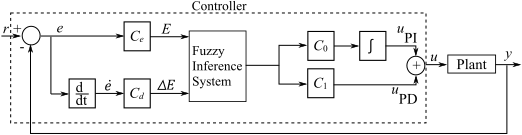
The controller uses a fuzzy inference system together with the following controller gains:
Ce — Gain factor to scale the error signal to the range of the corresponding input variable of the FIS
Cd — Gain factor applied to the derivative signal before it enters the FIS.
C0 — Gain factor applied to the FIS output in the PI control branch.
C1 — Gain factor applied to the FIS output in the PD control path.
To tune the controller gains, you can use one of these optimization methods:
Sequential coordinate-descent
Gradient descent (requires Simulink® Design Optimization™ software)
Pattern search (requires Simulink Design Optimization and Global Optimization Toolbox software)
Simulated annealing (requires Simulink Design Optimization and Global Optimization Toolbox software)
Particle swarm (requires Simulink Design Optimization and Global Optimization Toolbox software)
Genetic algorithm (requires Simulink Design Optimization and Global Optimization Toolbox software)
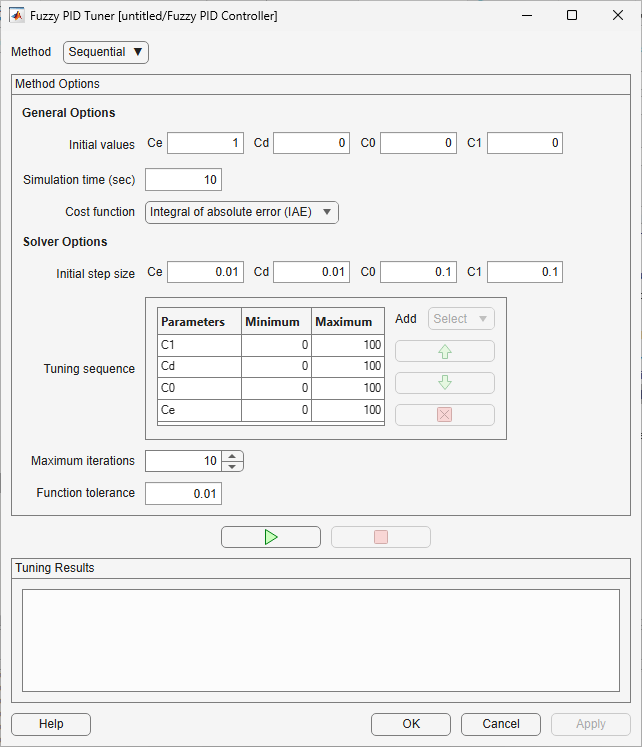
Open the Fuzzy PID Tuner
Simulink model: In the Fuzzy PID Controller block dialog box, click Tune.
Examples
When tuning controller gains using any methods other than sequential tuning, you can specify algorithm-specific tuning options.
In the Solver Options section, use the Algorithm settings drop-down list to add and configure tuning options. Any options that you do not specify use their default values.
To configure an option, in the leftmost list, select the option category. In the next list, select the optimization option. Then, specify the option value.
For example, the following figure shows how to configure the following options for the genetic algorithm tuning method.
Maximum number of generations, where:
The option category is
Run time limits.The option is
Max generations.The option value is
20.
Population size, where:
The option category is
Population settings.The option is
Population size.The option value is
100.

To add or remove options, click the corresponding + or –, respectively.
For more information on the algorithm-specific tuning options, click the question
mark icon  .
.
Parameters
Select one of these methods for tuning the controller gains:
Sequential— Coordinate-descent method that tunes parameters one at a time in a configurable sequenceGradient descent— Gradient-descent search usingfmincon(requires Simulink Design Optimization software)Pattern search— Direct-search local optimization method that searches a set of points near the current point to find a new optimum (requires Simulink Design Optimization and Global Optimization Toolbox software)Simulated annealing— Local optimization method that simulates a heating and cooling process to find a new optimal point near the current point (requires Simulink Design Optimization and Global Optimization Toolbox software)Particle swarm— Population-based global optimization method in which population members step throughout a search region (requires Simulink Design Optimization and Global Optimization Toolbox software)Genetic algorithm— Population-based global optimization method that searches randomly by mutation and crossover among population members (requires Simulink Design Optimization and Global Optimization Toolbox software)
General Options
Specify an initial value for each controller gain: Ce, Cd, C0, and C1. When you open Fuzzy PID Tuner, it sets the initial gain values to the values specified in the block parameters.
If you do not have an initial estimate of the controller gains, a good starting point is to set Ce to 1 and the remaining gains to 0.
Specify the duration of each optimization simulation in seconds. Fuzzy PID Tuner initially sets the simulation time to the simulation time defined in the model.
If the model simulation time is Inf, Fuzzy PID Tuner
sets the simulation time to 15 seconds.
Select one of these methods for computing the cost of each optimization simulation.
Integral of absolute error (IAE)— Compute the cumulative magnitude of errors between the plant output and the reference signal.Root mean squared error— Compute the root mean squared error between the plant output and the reference signal.
Solver Options
Specify an initial step size for tuning each controller gain: Ce, Cd, C0, and C1.
Dependencies
This parameter is supported when Method is
Sequential.
Specify the order in which to tune the controller gains along with the corresponding bounds for each gain value.
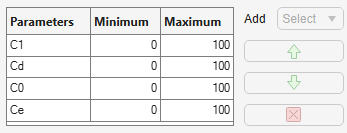
The Tuning sequence table has these columns:
Parameters — Controller gain parameter
Minimum — Lower bound for gain value
Maximum — Upper bound for gain value
To move a controller up or down in the tuning order, click  or
or  , respectively.
To remove a gain value from the tuning sequence, click  .
.
To add a gain to the tuning sequence, use the Add drop-down list.
Dependencies
This parameter is supported when Method is
Sequential.
Specify the maximum number of optimization iterations.
Dependencies
This parameter is supported when Method is
Sequential.
Specify the cost-improvement threshold, which controls the stopping criterion for the optimization. When the objective function improves by an amount less than Function tolerance the tuning algorithm stops.
Dependencies
This parameter is supported when Method is
Sequential.
Specify the upper and lower bound for each controller gain.
The Bounds table has these columns:
Parameters — Controller gain parameter
Minimum — Lower bound for gain value
Maximum — Upper bound for gain value
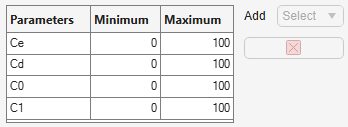
To remove a gain value from the tuning process, click .
To add a gain to the tuning process, use the Add drop-down list.
Dependencies
This parameter is supported when Method is any value other
than Sequential.
Version History
Introduced in R2026b

