Improve Performance of GPU Code by Removing Loop Dependencies
R2026bWhen you generate GPU code, GPU Coder™ does not generate parallel code for loops with loop-carried dependencies, which are loops whose iterations depend on each other. Instead, the generated GPU code contains loops. However, executing large loops takes a significant amount of execution time and can bottleneck the generated code performance. You can improve the performance of generated GPU code by removing loop-carried dependencies from large loops.
What Is a Loop-Carried Dependency?
A loop has a loop-carried dependency if an iteration of the loop depends on the result of a previous iteration. A loop can have a dependency when:
The loop uses a single variable to accumulate a value over multiple loop iterations.
The loop reuses the value of a variable from a previous iteration.
For example, this function, getNumOfPeaks, calculates the number of
peaks in an input variable named input. The function uses a
for-loop to accumulate the result in a variable
output. In each iteration, it increments the output
variable if the current element of input is a peak. The result of one
loop iteration depends on whether the previous iterations increased
output, so the for-loop has a loop-carried
dependency.
function output = getNumOfPeaks(input)
output = 0;
for i = 2:numel(input)-1
  if input(i) > input(i-1) && input(i) > input(i+1)
    output = output + 1;
  end
end
end
When you generate CUDA® code for getNumOfPeaks, the generated code for
getNumOfPeaks does not contain a kernel for the loop. GPU Coder does not generate parallel code for the loop because a thread that performs
the calculation for one iteration can read and write to output at the
same time as a thread for a different iteration. The value of output
after executing the loop in parallel is undefined.
Alternatively, the function myDiff contains a loop-carried dependency
because it reuses the value of a variable from a previous iteration. The function outputs an
array that contains the difference between the element of input and the
previous element. It uses two variables named current and
previous inside the loop to store values of input.
The value of output(i) depends on the previous
variable, which depends on the previous iteration.
function output = myDiff(input)
output = coder.nullcopy(zeros(numel(input)-1,1));
previous = input(1);
for i = 1:numel(output)
  current = input(i+1);
  output(i) = current-previous;
  previous = current;
end
end
Executing this loop in parallel results in a race condition, so GPU Coder does not generate a kernel.
Identifying Loop-Carried Dependencies
To identify loop-carried dependencies, use the GPU Performance Analyzer to find CPU loops. If the GPU Performance Analyzer detects large CPU loops that take significant amounts of the execution time, it reports them in the Diagnostics pane.
For example, suppose you profile the generated code for getNumOfPeaks
using the GPU Performance Analyzer. In the
Profiling Summary pane, the GPU utilization of the generated code is
zero percent, which indicates the generated code does not use the GPU. The
Diagnostics pane flags the loop
getNumOfPeaks_loop_0 because it takes a significant amount of the total
execution time.
cfg = coder.gpuConfig("mex");
inputData = rand([2^10,1]);
gpuPerformanceAnalyzer("getNumOfPeaks",{inputData},Config=cfg);
### Starting GPU code generation
Code generation successful: View report

### GPU code generation finished
### Starting application profiling
### Application profiling finished
### Starting profiling data processing
### Profiling data processing finished
### Showing profiling data
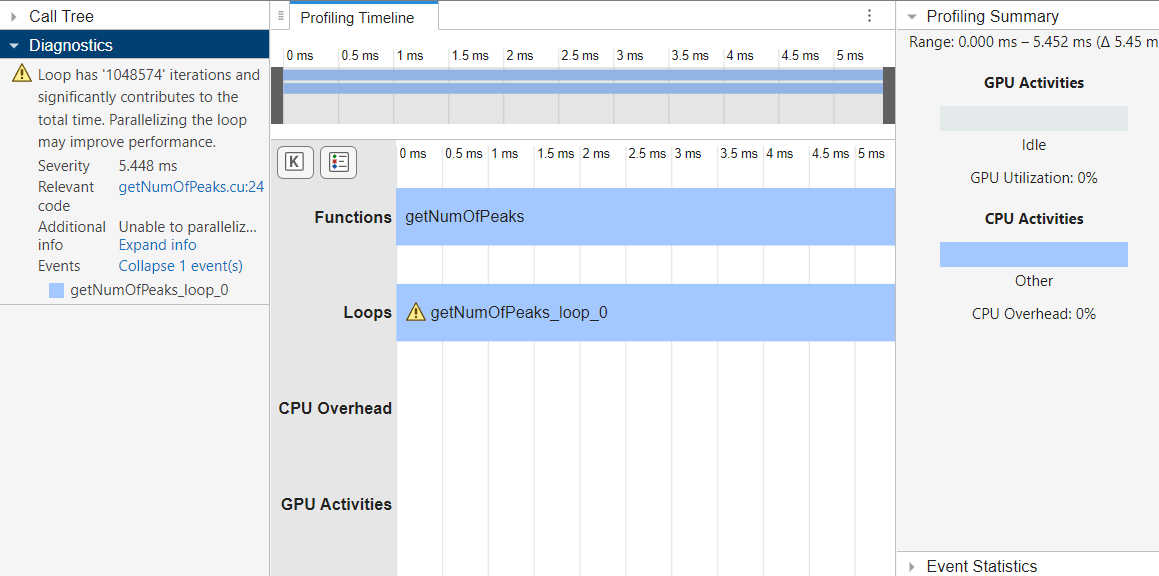
The Diagnostics pane can also show more information to help
identify loop-carried dependencies. Click Expand Info to show more
information about loop. In this function, the GPU
Performance Analyzer indicates that a variable
output causes a loop-carried dependency.
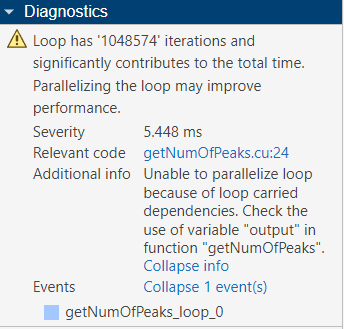
To optimize the code, check the output variable in the generated
code.
Loop-carried dependencies can also cause GPU Coder to generate kernels that contain loops. You can further optimize the performance by removing loop-carried dependencies that cause these loops.
Remove Dependencies from the Loop
To generate CUDA kernels, rewrite the loops to remove the loop-carried dependencies. For example, you can:
Rewrite the loop to avoid accessing data from other iterations
Accumulate a value using
gpucoder.reduceinstead of a loopMake read-modify-write operations atomic using a function such as
gpucoder.atomicAdd
Remove Code That Depends on Previous Iterations
You can rewrite loops to remove unnecessary variable reads or writes that create a
loop-carried dependency. Consider this loop from the myDiff function.
The loop uses the variable current to store
input(i+1) and the variable previous to store the
value of current from the previous iteration.
for i = 1:numel(output)
  current = input(i+1);
  output(i) = current - previous;
  previous = current;
end
This loop is optimized for serial execution. Because the code stores the entries of
input in the variables current and
previous, the loop reads each element of input
once and uses it twice, which can improve the memory cache usage and decrease the memory
reads from input. However, this memory access pattern causes a
loop-carried dependency on previous.
To remove the dependency, calculate output by reading
input(i+1) and input(i) at each iteration. The new
loop reads each entry of input twice, which makes the memory access
less efficient. However, because the loop does not reuse the result of the previous
iteration, the loop iterations are independent. GPU Coder generates a kernel for the
resulting loop.
function output = myDiff(input)
output = coder.nullcopy(zeros(numel(input)-1, 1));
for i = 1:numel(output)
  output(i) = input(i+1)-input(i);
end
end
Use gpucoder.reduce to Remove Loop Dependencies
You can use gpucoder.reduce to replace
loops that accumulate a value while looping over elements of an input array. For example,
in the getNumOfPeaks function, each iteration can increment the
output variable, and the output is the number of peaks accumulated
during the loop. You can use gpucoder.reduce to calculate the number of
peaks instead.
In the getNumOfPeaks function, create an array named
peaks that has the same size as the input. In the
for-loop, if the corresponding element of input is
a peak, set peaks(i) equal to 1 instead of
incrementing count. Then, you can use
gpucoder.reduce to sum peaks and find the number
of peaks.
function output = getNumOfPeaks(input)
peaks = zeros(size(input));
for i = 2:numel(input) - 1
  if input(i) > input(i -1) && input(i) > input(i+1)
    peaks(i) = 1;
  end
end
output = gpucoder.reduce(peaks,@plus);
end
When you generate code, GPU Coder generates one kernel for the loop that calculates peaks
and one kernel for the call to gpucoder.reduce.
Use Atomic Operations to Remove Loop Dependencies
The gpucoder.atomicAdd function
can remove dependencies by making read-modify-write operations atomic in the generated
code. When you use an atomic operation, GPU threads read, modify, and write to memory
without interference from other threads in the generated code, so GPU Coder can generate a kernel for the loop.
You can remove the dependency in the getNumOfPeaks function by
using gpucoder.atomicAdd. In the function, replace the addition
operation with a call to gpucoder.atomicAdd.
function output = getNumOfPeaks(input)
output = 0;
for i = 2:numel(input) - 1
  if input(i) > input(i -1) && input(i) > input(i+1)
    output = gpucoder.atomicAdd(output,1);
  end
end
end
Because each iteration uses an atomic operation to write to the
output variable, GPU Coder generates a kernel for the loop.
See Also
gpucoder.reduce | gpucoder.atomicAdd

