Create Adapter to Read Unsupported Image Formats for Blocked Processing
R2026bBy default, the blockedImage object can read any image file that can be read by the
imread function.
The
blockedImage object can read and write other image formats, but you must
specify an adapter that instructs the blockedImage object in how to
read the image format. Image Processing Toolbox™ offers several built-in adapters, such as TIFF3D and
JPEG2000.
See Adapter for a list of
available adapters. If an adapter for your file type does not exist, then you can create
a custom adapter.
To create an adapter, you must first define a class that inherits from the images.blocked.Adapter class. Then, you create an adapter as a concrete
instance of the class, and provide that adapter as input to the
blockedImage object. This topic demonstrates the process for
creating and using an adapter for the Erdas LAN file format. You can apply the same
process to any file format where you can query image dimensions and read rectangular
regions of pixel data.
If you are new to object-oriented programming, see Developing Classes That Work Together for general information on writing classes.
Learn More About the LAN File Format
This topic creates an adapter, named LanAdapter, that reads the
Erdas LAN file format. LAN files store multispectral Landsat thematic mapper
imagery. LAN files contain a 128-byte header followed by one or more spectral bands
of data, band-interleaved-by-line (BIL), in order of increasing band number. The
data is stored in little-endian byte order.
The header contains several pieces of important information about the file,
including size, data type, and number of bands of imagery contained in the file. The
table shows how this data is stored in the first 24 bytes of the file header. The
LanAdapter class does not use the remaining 104 bytes of the
header.
LAN File Header Content
| Bytes | Data Type | Content |
|---|---|---|
| 1–6 | 6 byte array of characters that identify the version of the file format | 'HEADER' or 'HEAD74'
(Pre-7.4 files say 'HEADER'.) |
| 7–8 | 16-bit integer | Pack type of the file (indicating bit depth) |
| 9–10 | 16-bit integer | Number of bands of data |
| 11–16 | 6 bytes | Unused |
| 17–20 | 32-bit integer | Number of columns of data |
| 21–24 | 32-bit integer | Number of rows of data |
In a typical in-memory workflow, you would read a LAN file by using the multibandread function. For
example, you could create a truecolor image for further processing. The LAN format
stores the RGB data from the visible spectrum in bands 3, 2, and 1,
respectively.
rgb = multibandread(myLANfile,[512 512 7], ...
   "uint8=>uint8",128,"bil","ieee-le",{"Band","Direct",[3 2 1]});
For large LAN files, the LanAdapter class uses the
multibandread to read blocks of data.
Define the LanAdapter Class
This section describes the implementation of the LanAdapter
class. Implementing the class involves naming the class and inheritances in the
classdef block, and defining properties, required methods,
and any optional methods.
Classdef
The LanAdapter class begins with the keyword
classdef. The classdef defines the
class name and indicates that LanAdapter inherits from the
images.blocked.Adapter superclass. The
images.blocked.Adapter class is an abstract class that defines the signature for methods that
blockedImage uses to read image files on disk.
classdef LanAdapter < images.blocked.Adapter
Properties
Following the classdef section, the
LanAdapter class contains a block of class properties
that stores metadata from the file header. Other classes that also inherit from
images.blocked.Adapter, but that support different file
formats, can have different properties.
   properties
      Filename
      NumBands
      SelectedBands
      ImageSize
  end
Required Methods
Following the properties block, define a
methods block. Adapter classes have three required
methods that all adapter classes must implement: openToRead, getInfo, and getIOBlock. Each method is implemented differently for different
file formats, depending on what tools are available for reading the specific
files.
Then, implement the first method, openToRead, which opens the source for reading. The
openToRead function must have two input arguments,
obj and source. The
obj argument refers to the concrete instance of the
adapter. The source argument is the name of the LAN
file.
For this adapter class, the openToRead function also
parses the LAN file header and sets properties of the adapter. The sample
LanAdapter class only supports uint8
data type files, so the function validates the pack type of the LAN file.
    methods

        function openToRead(obj,source)

            % Open the file
            obj.Filename = source;
            fid = fopen(source,"r");

            % Verify that the file begins with the headword "HEADER" or
            % "HEAD74", as per the Erdas LAN file specification
            headword = fread(fid,6,"uint8=>char");
            headword = headword'
            if ~(strcmp(headword,"HEADER") || strcmp(headword,"HEAD74"))
                error("Invalid LAN file header.");
            end

            % Read the data type from the header
            pack_type = fread(fid,1,"uint16",0,"ieee-le")
            if ~isequal(pack_type,0)
                error("Only uint8 data supported.");
            end

            % Provide band information
            numBands = fread(fid,1,"uint16",0,"ieee-le")
            obj.NumBands = numBands;
            if isempty(obj.SelectedBands)
                obj.SelectedBands = 1:numBands;  % only set default
            end

            % Specify image size
            unused_field = fread(fid,6,"uint8",0,"ieee-le");
            width = fread(fid,1,"uint32",0,"ieee-le")
            height = fread(fid,1,"uint32",0,"ieee-le")
            obj.ImageSize = [height width];
        end
Implement the second required method, getInfo, which returns a structure containing information about
the data. The structure has four required fields.
      function info = getInfo(obj)
          numSelectedBands = numel(obj.SelectedBands);
          info.Size = [obj.ImageSize numSelectedBands];
          info.Datatype = "uint8";
          info.IOBlockSize = [100 100 numSelectedBands];
          info.InitialValue = uint8(0);
      end
Implement the third required method, getIOBlock, which reads one block of data specified by the block
subscript ioBlockSub. The function signature for the
getIOBlock function has three input arguments. This
adapter assumes the LAN image has one resolution level. You can ignore the third
input argument corresponding to the resolution level by specifying the value as
~.
The getIOBlock function calculates the pixel indices
corresponding to the block subscript ioBlockSub, then reads
that block of data by using the multibandread function. The
call to multibandread is similar to that for an in-memory
image, with the addition of specified row and column indices for the
block.
        function data = getIOBlock(obj,ioBlockSub,~)
            info = getInfo(obj);
            blockSize = info.IOBlockSize;
            regionStart = (ioBlockSub-1).*blockSize + 1;
            regionEnd = min(ioBlockSub.*blockSize,info.Size);

            rows = regionStart(1):regionEnd(1);
            cols = regionStart(2):regionEnd(2);

            fullSize = [obj.ImageSize obj.NumBands];
            data = multibandread(obj.Filename,fullSize, ...
                  "uint8=>uint8",128,"bil","ieee-le", ...
                  {"Row","Direct",rows}, ...
                  {"Column","Direct",cols}, ...
                  {"Band","Direct",obj.SelectedBands});
          end
Optional Methods
When you write a custom adapter, you can optionally implement additional
methods to perform actions such as writing data and performing clean up tasks.
For a full list of optional methods, see images.blocked.Adapter.
Although these methods are not required by the images.blocked.Adapter abstract class, your file format might
require you to implement one or more of these methods in the class definition.
For example, you might need to implement the close method to close file handles and perform other class
clean-up responsibilities.
The LanAdapter class in this topic is read-only and does
not need to implement optional methods. If you want to write output to a LAN
format file, or another file with a format that blockedImage
does not support, then implement the openToWrite and setIOBlock methods. The LanAdapter class does
not need to implement the close method because the
multibandread function does not need maintenance of
open file handles.
End Methods Block and Classdef Block
After you define the required methods and any optional methods, end the
methods block and the classdef
block.
   end % methods
end % LanAdapter
Now that you understand how the LanAdapter class works, you
can use it in block processing workflows. The following topic shows how to use
the LanAdapter class to read RGB data from a multispectral
LAN file and write the RGB data to the JPG file format.
Use Custom LAN Adapter
This example shows how to create and use a custom adapter to read and process images in the LAN file format. The custom adapter is defined in the file LanAdapter.m, which is attached to the example as a supporting file.
Create a concrete instance of the LanAdapter class.
adapter = LanAdapter;
The LAN format contains the visible red, green, and blue spectrum in bands 3, 2, and 1, respectively. Set the SelectedBands property of the adapter as the visible R, G, and B bands, in that order.
adapter.SelectedBands = [3 2 1];
Create a blockedImage that reads a LAN file in blocks of size 100-by-100 pixels by using the adapter.
lanFile = "paris.lan";
bim = blockedImage(lanFile,BlockSize=[100 100],Adapter=adapter);
When you create the blocked image, the blockedImage function creates a copy of the adapter and calls the openToRead function, which sets properties of the copy of the adapter. If you want to inspect the adapter, then query the Adapter property of the blocked image by using dot notation: bim.Adapter.
Create a helper function that returns the selected color channels of a block of data as a numeric array.
function rgbBlock = extractRGB(block)
    rgbBlock = block.Data;
end
Extract the visible bands into a blocked RGB image by using the apply function. The apply function reads blocks of the LAN file by calling the getIOblock function of the adapter, then processes the blocks by using the extractRGB helper function.
bimRGB = apply(bim,@(block) extractRGB(block));
Display the blocked RGB image.
bigimageshow(bimRGB)
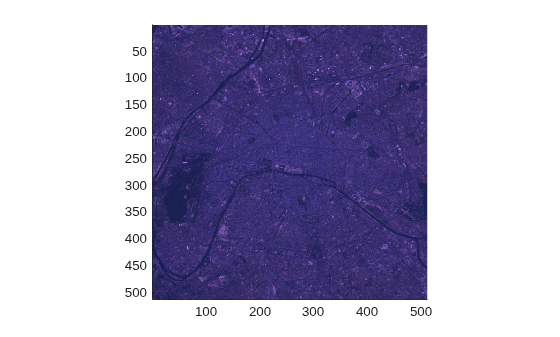
You can continue to process the blocked RGB image by using the apply function, or you can write the blocked RGB image to disk for future processing. By default, the write function writes each block of the numeric data to disk as a binary file, but you can specify an adapter to write to a different file format.
Write the RGB image to disk in the JPG file format by specifying the built-in images.blocked.JPEGBlocks adapter.
destJPEG = fullfile("OUTPUT-"+string(datetime("now",Format="yyyy-MM-dd-HH-mm-ss")),"paris");
write(bimRGB,destJPEG,Adapter=images.blocked.JPEGBlocks);
Because blockedImage supports the JPEG file format, you do not need to specify an adapter when you create a blockedImage from the written data.
bim2 = blockedImage(destJPEG);
See Also
images.blocked.Adapter | blockedImage | apply | write

