Optimize Experiment Performance Using Initialization Function
R2026bThe experiment function for a general-purpose experiment in Experiment Manager contains the instructions for a single trial and is run once for each parameter combination. If the trials for your experiment take a long time to execute, moving any setup code to an initialization function might reduce the run time.
Create an initialization function when you want to:
Load data or configure experiment details or initial conditions that apply to all trials.
Avoid redundant computation.
Improve clarity by separating setup and per-trial code.
This example shows how to configure an experiment that uses an initialization function to create data before the experiment trials begin.
Create MATLAB Code for Experiment
To start, write some MATLAB code that you can use to create an experiment. In this example, the MATLAB code first creates two vectors of data. The following procedure code determines the number of elements in those vectors A and B that are within a specified range for each combination of values for lower and upper.
A = 2 * randn(3e8,1) + 5;
B = 10 * rand([3e8 1]);
lower = [3 3.5 4];
upper = [5 5.5 6];
for i = 1:length(lower)
    for j = 1:length(upper)
        TF(i,j) = isbetween(A,lower(i),upper(j));
        A_count = sum(TF);
        TF2(i,j) = isbetween(B,lower(i),upper(j));
        B_count = sum(TF2);
    end
end
Define Initialization Function Using Code That Creates Data
An initialization function contains code to run before experiment trials begin and is not dependent on the parameter values.
If you specify an initialization function, Experiment Manager uses this process to run the experiment,
Run the initialization function and save its output as
params.InitializationFunctionOutput.Generate the required parameter value combinations.
Save the first parameter value combination and run the experiment function. Then, save the Trial 1 outputs and plots, and update the results table.
Repeat step 3 for all subsequent parameter value combinations.
To create an initialization function, in the Initialization Function section of the experiment editor, click New. Then, configure the function in the MATLAB Editor. The initialization function accepts no inputs and returns one array or scalar structure output.
For example, in a new experiment in Experiment Manager, copy and paste the code that creates the data vectors A and B into the initialization function. Assign the arrays of data to fields of a scalar structure output.
function output = Experiment1Initialization1()
output.A = 2 * randn(3e8,1) + 5;
output.B = 10 * rand([3e8 1]);
end
Then save and close your initialization function file.
Specify Parameters Using Code That Creates Variables
Add the parameters from the variable definition in your MATLAB code by clicking Add in the Parameters section and specifying the name and possible values for each parameter.
For example, add the parameter lower with the value of [3 3.5 4] and the parameter upper with a value of [5 5.5 6].
Name | Values |
|---|---|
|
|
|
|
Specify Experiment Function Using Procedure Code
The experiment function contains code that depends on the parameter values and must be run for each trial. In the experiment function, copy and paste the procedure code and modify it to provide the instructions for a single trial. You can access the data created in the initialization function using params.InitializationFunctionOutput and the parameter values using params.lower and params.upper. For this example, the resulting experiment function is:
function [A_count,B_count] = Experiment1Function1(params)
data = params.InitializationFunctionOutput;
lower = params.lower;
upper = params.upper;

TF = isbetween(data.A,lower,upper);
A_count = sum(TF);

TF2 = isbetween(data.B,lower,upper);
B_count = sum(TF2);
end
Then save and close your experiment function file.
Run Experiment and Analyze Run Time
After you configure the experiment, you can run it by clicking Run on the Experiment Manager toolstrip. Experiment Manager first calls the initialization function and then calls the experiment function for each parameter value combination and records the results in a table.
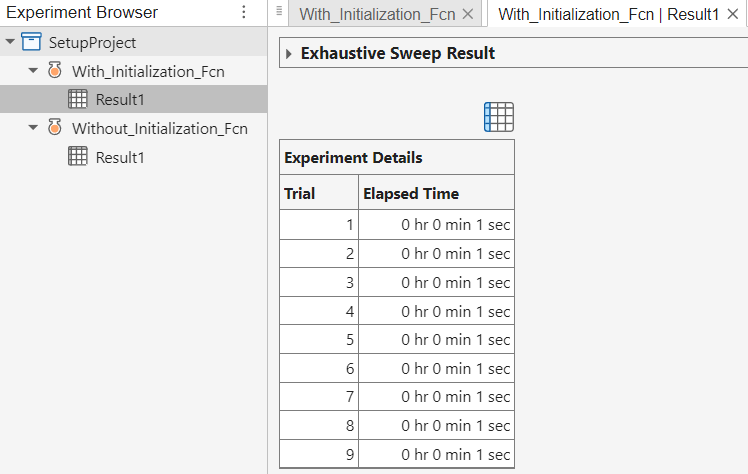
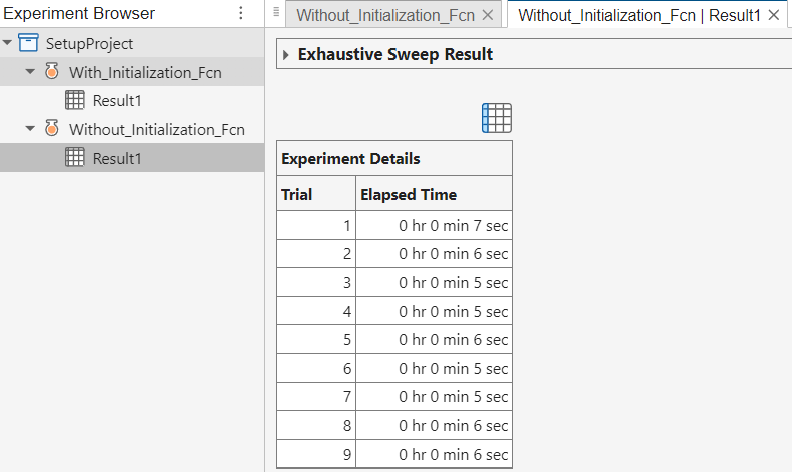
For this example, generating the data once in the initialization function results in a faster-running experiment than redundantly creating the data for each trial in the experiment function.
After moving your setup code into the initialization function, if your experiment trials still take a long time to run, consider running the trials in parallel or running the experiment in batch mode. For more information, see Run Experiments in Parallel and Offload Experiments as Batch Jobs to a Cluster.

