Getting Started with MapReduce
As the number and type of data acquisition devices grows annually, the sheer size and rate of data being collected is rapidly expanding. These big data sets can contain gigabytes or terabytes of data, and can grow on the order of megabytes or gigabytes per day. While the collection of this information presents opportunities for insight, it also presents many challenges. Most algorithms are not designed to process big data sets in a reasonable amount of time or with a reasonable amount of memory. MapReduce allows you to meet many of these challenges to gain important insights from large data sets.
What Is MapReduce?
MapReduce is a programming technique for analyzing data sets that do not fit in memory. You may be familiar with Hadoop® MapReduce, which is a popular implementation that works with the Hadoop Distributed File System (HDFS™). MATLAB® provides a slightly different implementation of the MapReduce technique with the mapreduce function.
mapreduce uses a datastore to process data in small blocks that individually fit into memory. Each block goes through a Map phase, which formats the data to be processed. Then the intermediate data blocks go through a Reduce phase, which aggregates the intermediate results to produce a final result. The Map and Reduce phases are encoded by map and reduce functions, which are primary inputs to mapreduce. There are endless combinations of map and reduce functions to process data, so this technique is both flexible and extremely powerful for tackling large data processing tasks.
mapreduce lends itself to being extended to run in several environments. For more information about these capabilities, see Speed Up and Deploy MapReduce Using Other Products.
The utility of the mapreduce function lies in its ability to perform calculations on large collections of data. Thus, mapreduce is not well-suited for performing calculations on normal sized data sets which can be loaded directly into computer memory and analyzed with traditional techniques. Instead, use mapreduce to perform a statistical or analytical calculation on a data set that does not fit in memory.
Each call to the map or reduce function by mapreduce is independent of all others. For example, a call to the map function cannot depend on inputs or results from a previous call to the map function. It is best to break up such calculations into multiple calls to mapreduce.
MapReduce Algorithm Phases
mapreduce moves each block of data in the input datastore through several phases before reaching the final output. The following figure outlines the phases of the algorithm for mapreduce.
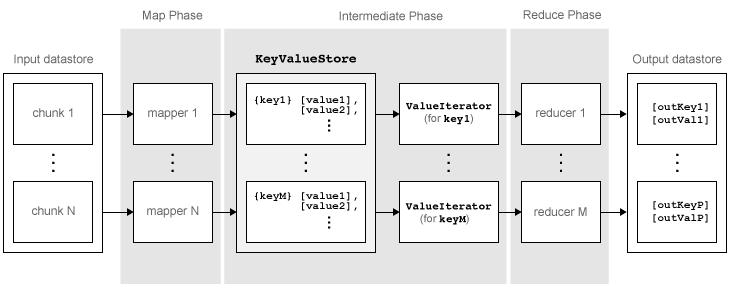
The algorithm has the following steps:
mapreducereads a block of data from the input datastore using[data,info] = read(ds), and then calls the map function to work on that block.The map function receives the block of data, organizes it or performs a precursory calculation, and then uses the
addandaddmultifunctions to add key-value pairs to an intermediate data storage object called aKeyValueStore. The number of calls to the map function bymapreduceis equal to the number of blocks in the input datastore.After the map function works on all of the blocks of data in the datastore,
mapreducegroups all of the values in the intermediateKeyValueStoreobject by unique key.Next,
mapreducecalls the reduce function once for each unique key added by the map function. Each unique key can have many associated values.mapreducepasses the values to the reduce function as aValueIteratorobject, which is an object used to iterate over the values. TheValueIteratorobject for each unique key contains all the associated values for that key.The reduce function uses the
hasnextandgetnextfunctions to iterate through the values in theValueIteratorobject one at a time. Then, after aggregating the intermediate results from the map function, the reduce function adds final key-value pairs to the output using theaddandaddmultifunctions. The order of the keys in the output is the same as the order in which the reduce function adds them to the finalKeyValueStoreobject. That is,mapreducedoes not explicitly sort the output. The reduce function writes the final key-value pairs to a finalKeyValueStoreobject. From this object,mapreducepulls the key-value pairs into the output datastore, which is aKeyValueDatastoreobject by default.
Example MapReduce Calculation
This example uses a simple calculation (the mean travel distance in a set of flight data) to illustrate the steps needed to run mapreduce.
Prepare Data
The first step to using mapreduce is to construct a datastore for the data set. Along with the map and reduce functions, the datastore for a data set is a required input to mapreduce, since it allows mapreduce to process the data in blocks.
mapreduce works with most types of datastores. For example, create a TabularTextDatastore object for the airlinesmall.csv data set.
ds = tabularTextDatastore('airlinesmall.csv','TreatAsMissing','NA')
ds =
  TabularTextDatastore with properties:

                      Files: {
                             ' .../Bdoc26a_3146167_1317206/tp4990765e/matlab-ex76309484/airlinesmall.csv'
                             }
                    Folders: {
                             '/tmp/Bdoc26a_3146167_1317206/tp4990765e/matlab-ex76309484'
                             }
               FileEncoding: 'UTF-8'
   AlternateFileSystemRoots: {}
         VariableNamingRule: 'modify'
          ReadVariableNames: true
              VariableNames: {'Year', 'Month', 'DayofMonth' ... and 26 more}
             DatetimeLocale: en_US

  Text Format Properties:
             NumHeaderLines: 0
                  Delimiter: ','
               RowDelimiter: '\r\n'
             TreatAsMissing: 'NA'
               MissingValue: NaN

  Advanced Text Format Properties:
            TextscanFormats: {'%f', '%f', '%f' ... and 26 more}
                   TextType: 'char'
         ExponentCharacters: 'eEdD'
               CommentStyle: ''
                 Whitespace: ' \b\t'
    MultipleDelimitersAsOne: false

  Properties that control the table returned by preview, read, readall:
      SelectedVariableNames: {'Year', 'Month', 'DayofMonth' ... and 26 more}
            SelectedFormats: {'%f', '%f', '%f' ... and 26 more}
                   ReadSize: 20000 rows
                 OutputType: 'table'
                   RowTimes: []

  Write-specific Properties:
     SupportedOutputFormats: ["txt"    "csv"    "dat"    "asc"    "xlsx"    "xls"    "parquet"    "parq"]
        DefaultOutputFormat: "txt"
Several of the previously described options are useful in the context of mapreduce. The mapreduce function executes read on the datastore to retrieve data to pass to the map function. Therefore, you can use the SelectedVariableNames, SelectedFormats, and ReadSize options to directly configure the block size and type of data that mapreduce passes to the map function.
For example, to select the Distance (total flight distance) variable as the only variable of interest, specify SelectedVariableNames.
ds.SelectedVariableNames = 'Distance';Now, whenever the read, readall, or preview functions act on ds, they will return only information for the Distance variable. To confirm this, you can preview the first few rows of data in the datastore. This allows you to examine the format of the data that the mapreduce function will pass to the map function.
preview(ds)
ans=8×1 table
    Distance
    ________

      308
      296
      480
      296
      373
      308
      447
      954
To view the exact data that mapreduce will pass to the map function, use read.
For additional information and a complete summary of the available options, see Datastore.
Write Map and Reduce Functions
The mapreduce function automatically calls the map and reduce functions during execution, so these functions must meet certain requirements to run properly.
The inputs to the map function are data, info, and intermKVStore:
dataandinfoare the result of a call to thereadfunction on the input datastore, whichmapreduceexecutes automatically before each call to the map function.intermKVStoreis the name of the intermediateKeyValueStoreobject to which the map function needs to add key-value pairs. Theaddandaddmultifunctions use this object name to add key-value pairs. If none of the calls to the map function add key-value pairs tointermKVStore, thenmapreducedoes not call the reduce function and the resulting datastore is empty.
A simple example of a map function is:
function MeanDistMapFun(data, info, intermKVStore)
  distances = data.Distance(~isnan(data.Distance));
  sumLenValue = [sum(distances)  length(distances)];
  add(intermKVStore, 'sumAndLength', sumLenValue);
end
This map function has only three lines, which perform some straightforward roles. The first line filters out all NaN values in the block of distance data. The second line creates a two-element vector with the total distance and count for the block, and the third line adds that vector of values to intermKVStore with the key, 'sumAndLength'. After this map function runs on all of the blocks of data in ds, the intermKVStore object contains the total distance and count for each block of distance data.
Save this function in your current folder as MeanDistMapFun.m.
The inputs to the reduce function are intermKey, intermValIter, and outKVStore:
intermKeyis for the active key added by the map function. Each call to the reduce function bymapreducespecifies a new unique key from the keys in the intermediateKeyValueStoreobject.intermValIteris theValueIteratorassociated with the active key,intermKey. ThisValueIteratorobject contains all of the values associated with the active key. Scroll through the values using thehasnextandgetnextfunctions.outKVStoreis the name for the finalKeyValueStoreobject to which the reduce function needs to add key-value pairs.mapreducetakes the output key-value pairs fromoutKVStoreand returns them in the output datastore, which is aKeyValueDatastoreobject by default. If none of the calls to the reduce function add key-value pairs tooutKVStore, thenmapreducereturns an empty datastore.
A simple example of a reduce function is:
function MeanDistReduceFun(intermKey, intermValIter, outKVStore)
  sumLen = [0 0];
  while hasnext(intermValIter)
    sumLen = sumLen + getnext(intermValIter);
  end
  add(outKVStore, 'Mean', sumLen(1)/sumLen(2));
end
This reduce function loops through each of the distance and count values in intermValIter, keeping a running total of the distance and count after each pass. After this loop, the reduce function calculates the overall mean flight distance with a simple division, and then adds a single key to outKVStore.
Save this function in your current folder as MeanDistReduceFun.m.
For information about writing more advanced map and reduce functions, see Write a Map Function and Write a Reduce Function.
Run mapreduce
After you have a datastore, a map function, and a reduce function, you can call mapreduce to perform the calculation. To calculate the average flight distance in the data set, call mapreduce using ds, MeanDistMapFun, and MeanDistReduceFun.
outds = mapreduce(ds, @MeanDistMapFun, @MeanDistReduceFun);
********************************
*      MAPREDUCE PROGRESS      *
********************************
Map   0% Reduce   0%
Map  16% Reduce   0%
Map  32% Reduce   0%
Map  48% Reduce   0%
Map  65% Reduce   0%
Map  81% Reduce   0%
Map  97% Reduce   0%
Map 100% Reduce   0%
Map 100% Reduce 100%
By default, the mapreduce function displays progress information at the command line and returns a KeyValueDatastore object that points to files in the current folder. You can adjust all three of these options using the Name,Value pair arguments for 'OutputFolder', 'OutputType', and 'Display'. For more information, see the reference page for mapreduce.
View Results
Use the readall function to read the key-value pairs from the output datastore.
readall(outds)
ans=1×2 table
      Key          Value
    ________    ____________

    {'Mean'}    {[702.1630]}
See Also
tabularTextDatastore | mapreduce

