Validate Feature Fill
R2026bAfter you fill the feature, use validation data to validate the feature fill.
In the Common Tasks pane, select Validate.
In the Select Data File dialog box, open the file that contains the validation data.
Use the Data Set Import Wizard to select and assign the data columns.
Optionally, in the Data Set View dialog box, accept name changes. Click OK.
Optionally, in the Import Validation Data dialog box, click Yes to add variables that are not included in the data set to the data.
Optionally, in the Link Data Set dialog box, link data set factors to variables, models, or tables. Click OK.
In CAGE, in the Processes pane, click Feature
 .
.In the CAGE Validation tab, review the validation results. Set:
Validation data source to the data source file.
Reference to the model that you want to investigate.
X-axis factor and Y-axis factor to the values you want to investigate.
For example, here is validation data for characterizing a battery.
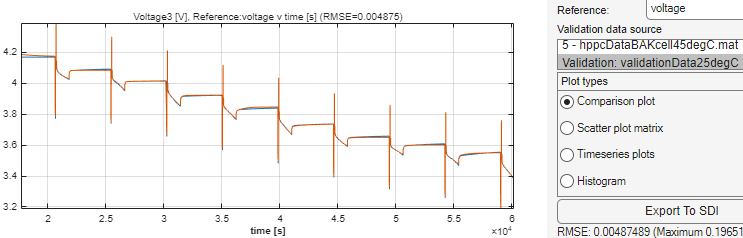
To view additional validation plots, in the right pane, select the plot type in the Plot types section. You can select:
Comparison plot
Scatter plot matrix
Timeseries plots
Histogram
Comparison plot is selected by default.
You can also export the simulation data to Simulation Data Inspector. Click Export To SDI.

