How the Model Tree Relates to Command-Line Objects
R2026bThe tree in the Model Browser displays the hierarchical structure of models. This structure must be understood to use the command-line interface. The following examples illustrate the relationship between projects, test plans and responses in one-stage and two-stage models.
The following is an example of a two-stage model tree.
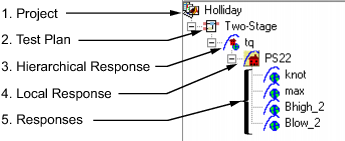
The elements of the tree correspond to the following objects in the command-line interface:
Project —
mbcmodel.projectTest Plan —
mbcmodel.testplanHierarchical Response —
mbcmodel.hierarchicalresponseLocal Response —
mbcmodel.localresponseResponses —
mbcmodel.response
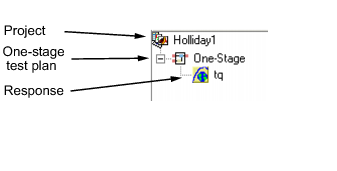
The following example illustrates a project containing a one-stage test plan; in the command-line interface this corresponds to a project, one-stage test plan, and a response model.
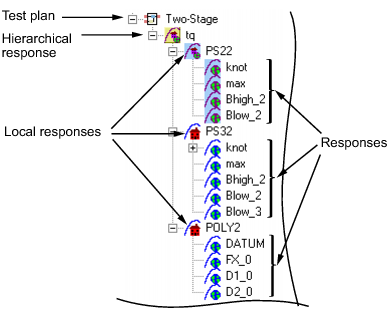
Hierarchical responses can have multiple local responses, as shown in the following
example from the Model Browser. In the command-line interface these are accessible via
the hierarchical response object property
(mbcmodel.hierarchicalresponse). In this example, the local
responses are PS22, PS32, and
POLY2.
Only one of these local responses can be chosen as best (in this example,
PS22, indicated by the blue icon) and used to construct the
hierarchical response, together with the associated response features of the local
response.
Responses can have zero or more alternative responses, as shown in the following model
tree. You call the method CreateAlternativeModels on the command line to do the same.
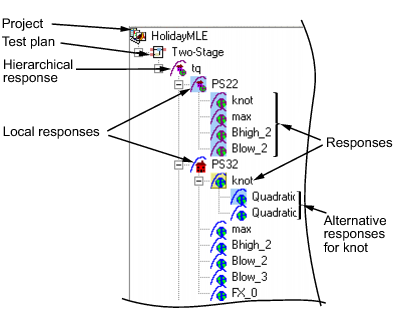
You can create alternative responses for any response (including all one-stage responses).
You can use model templates to try alternative model types for several responses. The
following example shows the results of using a model template for four alternative
responses (Linear-RBF, RBF-multiquadric,
Cubic, and Quadratic). The model template has
been used to create alternative responses for the responses knot and
max. You can call the method CreateAlternativeModels to do this in the command-line interface.
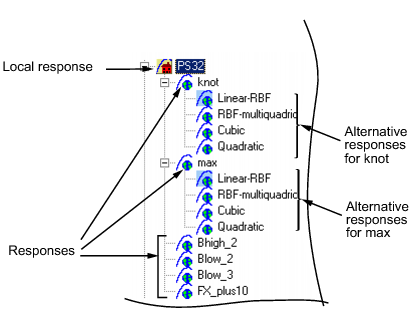
One of the alternative responses must be chosen as best for each response (call the
method ChooseAsBest).
In this example, when Linear-RBF is chosen as best from the
alternatives for the knot response, then it is copied to
knot.

