Define Operating Point Groupings
R2026bThe Define Operating Point Groupings dialog box records the current data set into groups that are called operating points. Operating point groupings are used to define hierarchical structure in the data for point-by-point and two-stage modeling.
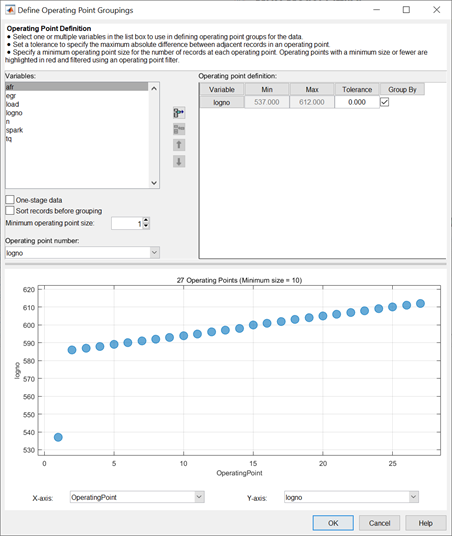
Open the dialog box from the Data Editor using one of these actions:
Go to Tools > Operating Points.
Use the toolbar button
 .
.
Select a variable in the list box to use to define groups within the data.
Clicking Add Variable
 adds the currently
selected variable in the Variables list
to the list view on the right. Alternatively, double-click
variables to add them.
adds the currently
selected variable in the Variables list
to the list view on the right. Alternatively, double-click
variables to add them.
You can now use this variable to define groups in the data.
The maximum and minimum values of grouping variables are displayed.
Use the Tolerance to define groups. When the value of
n changes by more than the tolerance, a new group
is defined. You can change the tolerance by typing directly in the edit
box.
You can define additional groups by selecting another variable and choosing a tolerance. Data records are then grouped by any of the grouping variables changing outside their tolerances.
The blue bubbles represent operating point groupings. The size of the blue bubbles are proportional to the number of data records within each operating point.
To plot variables without using them to define groups, clear the Group By check box.
Remove variables from grouping by selecting the unwanted variable in the list
view and clicking Remove Variable  .
.
One-stage data defines one operating point per record, regardless of any other grouping. Select this check box to use the data in creating one-stage models.
Sort records before grouping allows you to reorder records in the data set. Otherwise, the groups are defined using the order of records in the original data set.
Minimum operating point size allows you to specify a minimum operating point size for the number of records at each operating point. Operating points with a minimum size or fewer are highlighted in red and filtered using an operating point filer.
The Operating point number list shows all the variables
in the current data set. You can select any of these variables to number the
operating points. For example, lognumber could be useful
instead of 1,2,3... if the data is taken in numbered tests and you want
access to that information during modeling.
Every record in an operating point must share the same operating point number to identify it, so when you use a variable to number operating points, the value of that variable is taken in the first record in each operating point.
Operating point numbers must be unique. If any values in the chosen variable
are the same, they are assigned new operating point numbers for the purposes
of modeling. (This change does not affect the underlying data, which retains
the correct lognumber or other variable.)
Click OK to accept the operating point groupings defined and close the dialog box.

