Quantizer
Libraries:
Mixed-Signal Blockset /
ADC /
Building Blocks
Description
Use the Quantizer block for mid-tread quantizations in delta-sigma modulators with multi-bit and multi-level support and realistic non-ideal modeling. You can model the input/output characteristics as a function of number of bits or number of levels. You can also model various impairments such as offset error, gain error, and INL (integral nonlinearity). The block uses a mid-tread quantization characteristics.
Examples
Open the model quantizer_impairments attached with this example.
model = 'quantizer_impairments';
open_system(model)
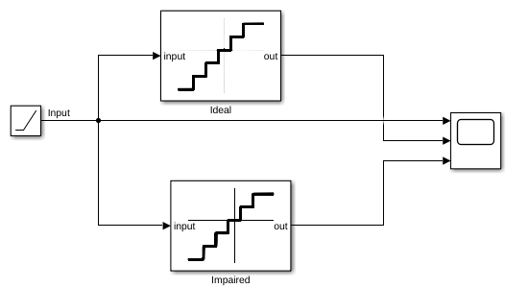
The model has two 4-bit Quantizer blocks connected to the same input signal. The quantizer blocks are identical in every way, but one is label Ideal and the other is labeled Impaired. Initially, none of them have any impairments.
Effect of offset error
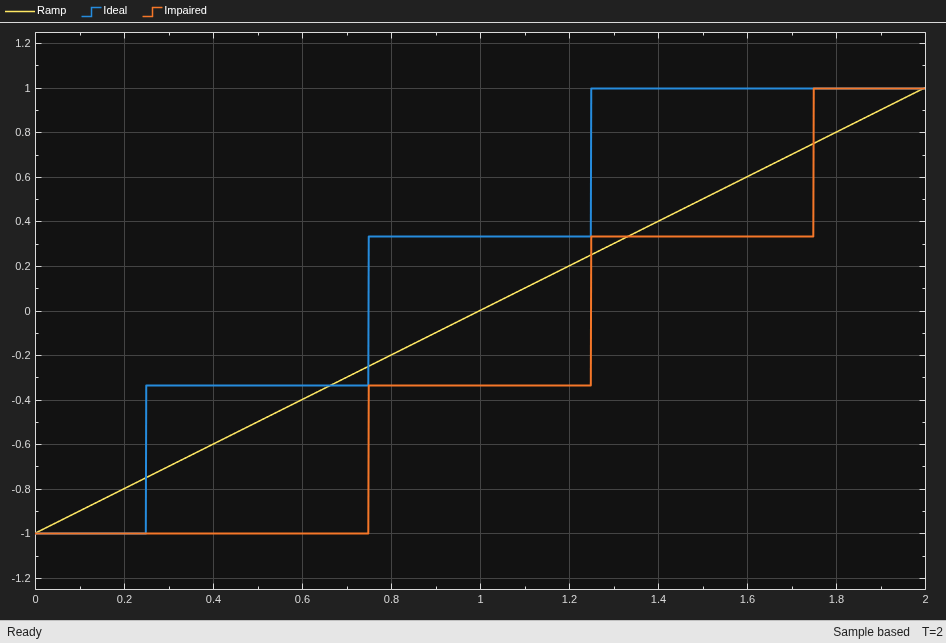
To observe the effect of offset error only, select Enable offset error option in the quantizer block labeled Impaired and set offset error value to 1 LSB.
set_param([model '/Impaired'],'EnableOffsetError','on', ... 'OffsetError','1')
Run the simulation. Observe how the output shifts because of the offset error.
sim(model);
Effect of Gain Error
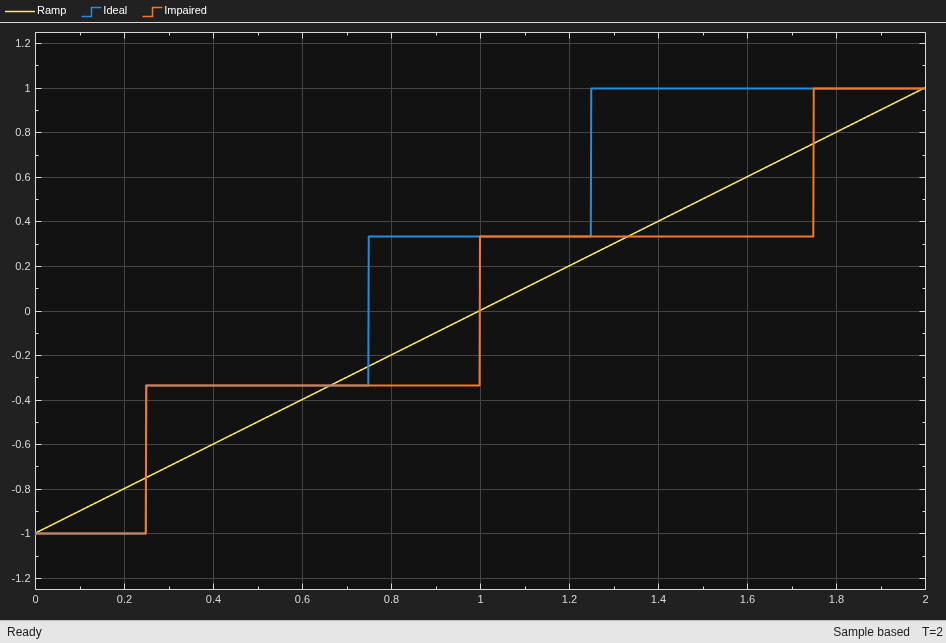
To observe the effect of gain error only, deselect the Enable Offset Error option in the impaired model. Select Enable gain error option and set gain error value to 1 LSB.
set_param([model '/Impaired'],'EnableOffsetError','off', ... 'EnableGainError','on','GainError','1');
Rerun the model. Observe how the output shifts due to gain error.
sim(model);
Ports
Input
Analog input signal, specified as a scalar.
Data Types: double
Output
Digital output signal, returned as a scalar.
Data Types: double
Parameters
To edit block parameters interactively, use the Property Inspector. From the Simulink® Toolstrip, on the Simulation tab, in the Prepare gallery, select Property Inspector.
Determine how to define the input/output characteristics:
Multibit— Define the input/output characteristics as a function of the number of bits.Level-Based— Define the input/output characteristics as a function of the number of levels.
Programmatic Use
Block parameter:
TypeOfQuantizer |
| Type: character vector |
Values:
Multibit |
Level-Based |
Default:
Multibit |
Number of bits, specified as a positive integer scalar.
Dependencies
To enable this parameter, set Type of quantizer to
Multibit.
Programmatic Use
Block parameter:
Nbits |
| Type: character vector |
| Values: positive integer scalar |
Default:
2 |
Number of levels, specified as a positive even integer scalar.
Dependencies
To enable this parameter, set Type of quantizer to
Level-Based.
Programmatic Use
Block parameter:
Nlevels |
| Type: character vector |
| Values: positive integer scalar |
Default:
4 |
Period of the clock signal which is used to sample the input signal, specified as a positive real scalar.
Programmatic Use
Block parameter:
ts |
| Type: character vector |
| Values: positive real scalar |
Default:
1e-3 |
Configuration
Largest possible value that the quantizer can produce given its full-scale range, specified as a real scalar.
Programmatic Use
Block parameter:
Vhigh |
| Type: character vector |
| Values: real scalar |
Default:
2 |
Smallest possible value that the quantizer can produce given its full-scale range, specified as a real scalar.
Programmatic Use
Block parameter:
Vlow |
| Type: character vector |
| Values: real scalar |
Default:
-2 |
Range of input signal values that quantizer can process, specified as a real scalar.
Programmatic Use
Block parameter:
Xfs |
| Type: character vector |
| Values: real scalar |
Default:
2 |
Impairments
Select this parameter to enable gain error calculations while modeling the quantizer.
Programmatic Use
Block parameter:
EnableGainError |
| Type: character vector |
Values:
off | on |
Default:
off |
Error in the slope of the quantizer transfer curve, specified as a real scalar in LSB (least significant bit), FS (full-scale), or %FS (percentage full scale).
Dependencies
To enable this parameter, select the Enable gain error parameter.
Programmatic Use
Block parameter:
GainError |
| Type: character vector |
| Values: real scalar |
Default:
0 |
Select this parameter to enable offset error calculations while modeling the quantizer.
Programmatic Use
Block parameter:
EnableOffsetError |
| Type: character vector |
Values:
off | on |
Default:
off |
Amount by which to shift quantization steps, specified as a real scalar in LSB (least significant bit), FS (full-scale), or %FS (percentage full scale).
Dependencies
To enable this parameter, select the Enable offset error parameter.
Programmatic Use
Block parameter:
OffsetError |
| Type: character vector |
| Values: real scalar |
Default:
0 |
Select this parameter to enable INL calculations while modeling the quantizer.
Programmatic Use
Block parameter:
EnableINL |
| Type: character vector |
Values:
off | on |
Default:
off |
Maximum deviation of the measured transfer function from a straight line, specified as a real scalar in LSB (least significant bit), FS (full-scale), or %FS (percentage full scale).
Dependencies
To enable this parameter, select the Enable INL parameter.
Programmatic Use
Block parameter:
INL |
| Type: character vector |
| Values: real scalar |
Default:
0 |
Version History
Introduced in R2026a
MATLAB Command
You clicked a link that corresponds to this MATLAB command:
Run the command by entering it in the MATLAB Command Window. Web browsers do not support MATLAB commands.
选择网站
选择网站以获取翻译的可用内容,以及查看当地活动和优惠。根据您的位置,我们建议您选择:。
您也可以从以下列表中选择网站:
如何获得最佳网站性能
选择中国网站(中文或英文)以获得最佳网站性能。其他 MathWorks 国家/地区网站并未针对您所在位置的访问进行优化。
美洲
- América Latina (Español)
- Canada (English)
- United States (English)
欧洲
- Belgium (English)
- Denmark (English)
- Deutschland (Deutsch)
- España (Español)
- Finland (English)
- France (Français)
- Ireland (English)
- Italia (Italiano)
- Luxembourg (English)
- Netherlands (English)
- Norway (English)
- Österreich (Deutsch)
- Portugal (English)
- Sweden (English)
- Switzerland
- United Kingdom (English)