Reduce Number of Local Variables in Generated Code for Rockwell Automation IDEs
R2026bThis example shows how to customize the number of local variables to pack into struct data types in the generated Structured Text code for the Rockwell Automation Studio 5000 IDE. If you generate Structured Text code and the number of input, output, and local variables and parameters exceeds 512, by default, Simulink PLC Coder™ reduces the number of temporary variables by packing them into structures in the generated Structured Text code. You can modify the number of local variables in the generated code by setting custom values for the variable limit, the structure field limit, and the indexing that the code generator uses to name the fields.
Open the Model
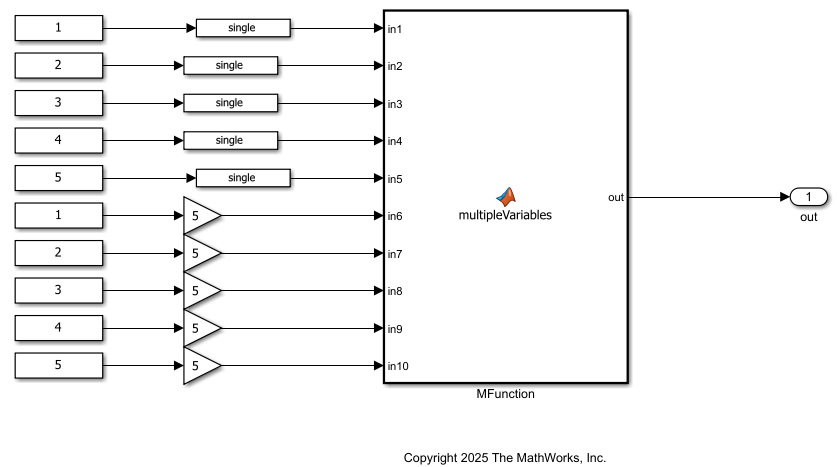
The customizeVariableLimits model contains a MATLAB Function block that accepts ten inputs and produces a single output.
Generate Code with Default Limits
First, generate Structured Text code for the model by using the default settings for the variable limits. Remove the plc_custom_fcnvar_limit.m file from the MATLAB path. To generate code, select the MATLAB Function block in the top-level model. In the PLC Code tab, click Settings > PLC Code Generation Settings. Change Target IDE to Rockwell Studio 5000: AOI. Click OK and click Generate PLC Code.
Alternatively, generate code programmatically by using the plcgeneratecode function.
plcgeneratecode("customizeVariableLimit/MFunction")
View the generated code by using the coder.example.extractLines function. Replace customizeVariableLimit_default.st with the name of your generated code file.
coder.example.extractLines("customizeVariableLimit_default.st","v1: REAL;","v30: REAL",1,1);
    v1: REAL;
    v2: REAL;
    v3: REAL;
    v4: REAL;
    v5: REAL;
    v6: REAL;
    v7: REAL;
    v8: REAL;
    v9: REAL;
    v10: REAL;
    v11: REAL;
    v12: REAL;
    v13: REAL;
    v14: REAL;
    v15: REAL;
    v16: REAL;
    v17: REAL;
    v18: REAL;
    v19: REAL;
    v20: REAL;
    v21: REAL;
    v22: REAL;
    v23: REAL;
    v24: REAL;
    v25: REAL;
    v26: REAL;
    v27: REAL;
    v28: REAL;
    v29: REAL;
    v30: REAL;
This example output shows the first 30 local variables. The generated code has 510 temporary variables. Because this number is below the default limit of 512 variables Simulink PLC Coder™ does not pack the variables into structures.
Generate Code with Custom Limits
Add the plc_custom_fcnvar_limit.m file on the MATLAB path. View the contents of the file.
type plc_custom_fcnvar_limit.mfunction [fcnVarLimit, structFieldLimit, structTypeBaseIdx] = plc_custom_fcnvar_limit % % Copyright 2025 The MathWorks, Inc. fcnVarLimit = 100; % target allowed add-on instruction (AOI) var limit, default is 510 structFieldLimit = 50; % target allowed struct field limit, default is 500 structTypeBaseIdx = 1; % 1-based index of generated struct type, can be customized to avoid generated struct type name conflict % eg: if codegen for subsystem #1 has generated struct type with idx 1 to 10, % for subsystem #2, set structTypeBaseIdx to 11, etc end
This function takes three input arguments:
fcnVarLimit— Number of temporary variables inside add-on instructions (AOIs). The default value is 510.structFieldLimit— Number of allowed fields in astructdata type. The default value is 500.structTypeBaseIdx— One-based indexing to add to the structure name in the generated code. Use this property to avoid naming conflicts. For example, if you set this property to 5 the first structure name ends with_5, the second structure name ends with_6, and so on.
In this example, fcnVarLimit is 100, structFieldLimit is 50, and structTypeBaseIdx is 1.
To generate code, select the MATLAB Function block in the top-level model, then click Generate PLC Code.
Alternatively, generate code programmatically by using the plcgeneratecode function.
plcgeneratecode("customizeVariableLimit/MFunction")
View the generated code by using the coder.example.extractLines function. Replace customizeVariableLimit_custom.st with the name of your generated code file.
coder.example.extractLines("customizeVariableLimit_custom.st","v50: REAL;","END_VAR",1,1)
    v50: REAL;
    v51: REAL;
    v52: REAL;
    v53: REAL;
    v54: REAL;
    v55: REAL;
    v56: REAL;
    v57: REAL;
    v58: REAL;
    v59: REAL;
    v60: REAL;
    v_PLCSTRUCT_1: PLCSTRUCT_1;
    v_PLCSTRUCT_2: PLCSTRUCT_2;
    v_PLCSTRUCT_3: PLCSTRUCT_3;
    v_PLCSTRUCT_4: PLCSTRUCT_4;
    v_PLCSTRUCT_5: PLCSTRUCT_5;
    v_PLCSTRUCT_6: PLCSTRUCT_6;
    v_PLCSTRUCT_7: PLCSTRUCT_7;
    v_PLCSTRUCT_8: PLCSTRUCT_8;
    v_PLCSTRUCT_9: PLCSTRUCT_9;
END_VAR
The generated code stores the first 60 variables as temporary variables and packs the remaining variables into structures.
See Also
plcgeneratecode | Allow nesting of UDTs if
fields are more than allowed threshold

