主要内容

BiasAnomaly

Synthetic bias anomaly model for validating anomaly detection models

Since R2026a

Description

Add-On Required: This feature requires the Time Series Anomaly Detection for MATLAB add-on.

The BiasAnomaly object specifies the characteristics of a constant or proportional bias anomaly model that you can inject into a time series using injectAnomaly. Name-value argument specifications in injectAnomaly determine the window location and length during which the anomaly occurs.

You create this model using syntheticAnomaly. BiasAnomaly is one type of anomaly model in a set of anomaly objects that you can use to perturb a time series in multiple ways. You can then use this perturbed time series to help validate anomaly detection models against different anomaly types.
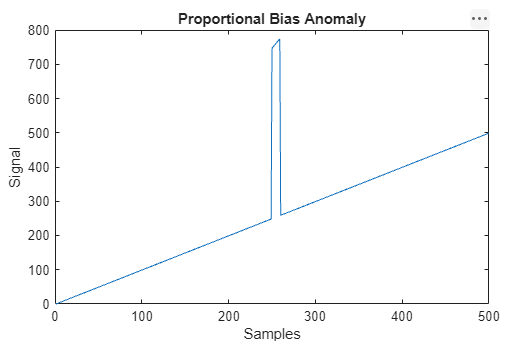
Plot of a bias anomaly within a ramping signal. The anomaly begins at 250 and produces an offset with the same slope as the ramp. center.

Properties

expand all

Bias type, represented as "Constant" or "Proportional".

  • When Type is set to "Constant", injectAnomaly adds a constant offset over the entire window length that you specify to injectAnomaly, as shown in the following equation.

    y^(n)=y(n)+β

    Here,

    • y(n) is the original time series.

    • β(n) is the constant bias value.

    • ŷ(n) is the resulting anomalous time series.

  • When Type is set to "Proportional", injectAnomaly incorporates an offset to the entire window length in a manner that results in a bias that is proportional to the original time series value, as shown in the following equation.

    y^(n)=y(n)(1+β)

Offset value β for each sample, represented as a numeric scalar.

Object Functions

injectAnomaly Inject anomalies defined by one or more anomaly models into a univariate time series

Version History

Introduced in R2026a