TCP/IP Receive
R2026bReceive data over TCP/IP network from remote host
TCP/IP Receive block
To add a block to a model, double-click the canvas and start typing the block name. Then, select the block from the list.
Libraries:
Simulink Coder Support Package for BeagleBone Blue Hardware /
Communication
Simulink Support Package for Android Devices /
Communication
Simulink Support Package for LEGO MINDSTORMS EV3 Hardware
Raspberry Pi Blockset /
Network
Description
Receive data from a remote host/another target hardware over a network. When you set the connection mode as server, you must provide the local port. The local port acts as the listening port of the TCP/IP server. When you set the block as a client, you must provide the remote address and the remote port of the TCP/IP server to receive data. The block accepts data either in blocking mode or in non-blocking mode. The Data port output contains the requested data at each time step. The Status port contains 0 or 1 to indicate whether the new data at the specified time step is received. The Status port value 1 indicates that the data from Data port is valid.
In the blocking mode, the model blocks the execution while it waits for the requested data to become available.
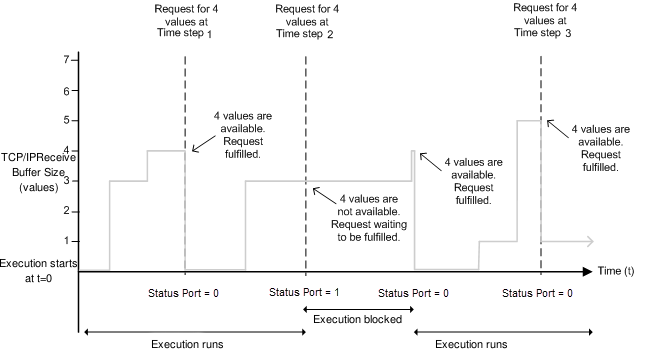
At time step 1, the block requests four data, and the buffer gets four data values. The block returns the four received data values at the Data port, and the execution continues.
At time step 2, the block requests data again, but the buffer gets only three values.
Because the requested data size is 4, the block waits until the buffer
receives the fourth data value or the timeout value elapses. During this phase, the
execution pauses.
At time step 3, the buffer contains sufficient data to satisfy the request. The block returns the first four data values in the order received, and the execution resumes. Any remaining data values are used in the next receipt cycle.
In non-blocking mode, the model runs continuously.
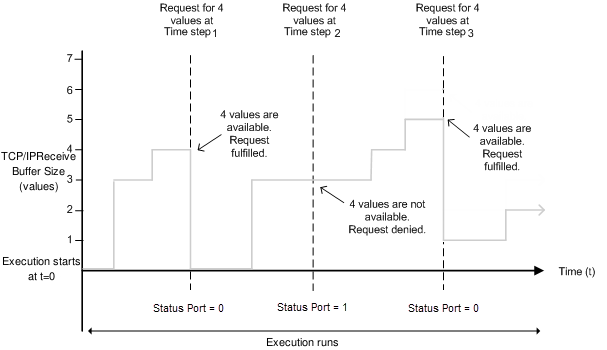
At time step 1, the block requests data, and the buffer gets four data values. The block
sets the Status port value to 1, indicating that the
requested data is available. The Data port, at this point, contains the newly
received data values.
At time step 2, the block requests data again, but the buffer gets only three values. The
block cannot return the data because the data size is specified as 4.
Therefore, the block sets the Status port value to 0,
indicating that the requested data is not available. All values on the Data
port become 0. The buffer, at this point, has three data values.
However, during this phase, the execution does not stop unlike in the blocking
mode.
At time step 3, the buffer has five data values, and the block returns the first four
data values in the order received and sets the Status port value to
1. The remaining data value is used in the next receipt
cycle.
Ports
Output
Parameters
Version History
Introduced in R2017a

