创建带有多级可折叠行的 HTML 表
R2026b本示例演示了如何创建带有可折叠行或多级可折叠行的 HTML 表。您可以使用可折叠父行来隐藏或显示与每行父行关联的子级行中的内容。子行也可以作为父行,并拥有自己的关联子级,从而允许您创建多级可折叠的表区域。
创建带可折叠行的表
导入 mlreportgen.report 和 mlreportgen.dom 命名空间,这样就无需为对象构造函数和方法包含完全限定名称。
import mlreportgen.report.*
import mlreportgen.dom.*
创建一个 HTML 文档。
rpt = Report("myCollapsibleTables","html");
open(rpt);
为包含可折叠行的表创建一个章节。
chap1 = Chapter("Table with collapsible rows");将表数据指定为字符串的元胞数组。数组中的每个字符串都包含表中一行对应的文本。
collapsibleTableData = { ...
    "Parent Row: Click to expand next 2 rows"; ...
    "  Collapsible Content for Parent Row"; ...
    "  More Collapsible Content for Parent Row"; ...
    "Static Row" ...
    };
创建表并设置基本样式。若要保留行首的空格,请在第二行和第三行中使用 WhiteSpace("preserve")。
tbl = Table(collapsibleTableData);
tbl.Border = "solid";
tbl.RowSep = "solid";
tbl.ColSep = "solid";
tbl.Style = [tbl.Style {WhiteSpace("preserve")}];
将表的第一行设置为可折叠状态,这样点击该行即可折叠其下方的两行。Collapsible 对象指定的值用于确定哪些行将成为父行的子级行。在此情况下,第一行是父行,第二行和第三行是子级行。
row1 = tbl.row(1);
row1.Style = [row1.Style {Collapsible(2)}];
将表附加到章节,将章节附加到报告。
append(chap1,tbl);
append(rpt,chap1);
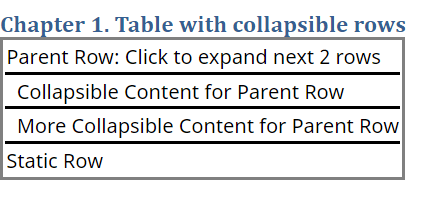
该图显示了表已完全展开,且子级行处于折叠状态。要展开子级行,请再次点击父行。
|
所有行均展开的表 |
第二行折叠的表 |
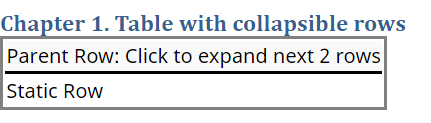
创建包含多级可折叠行的表
为包含两级可折叠行的表创建另一个章节。
chap2 = Chapter("Table with nested collapsible rows");请指定一个包含七行数据的表的数据。
collapsiblenestedTableData = { ...
    "Parent Row: Click to expand next 3 rows"; ...
    "  Collapsible Content for Parent Row"; ...
    "  More Collapsible Content for Parent Row"; ...
    "  Sub-Parent Row: : Click to expand next 2 rows"
    "     Nested Collapsible Content for Sub-Parent Row"; ...
    "     Nested More Collapsible Content for Sub-Parent Row"; ...
    "Static Row" ...
    };
创建表。
tbl2 = Table(collapsiblenestedTableData);
tbl2.Border = "solid";
tbl2.RowSep = "solid";
tbl2.ColSep = "solid";
tbl2.Style = [tbl2.Style {WhiteSpace("preserve")}];
将第四行设置为可折叠状态,这样点击该行即可折叠其下方的两行。
row4 = tbl2.row(4);
row4.Style = [row4.Style {Collapsible(2)}];
将表的第一行设置为可折叠,这样点击该行即可折叠其下方的五行,包括随第四行一起折叠的两行。
row1 = tbl2.row(1);
row1.Style = [row1.Style {Collapsible(5)}];
将表附加到章节,将章节附加到报告。
append(chap2,tbl2);
append(rpt,chap2);
关闭并查看报告。
close(rpt);
rptview(rpt);
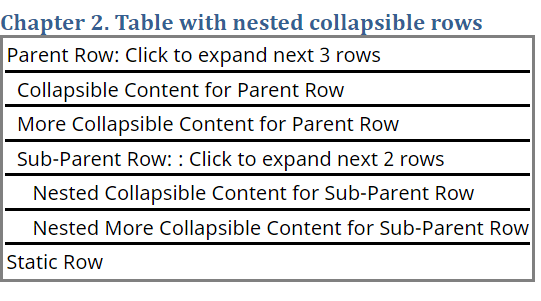
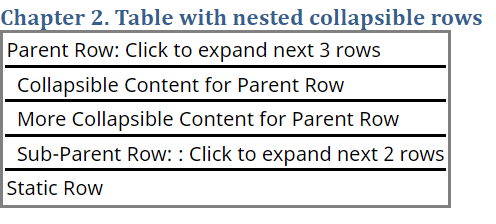
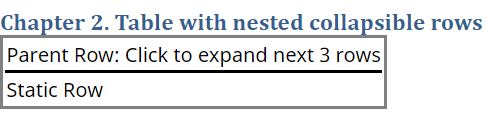
要展开或折叠一组可折叠行,请点击其父行。当您将鼠标悬停在折叠的行上时,该行会显示浅灰色高亮效果。折叠顶级父行将隐藏所有子级行。如果这些子级行中任何一行同时也是父行,则其子级行也将被隐藏。当父行展开时,该父行下的所有子行也会随之展开。
该图显示了第二章节中的表已完全展开,其中第四行和第二行均处于折叠状态。
|
所有行均展开的表 |
第四行折叠的表 |
第二行和第四行折叠的表 |