Three-Axle Vehicle Body
R2026bThree-Axle Vehicle Body block
To add a block to a model, double-click the canvas and start typing the block name. Then, select the block from the list.
Libraries:
Simscape /
Driveline /
Tires & Vehicles
Description
The Three-Axle Vehicle Body block represents a three-axle vehicle in longitudinal motion. You can specify the number of wheels for each axle. The block accounts for body mass, aerodynamic drag, road incline, pitch and heave, and weight distribution between axles due to acceleration and road profile. The vehicle mass and center of gravity remain constant.
Vehicle Model
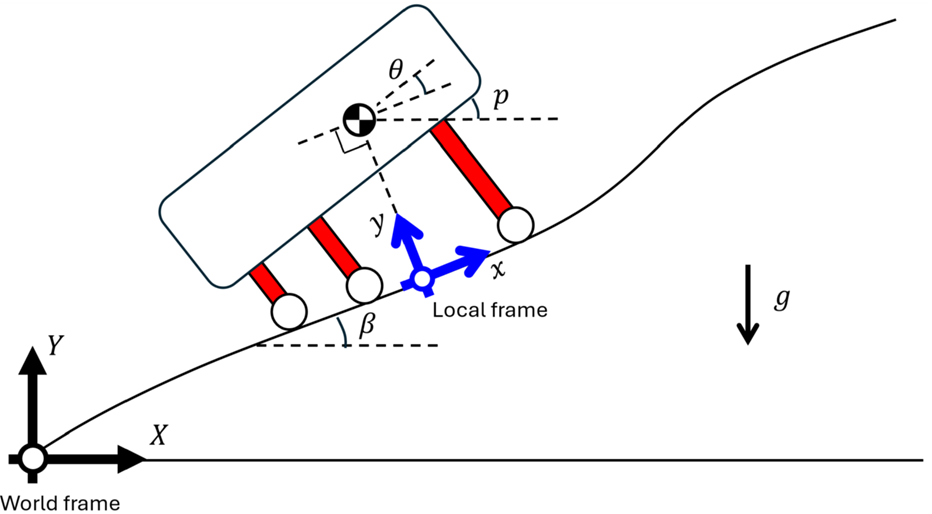
The vehicle axles are parallel and form a plane. The local frame moves with the center of gravity. The x-axis is tangential to the road surface in the direction of forward motion, while the y-axis points to the center of gravity.
If the vehicle travels on an inclined road, the normal direction, y, is not parallel to gravity but is always perpendicular to the axle-longitudinal plane. θ is the relative pitch angle between the road inclination angle, β, and the angle of the vehicle. p = θ+β, where p is the pitch angle, measured against the X-axis of the world frame.
Equations
The block balances force in the x and y-directions, such that
where:
m is the mass of the vehicle.
xCG and yCG are the positions of the center of gravity along the x-axis and y-axis, respectively.
Froad is the force of the road acting on the vehicle in the x-direction.
Fdrag is the force due to drag acting on the vehicle in the x-direction.
g is the gravitational acceleration.
v is the vehicle velocity tangential to the road surface.
Ff, Fm, and Fr are the forces applied to the front, middle, and rear suspension in the y-direction, respectively.
The block defines the horizontal locations of the center of gravity (CG), middle axis, and rear axle with respect to the location of the front axle. The figure shows the vehicle body with and without suspension deformation.
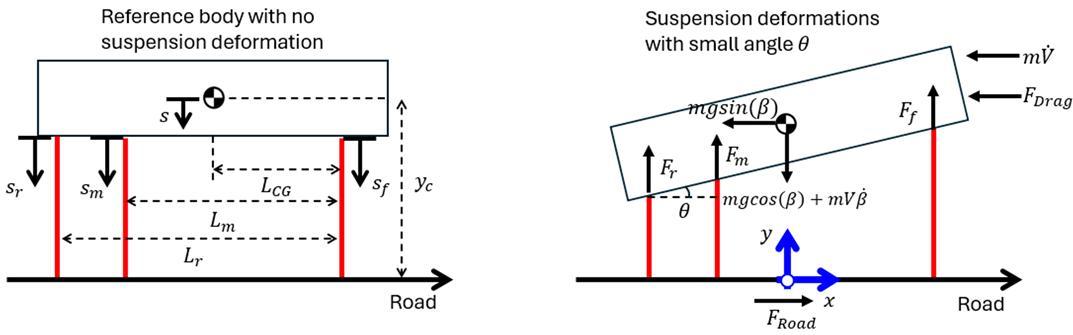
The block balances torque about the CG, such that
where:
I is the pitch moment of inertia of the vehicle.
LCG is the distance from the front axle to the CG along the x-axis.
Lm is the distance from the front axle to the middle axle along the x-axis.
Lr is the distance from the front axle to the rear axle along the x-axis.
yc is the height of the CG with no deformation.
s is the change in position of the CG due to suspension deformation, such that s = yc-yCG.
The block defines the forces at the front, middle, and rear suspensions, such that
where:
Ff,suspension, Fm,suspension, Fr,suspension are the forces transmitted by the front, middle, and rear suspension, respectively.
Ff,hardstop, Fm,hardstop, and Fr,hardstop are the forces applied by the hard stops at the front, middle, and rear suspensions, respectively.
The figure illustrates the geometric relationships.
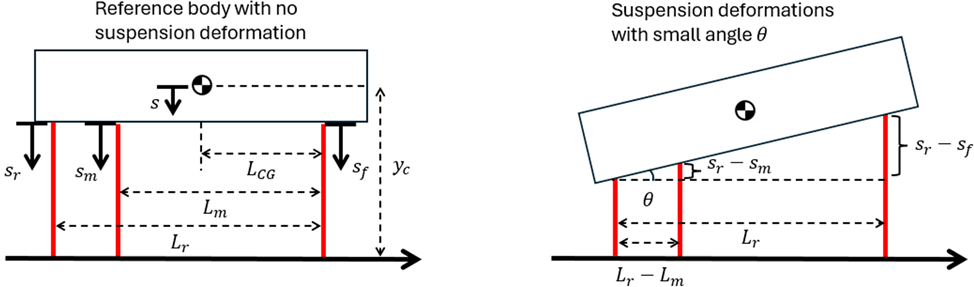
The block leverages the small angle and rigid body assumptions to simplify calculations, such that
The block calculates the height change of the CG due to deformation, such that
When you select the Enable hard stops
parameter, the block uses a subcomponent implementation of the
Translational Hard Stop block, where the setting
of the Hard stop model parameter is Stiffness
and damping applied smoothly through transition region, damped
rebound.
Ports
Input
Output
Conserving
Parameters
Extended Capabilities
Version History
Introduced in R2026a

