Simulate Hierarchical PBPK Model Using SimBiology Model Analyzer
R2026bThis example shows how to use SimBiology Model Analyzer to simulate a hierarchical PBPK model that contains organ submodels. You simulate individual submodels in isolation and simulate the full model. The model uses illustrative parameter values adapted from [1] and is not meant to reflect exact physiology. To learn how to build a hierarchical model, see Build PBPK Model from Organ Submodels using SimBiology Model Builder.
Enter the following command to open the app with a prebuilt PBPK model.
openExample('simbio/AnalyzeHierarchicalPBPKModelExample');
The Browser pane shows the PBPK model under Models.

The PBPK model consists of three submodels (Brain, Heart, and Lung). To see the full model hierarchy, add a program that uses the model.
On the Home tab, select Program > Simulate Model. The app adds Program1.
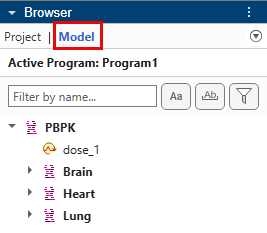
In the Browser pane, click the Model tab to see the full model hierarchy. You can expand each submodel to see its corresponding model components.
Simulate Submodel in Isolation
By default, the simulation program is set to simulate the top-level model of a model hierarchy.
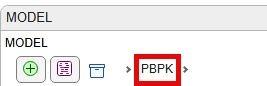
Go to the Program1 tab and check the Model step, which shows the current model is PBPK.
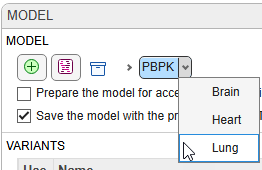
To simulate a submodel, such as Lung, click the model selector dropdown and select Lung.
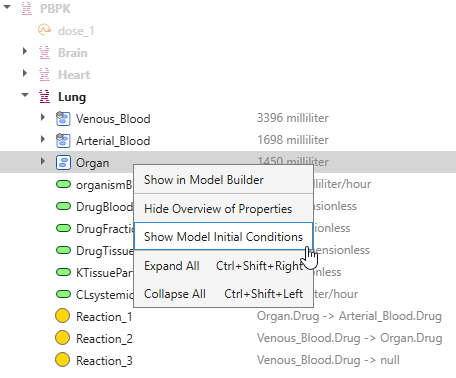
The Model tab in the Browser pane updates to show only model components that belong to the Lung submodel. By default, the Model tab shows additional information about each component (for example, the volume of the Venous_Blood compartment), you can access initial conditions and other options through the context menu.
In Program1, the Doses section shows an active dose targeting the Drug species in the Venous_Blood compartment of Lung: PBPK.Lung.Venous_Blood.Drug, which is the fully qualified name (FullyQualifiedName) of the Drug species. The name encodes the dot-separated path from the top-level model through each submodel to this species.
Click the States To Log section to see the list of logged states, which includes all three drug species in Lung.
Click Run on the Home tab to simulate the submodel.
After simulation, the Plot1 tab opens.
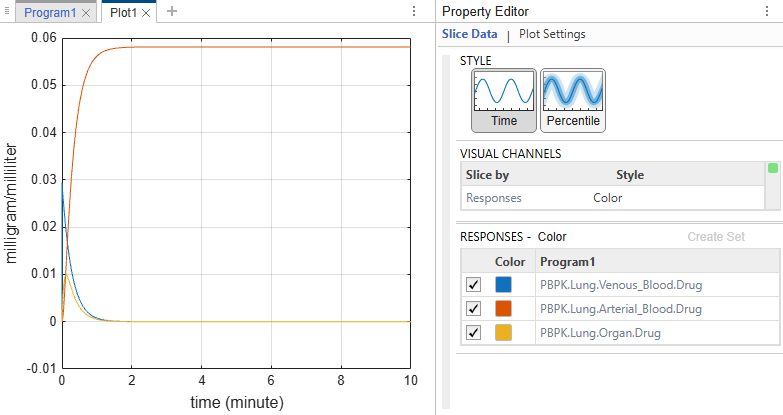
In the lung submodel, blood flows from the venous pool through the lung tissue into the arterial pool. The elimination reaction removes drug from the venous pool.
Venous_Blood.Drug starts at peak concentration and decays rapidly as the drug flows into the
Organcompartment and is eliminated. It reaches approximately zero within a few minutes.Organ.Drug spikes briefly and then decays to zero as the drug exits into
Arterial_Blood.Arterial_Blood.Drug rises steadily and plateaus. In isolation, there is no pathway out of the arterial pool — drug that enters
Arterial_Bloodcannot return toVenous_Bloodfor elimination. This behavior is expected when simulating the lung submodel alone. In the full model, theBrainandHeartsubmodels provide the return path from arterial blood back to venous blood.
Simulate Full Model
Go back to Program1. In the Model step, click PBPK to set it as the current model.

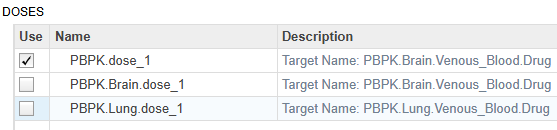
The Doses section now shows three active doses targeting the same drug species. Two doses belong to different submodels. When simulating the top-level model, doses from any submodel can be applied. If all three doses are selected, so they will all be applied when you run the program.
Apply just one dose: PBPK.dose_1.
Check Resolved Quantities
Click the States to Log section to see a list states.
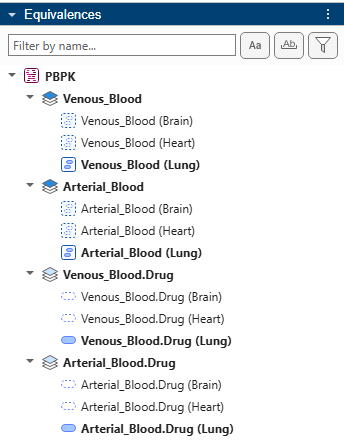
You can add more quantities to the table by start typing in the quantity name in a new row. However, only resolved quantities or standalone quantities that are not part of an equivalence set appear in the autopopulated list shown in the table. An equivalence set can contain multiple quantities, but the app uses one quantity as the representative quantity during simulation. This representative quantity is the resolved quantity. For details, see Model Hierarchy and Equivalence Sets.
In this PBPK model, quantities that are members of equivalence sets but are not resolved quantities such as PBPK.Brain.Venous_Blood.Drug,cannot be logged because the simulation uses the resolved quantity (PBPK.Lung.Venous_Blood.Drug) in their place.
To check the equivalence sets and the corresponding resolved quantities, expand the Equivalences pane below the Browser pane.
Run and View Results
Click Run. The program generates an updated plot.
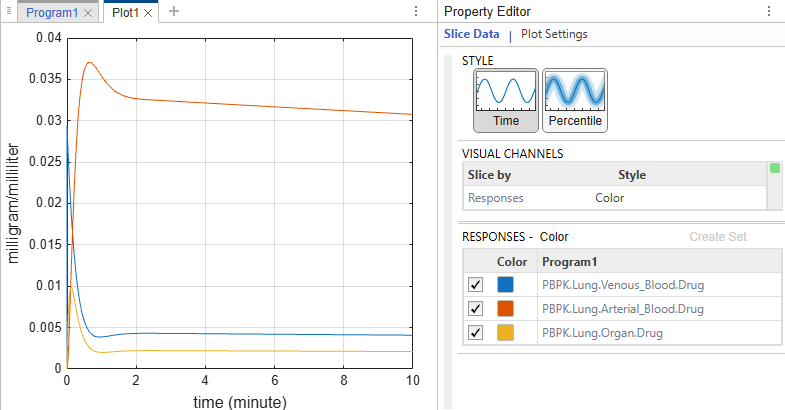
With the full hierarchy connected, the drug recirculates through a complete loop through the brain and heart organs.
Venous_Blood.Drug decays from its initial peak. The drug returns to the venous pool from Brain and Heart, sustaining the concentration. The elimination reaction gradually clears the drug.
Lung.Organ.Drug spikes briefly and then decays as the drug exits to the arterial pool.
Arterial_Blood.Drug rises, peaks, then slowly decays. Unlike in the Lung-only simulation where it plateaued indefinitely, the arterial pool now drains through the brain and heart organs back toward the venous pool. The key difference from the isolated lung simulation is that the brain and heart submodels complete the recirculation loop, allowing the drug to eventually reach Venous_Blood for elimination.
References
[1] Sven Mesecke (2026). Physiologically-based Pharmacokinetic (PBPK) model for SimBiology (https://www.mathworks.com/matlabcentral/fileexchange/37132-physiologically-based-pharmacokinetic-pbpk-model-for-simbiology), MATLAB Central File Exchange. Retrieved August 14, 2026.

