Sequence Viewer
R2026bDisplay messages, events, states, transitions, and functions between blocks during simulation
Sequence Viewer block

To add a block to a model, double-click the canvas and start typing the block name. Then, select the block from the list.
Libraries:
Simulink /
Messages & Events
SimEvents
Simulink Test
Stateflow
Description
The Sequence Viewer block displays messages, events, states, transitions, and functions between certain blocks during simulation. The blocks that you can display are called lifeline blocks and include:
Subsystems
Referenced models
Blocks that contain messages, such as Stateflow® charts
Blocks that call functions or generate events, such as Function Caller, Function-Call Generator, and MATLAB Function blocks
Blocks that contain functions, such as Function-Call Subsystem and Simulink Function blocks
To see states, transitions, and events for lifeline blocks in a referenced model, you must have a Sequence Viewer block in the referenced model. Without a Sequence Viewer block in the referenced model, you can see only messages and functions for lifeline blocks in the referenced model.
Note
The Sequence Viewer block does not display function calls generated by MATLAB Function blocks and S-functions.
Examples
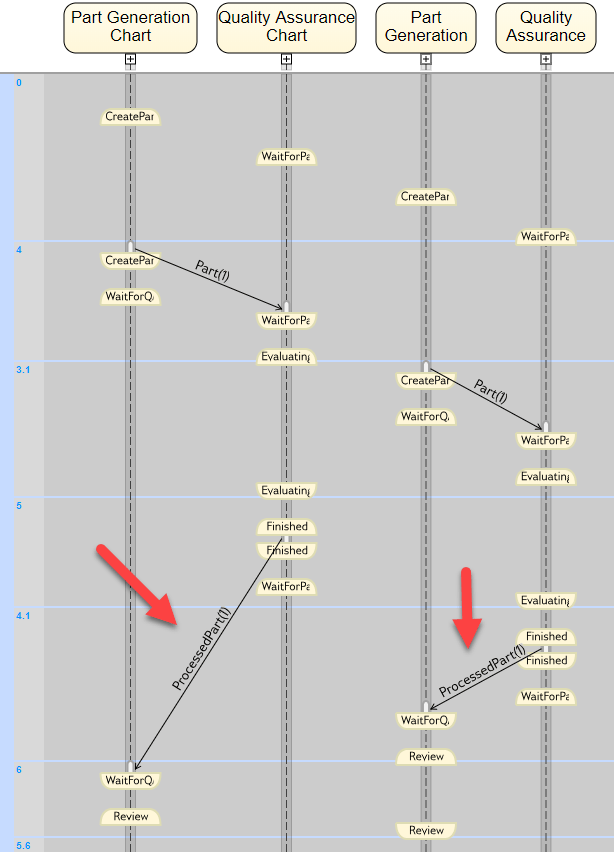
Trigger a Discrete-Event Chart Block on Message Arrival
Trigger a Discrete-Event Chart Block on the message arrival when generating parts in a facility and performing quality assurance. In the example, behaviors of a Discrete-Event Chart and Stateflow® Chart blocks are compared. Both blocks require a Stateflow® license. The example shows that, a Discrete-Event Chart block executes immediately upon the arrival of a message and does not wait for the next sample time hit.
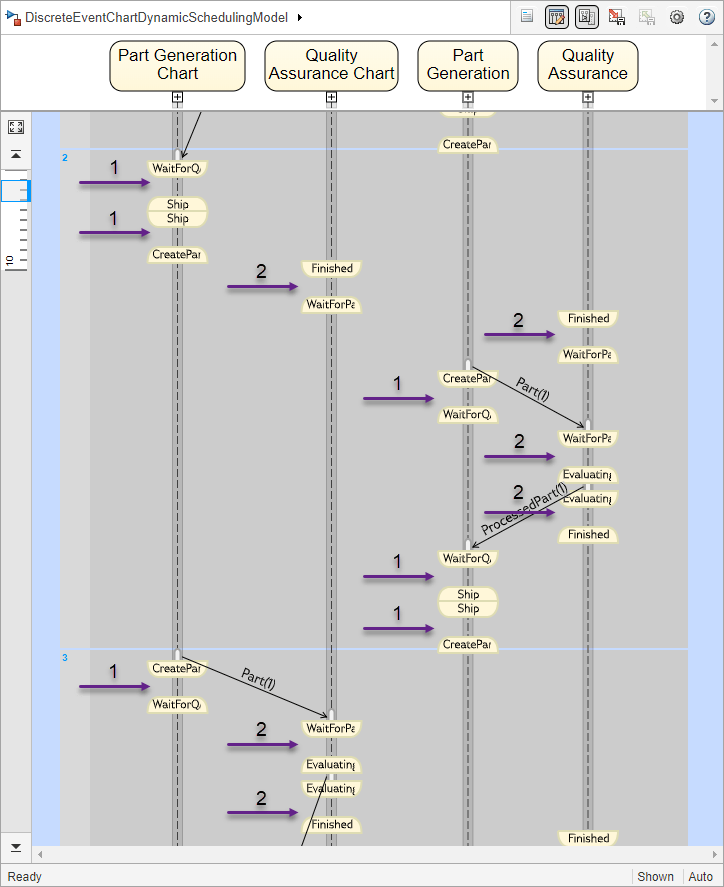
Dynamic Scheduling of Discrete-Event Chart Block
Use the dynamic scheduling that the Discrete-Event Chart block provides. A Discrete Event Chart block can execute zero or multiple times in a time step. The example compares the behaviors of the Discrete-Event Chart and Stateflow® Chart blocks. Both blocks require a Stateflow® license.
Parameters
Block Characteristics
Data Types |
|
Direct Feedthrough |
|
Multidimensional Signals |
|
Variable-Size Signals |
|
Zero-Crossing Detection |
|
Programmatic Use: Add Block
To add the block programmatically, use the add_block function with one of these library block paths as the source.
"simulink/Messages & Events/Sequence Viewer"
"sldelib/Sequence Viewer"
"sltestlib/Sequence Viewer"
"sflib/Sequence Viewer"
Example: add_block("simulink/Messages & Events/Sequence Viewer","myModel/myBlock",MakeNameUnique="on")
Extended Capabilities
Version History
Introduced in R2015b

