Flow Rate Sensor (MA)
R2026bFlow Rate Sensor (MA) block

To add a block to a model, double-click the canvas and start typing the block name. Then, select the block from the list.
Libraries:
Simscape /
Foundation Library /
Moist Air /
Sensors
Description
The Flow Rate Sensor (MA) block represents an ideal sensor that measures mass flow rate, energy flow rate, and volumetric flow rate in a moist air network. There is no change in pressure, temperature, specific humidity, or trace gas mass fraction across the sensor.
Because the flow rates are Through variables, the block must connect in series with the component being measured.
The relative orientation of ports A and B establishes the measurement sign. The sign is positive if flow occurs from port A to port B. Switching port connections reverses the measurement sign.
Five physical signal ports are available to output the measurement data:
Port M outputs the mass flow rate.
Port V outputs the volumetric flow rate.
Port φ outputs the energy flow rate.
Port Mw outputs the water vapor mass flow rate.
Port Mg outputs the trace gas mass flow rate.
Port Md outputs the water droplets mass flow rate.
These ports have conditional port visibility on the block icon. Use the block parameters to expose only the ports that you need for measurements in a particular model.
Connect the measurement ports to PS-Simulink Converter blocks to transform the output physical signals into Simulink® signals, for example, for plotting or additional data processing.
Examples
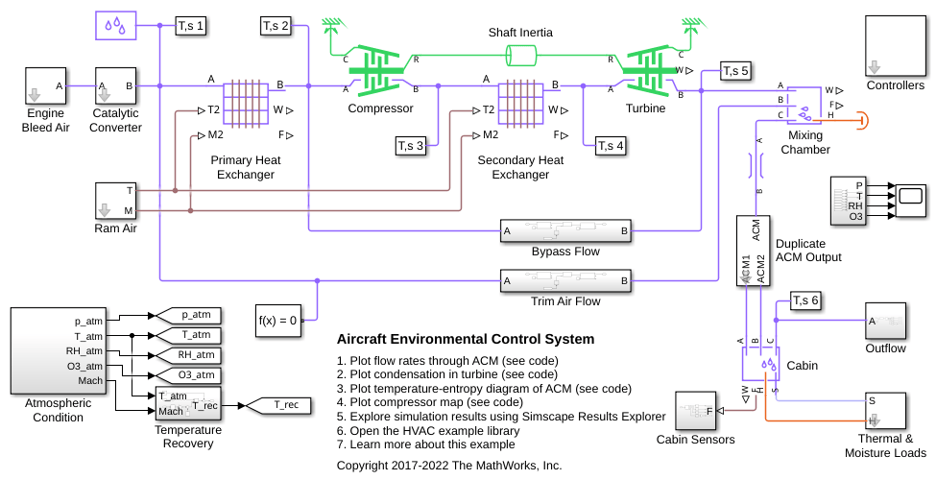
Aircraft Environmental Control System
Models an aircraft environmental control system (ECS) that regulates pressure, temperature, humidity, and ozone (O3) to maintain a comfortable and safe cabin environment. Cooling and dehumidification are provided by the air cycle machine (ACM), which operates as an inverse Brayton cycle to remove heat from pressurized hot engine bleed air. Some hot bleed air is mixed directly with the output of the ACM to adjust the temperature. Pressurization is maintained by the outflow valve in the cabin. This model simulates the ECS operating from a hot ground condition to a cold cruise condition and back to a cold ground condition.
Ports
Output
Physical signal output port for the mixture mass flow rate measurement.
Dependencies
To enable this port, select the Mass flow rate check box.
Programmatic Use
Port:
M
Physical signal output port for the mixture volumetric flow rate measurement.
Dependencies
To enable this port, select the Volumetric flow rate check box.
Programmatic Use
Port:
V
Physical signal output port for the mixture energy flow rate measurement.
Programmatic Use
Port:
PHI
Physical signal output port for the water vapor mass flow rate measurement.
Dependencies
To enable this port, select the Water vapor mass flow rate check box.
Programmatic Use
Port:
Mw
Physical signal output port for the trace gas mass flow rate measurement.
Dependencies
To enable this port, select the Trace gas mass flow rate check box.
Programmatic Use
Port:
Mg
Physical signal output port for the water droplets mass flow rate, in kg/s.
Dependencies
To enable this port, select the Water droplets mass flow rate check box.
Programmatic Use
Port:
Md
Conserving
Moist air conserving port. Flow rates are positive if air flows from port A to port B.
Programmatic Use
Port:
A
Moist air conserving port. Flow rates are positive if air flows from port A to port B.
Programmatic Use
Port:
B
Parameters
Selecting this check box exposes the output port M, which lets you measure mass flow rate.
Programmatic Use
| Parameter: | mass_flow_measure |
| Values: | "true" | "false" |
Selecting this check box exposes the output port V, which lets you measure volumetric flow rate.
Programmatic Use
| Parameter: | volumetric_flow_measure |
| Values: | "true" | "false" |
Select whether the sensor calculates volumetric flow rate at actual working conditions or at a standard pressure, temperature, and relative humidity:
Actual conditions— The sensor calculates the volumetric flow rate by using the moist air density at the actual working conditions of the system.Standard conditions— The sensor calculates the volumetric flow rate by using the moist air density at standard conditions. When you select this option, additional parameters become available to let you specify the standard pressure, temperature, humidity, and trace gas amount.
Dependencies
To enable this parameter, select the Volumetric flow rate check box.
Programmatic Use
| Parameter: | volumetric_flow_conditions |
| Values: | "foundation.enum.volumetric_flow_conditions.actual" | "foundation.enum.volumetric_flow_conditions.standard" |
Moist air pressure at standard conditions.
Dependencies
To enable this parameter, set Volumetric flow measurement
conditions to Standard conditions.
Programmatic Use
Parameter:
p_std
Moist air temperature at standard conditions.
Dependencies
To enable this parameter, set Volumetric flow measurement
conditions to Standard conditions.
Programmatic Use
Parameter:
T_std
Method to specify the initial moist air humidity.
Dependencies
To enable this parameter, set Volumetric flow measurement
conditions to Standard conditions.
Programmatic Use
| Parameter: | humidity_spec |
| Values: | "foundation.enum.HumiditySpec.RelativeHumidity" | "foundation.enum.HumiditySpec.SpecificHumidity" | "foundation.enum.HumiditySpec.MoleFraction" | "foundation.enum.HumiditySpec.HumidityRatio" | "foundation.enum.HumiditySpec.WetBulbTemperature" |
Moist air relative humidity at standard conditions.
Dependencies
To enable this parameter, set Standard humidity specification
to Relative humidity.
Programmatic Use
Parameter:
RH_std
Specific humidity in the moist air at standard conditions. The specific humidity is the mass fraction of water vapor to the combined total mass of water vapor, trace gas, and dry air.
Dependencies
To enable this parameter, set Standard humidity specification
to Specific humidity.
Programmatic Use
Parameter:
x_w_std
Mole fraction of the water vapor in the moist air channel at standard conditions. The water vapor mole fraction is relative to the combined molar quantity of water vapor, trace species, and dry air.
Dependencies
To enable this parameter, set Standard humidity specification
to Mole fraction.
Programmatic Use
Parameter:
y_w_std
Humidity ratio in the moist air channel at standard conditions. The humidity ratio is the ratio of the mass of water vapor to the mass of dry air and trace gas.
Dependencies
To enable this parameter, set Standard humidity specification
to Humidity ratio.
Programmatic Use
Parameter:
HR_std
Wet-bulb temperature at standard conditions. The block uses this value to calculate humidity.
Dependencies
To enable this parameter, set Standard humidity specification
to Wet-bulb temperature.
Programmatic Use
Parameter:
Tw_std
Measurement type of trace gas.
Dependencies
To enable this parameter, set Volumetric flow measurement
conditions to Standard conditions.
Programmatic Use
| Parameter: | trace_gas_spec |
| Values: | "foundation.enum.trace_gas_spec.mass_fraction" | "foundation.enum.trace_gas_spec.mole_fraction" |
Amount of trace gas in the moist air by mass fraction at standard conditions. The mass fraction is relative to the combined total mass of water vapor, trace gas, and dry air.
The block ignores this parameter if the Trace gas model
parameter in the Moist Air Properties (MA) block is
None.
Dependencies
To enable this parameter, set Standard trace gas
specification to Mass fraction.
Programmatic Use
Parameter:
x_g_std
Amount of trace gas in the moist air by mole fraction at standard conditions. The mole fraction is relative to the combined molar total of water vapor, trace gas, and dry air.
The block ignores this parameter if the Trace gas model
parameter in the Moist Air Properties (MA) block is
None.
Dependencies
To enable this parameter, set Standard trace gas
specification to Mole fraction.
Programmatic Use
Parameter:
y_g_std
Relative humidity above which condensation occurs.
Dependencies
To enable this parameter, set Volumetric flow measurement
conditions to Standard conditions.
Programmatic Use
Parameter:
RH_ws
Selecting this check box exposes the output port φ, which lets you measure energy flow rate.
Programmatic Use
| Parameter: | energy_flow_measure |
| Values: | "true" | "false" |
Selecting this check box exposes the output port Mw, which lets you measure water vapor mass flow rate.
Programmatic Use
| Parameter: | vapor_flow_measure |
| Values: | "true" | "false" |
Selecting this check box exposes the output port Mg, which lets you measure trace gas mass flow rate.
Programmatic Use
| Parameter: | gas_flow_measure |
| Values: | "true" | "false" |
Selecting this check box exposes the output port Md, which lets you measure the water droplets mass flow rate.
Programmatic Use
| Parameter: | droplets_flow_measure |
| Values: | "true" | "false" |
Extended Capabilities
C/C++ Code Generation
Generate C and C++ code using Simulink® Coder™.
Version History
Introduced in R2023aWhen calculating volumetric flow rate by using density at standard conditions, the block now provides a full range of humidity and trace gas parameterization options. Previously, the block allowed you to specify relative humidity only and assumed zero trace gas at standard conditions.
Blocks in the moist air domain can now model water droplets suspended in a moist air flow. To model water droplets, select Enable entrained water droplets in the Moist Air Properties (MA) block connected to your moist air network.
In R2023a, separate Mass & Energy Flow Rate Sensor (MA) and Volumetric Flow Rate Sensor (MA) blocks have been combined into a single Flow Rate Sensor (MA) block that lets you measure mass flow rate, energy flow rate, and volumetric flow rate. The new block lets you use the block parameters to expose only the ports that you need for measurements in a particular model, which helps to reduce clutter and improve the block diagram layout.
This change has no compatibility impact when you use these Foundation library blocks in your models. When you open an existing model, the Mass & Energy Flow Rate Sensor (MA) and Volumetric Flow Rate Sensor (MA) blocks within it are automatically replaced by Flow Rate Sensor (G) blocks with the appropriate ports exposed.
However, if you use the Mass & Energy Flow Rate Sensor (MA) and Volumetric Flow Rate Sensor (MA) blocks in your custom composite components, you need to update the composite component code.
| Sensor Block to Update | Old Syntax | New Syntax |
|---|---|---|
| Mass & Energy Flow Rate Sensor (MA) | sensor =
foundation.moist_air.sensors.mass_flow_energy_flow_sensor; | sensor = foundation.moist_air.sensors.flow_sensor; |
| Volumetric Flow Rate Sensor (MA) | sensor =
foundation.moist_air.sensors.volumetric_flow_sensor; | sensor =
foundation.moist_air.sensors.flow_sensor(volumetric_flow_measure=true); |
MATLAB Command
You clicked a link that corresponds to this MATLAB command:
Run the command by entering it in the MATLAB Command Window. Web browsers do not support MATLAB commands.
选择网站
选择网站以获取翻译的可用内容,以及查看当地活动和优惠。根据您的位置,我们建议您选择:。
您也可以从以下列表中选择网站:
如何获得最佳网站性能
选择中国网站(中文或英文)以获得最佳网站性能。其他 MathWorks 国家/地区网站并未针对您所在位置的访问进行优化。
美洲
- América Latina (Español)
- Canada (English)
- United States (English)
欧洲
- Belgium (English)
- Denmark (English)
- Deutschland (Deutsch)
- España (Español)
- Finland (English)
- France (Français)
- Ireland (English)
- Italia (Italiano)
- Luxembourg (English)
- Netherlands (English)
- Norway (English)
- Österreich (Deutsch)
- Portugal (English)
- Sweden (English)
- Switzerland
- United Kingdom (English)
