Interfacing Angle-Based Rotational and Position-Based Translational Networks
R2026bThis example demonstrates how you can define positive directions for translation and rotation in your physical view and adjust the Simscape™ network to achieve the desired behavior. It highlights the flexibility of Simscape in mapping physical directions to schematic representations.
As described in the Interpreting Angle in the Angle-Based Rotational Domain example, you define:
A positive translational direction for translation.
A positive axis direction for rotation.
This example compares two systems where you swap the positive rotational axis direction in the physical view. While this scenario is simple, the concept is useful for configuring more complex systems.
Scenario
Consider physical views for both systems.
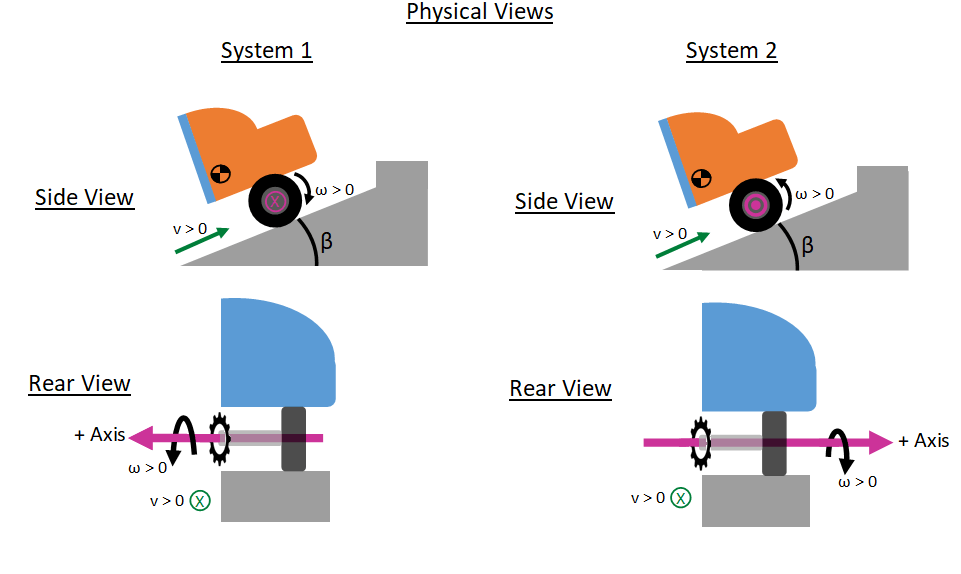
The modeled scenario is:
A quarter-car travels uphill.
The car starts at rest on a slope.
An engine powers the wheels to move the car uphill.
After traveling 10 meters, the front wheel hits a curb.
In both systems, you define positive translational motion as uphill. Both systems represent the positive translational direction with a green arrow pointing uphill in the side view and into the page in the rear view.
You define the positive rotational axis direction differently in the two systems.
System 1: Positive wheel angular velocity drives the car uphill. Following the right-hand rule, the pink axis points into the page in the side view and to the left in the rear view.
System 2: Negative wheel angular velocity drives the car uphill. The pink axis points out of the page in the side view and to the right in the rear view.
See the Interpreting Angle in the Angle-Based Rotational Domain example for more information on defining the rotational network direction.
The rotational domain supports a moving axis without special considerations unless the scenario has complexities such as uneven inertia or friction dependent on normal force.
Configure the Model
Open the model.
open_system('InterfacingRotationalAndTranslationalCarOnSlope');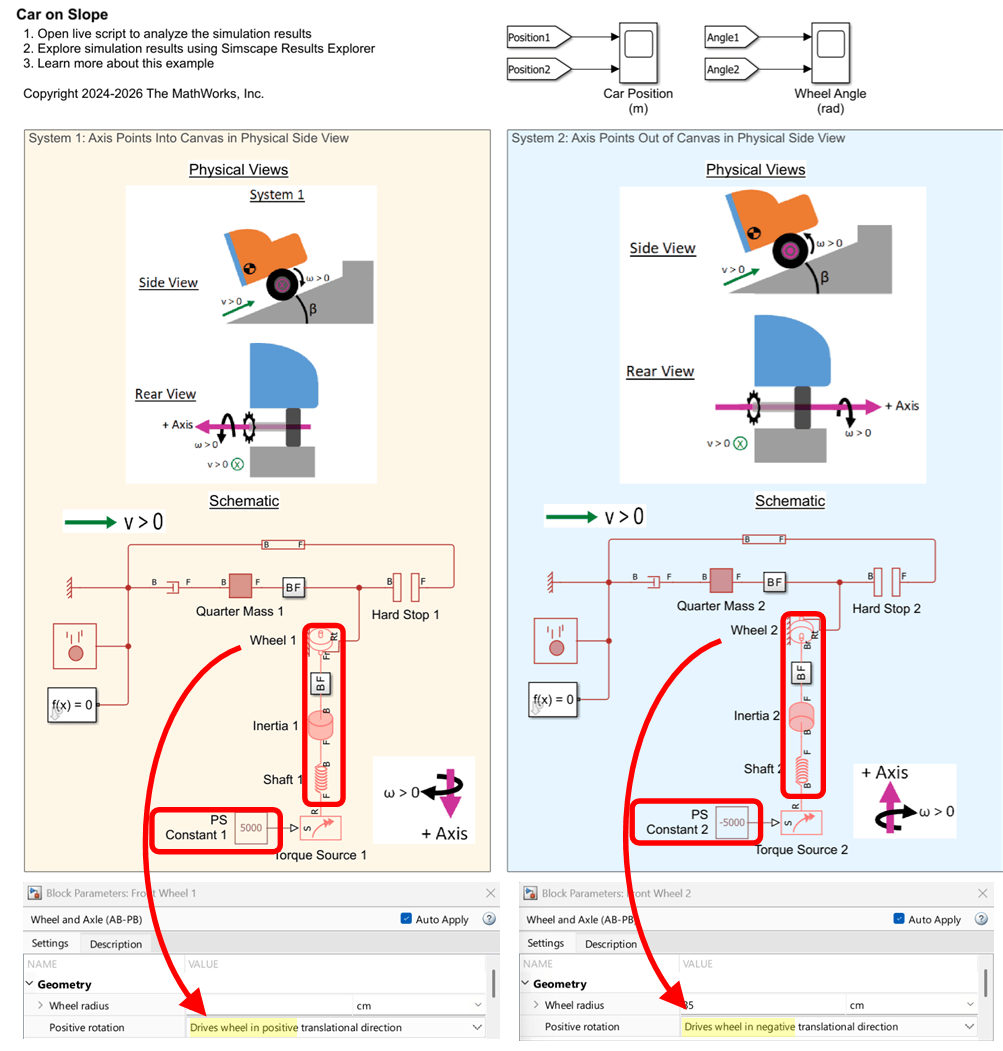
To swap the positive axis direction, you adjust:
Torque Source Signal Sign
System 1: Positive torque drives the wheel uphill. The PS Constant 1 block has a positive Constant value.
System 2: Negative torque drives the wheel uphill. The PS Constant 2 block has a negative Constant value.
Wheel and Axle (AB-PB) Block Setting
System 1: Positive rotation
Drives wheel in positive translational direction.System 2: Positive rotation
Drives wheel in negative translational direction.
Ordering and Alignment of Rotational Blocks Along the Axis
System 1: Torque source closer to the front of the axis; wheel closer to the rear of the axis.
System 2: Reverse ordering.
Ensure that the B-F direction of each two-port rotational block aligns with the rear-to-front direction of the axis.
Step 3 affects the sign of the shaft deformation (theta_rel). This sign matters when the shaft or any other 2-port element has asymmetric behavior based on the angle rather than a simple linear behavior.
You are free to choose any axis orientation (up, down, left, right) in a Simscape schematic. The directions in these schematics are:
System 1: The positive axis direction is downward in the schematic. This is indicated by port B being placed above port F on two‑port rotational blocks.
System 2: The positive axis direction is upward in the schematic, shown by the opposite port arrangement.
The critical requirement for equivalent physical behavior is that the block ordering and the B-to-F direction of each two‑port rotational block are consistent with the intended positive axis direction in the schematic.
Simulation Results
Run the simulation and open the scopes:
close_system('InterfacingRotationalAndTranslationalCarOnSlope/Car Position (m)');
open_system('InterfacingRotationalAndTranslationalCarOnSlope/Wheel Angle (rad)');
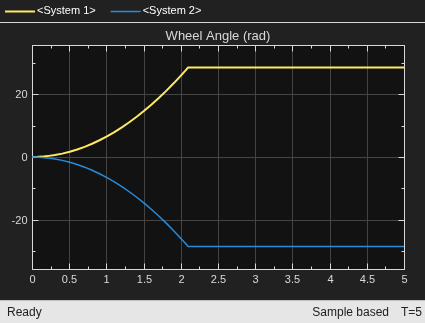
sim('InterfacingRotationalAndTranslationalCarOnSlope');The simulation shows that both cars travel from 0 m to 10 m, corresponding to uphill motion, before the hard stop engages. The wheel of System 1 rotates with positive angular velocity while the wheel of System 2 rotates with negative angular velocity.

