Propagate all signal labels out of the model
R2026bOption to pass propagated signal names out of referenced model
Model Configuration Pane: Model Referencing
Description
The Propagate all signal labels out of the model configuration parameter determines whether to pass propagated signal names to output signals of a Model block.
By default, each instance of a referenced model propagates signal labels. Clear the configuration parameter for each referenced model that you do not want to propagate signal labels.
Set Configuration Parameter for Referenced Models
In a model reference hierarchy, whether you edit the parameter in the top model or the current referenced model depends on how you access the Configuration Parameters dialog box.
Top model in the current model hierarchy — In the Simulink® Toolstrip, on the Modeling tab, click Model Settings.
Current referenced model — In the Simulink Toolstrip, on the Modeling tab, click the Model Settings button arrow. Then, in the Referenced Model section, select Model Settings.
Alternatively, open the referenced model as a top model. Then, in the Simulink Toolstrip, on the Modeling tab, click Model Settings.
Dependencies
To enable this parameter, set Total
number of instances allowed per top model to One or
Multiple.
Settings
on (default) | offonThe software propagates signal names to output signals of a Model block.
offThe software does not propagate signal names to output signals of a Model block.
Examples
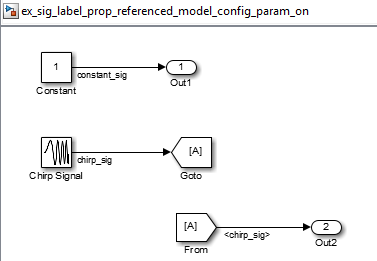
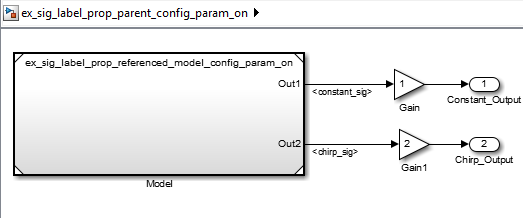
These models illustrate the behavior when you use the default setting of the Propagate all signal labels out of the model parameter of enabled for the referenced model.
In the referenced model, a signal labeled chirp_sig connects to
an Outport block named Out2.
In the parent model, the output signal from the Out2 port of
the Model block displays the propagated signal name
chirp_sig.
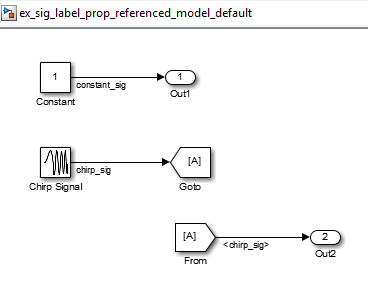
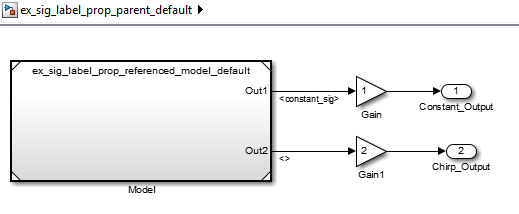
These models illustrate the behavior when you enable signal label propagation for every eligible signal and clear the Propagate all signal labels out of the model configuration parameter.
In the referenced model, signal label propagation occurs as in any model.
In the parent model, the output signal from the Out2 port of the Model block displays empty brackets for the propagated signal label.
Recommended Settings
| Application | Setting |
|---|---|
| Debugging | No impact |
| Traceability | No impact |
| Efficiency | No impact |
| Safety precaution | No recommendation |
Programmatic Use
Parameter:
PropagateSignalLabelsOutOfModel |
Value:
'on' | 'off' |
Default:
'on' |
Version History
Introduced in R2012a

