创建动态封装对话框
R2026b此示例说明如何创建动态封装对话框。在封装子系统模块中,您可以创建根据用户输入而变化的动态封装对话框。以这种方式变化的封装对话框的特性包括:
参数控制项的可见性:一个参数的更改可能导致另一个参数的控制项出现或消失。对话框在新控制项出现时展开,在控制项消失时收缩。
参数控制项的启用或禁用状态:更改一个参数会启用或禁用另一个参数的输入控制项。禁用的控制项呈灰显状态。
参数值:更改一个参数会将相关对话框参数设置为适当的值。
注意:您无法在封装回调中添加、删除或修改封装参数。
您还可以使用可自修改的封装更改子系统模块的结构。有关详细信息,请参阅Use Variant Blocks and Self-Modifiable Masks to Modify Linked Library Blocks。
创建动态封装对话框的步骤包括:
1.使用封装编辑器定义对话框的参数,包括静态和动态参数。
2.在封装编辑器的代码选项卡中为每个动态参数编写一个回调函数。回调定义对话框如何响应对该参数的更改。该回调函数会使用 Organize Mask Initialization and Callbacks in a MATLAB File 命令设置封装参数,这些封装参数会影响对话框上其他控件的外观和设置。
3.保存包含封装子系统的模型或库,以完成动态封装对话框的创建。
浏览模型
此示例中有两个子系统模块 Making a Parameter Invisible 和 Disabling a Parameter,用于更改封装参数的可见性和禁用封装参数。
open_system("slexMaskDDGExample.slx");
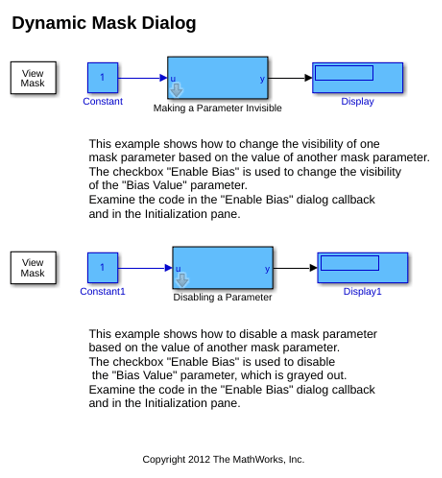
更改封装参数的可见性
以子系统模块 Making a Parameter Invisible 为例。此示例说明如何根据封装参数的值来更改另一个封装参数的可见性。Enable Bias 的值通过选中或清除 Enable Bias 复选框来设置。它用于更改参数偏置的可见性。
要更改封装参数的可见性,请执行以下操作:
1.创建两个编辑参数 Gain Value 和 Bias。创建一个复选框参数 Enable Bias。
2.在代码窗格的初始化部分使用以下代码。
function initialization()
%In the Initialization command, the variable 'enableBias' corresponding to
%the checkbox returns the following values:
unchecked = 0
checked = 1
% If the box is unchecked, we set the bias value to zero
if ~enableBias
  biasValue = 0;
end
% Othewise, the value from the mask parameter is used
end
3.在 enableBias 的参数回调部分使用以下代码。
function enableBias_callback()
% Control parameter visibility. Get the value of the Enable Bias checkbox
% unchecked = 'off'
% checked = 'on'
enab = get_param(gcb,'enableBias');
% Set the 'MaskVisibilities' property for each parameters
if strcmp(enab,'on')
  set_param(gcb,'MaskVisibilities',{'on','on','on'});
else
  set_param(gcb,'MaskVisibilities',{'on','on','off'});
end
% Note that the value of the bias is not handled here.
% See the Initialization tab
end
4.双击子系统模块 Making a Parameter Invisible。清除 Enable Bias 参数,请注意 Bias 参数不可见。
禁用封装参数
以子系统模块 Disabling a Parameter 为例。此示例说明如何基于封装参数的值禁用另一个封装参数。复选框 Enable Bias 用于禁用 Bias Value 参数,该参数呈灰显。
要禁用封装参数,请执行以下操作:
1.创建两个编辑参数 Gain Value 和 Bias。创建一个复选框参数 Enable Bias。
2.在代码窗格的初始化部分使用以下代码。
function initialization()
% In the Initialization command, the variable 'enableBias' corresponding to
% the checkbox returns the following values:
% unchecked = 0
% checked = 1
If the box is unchecked, we set the bias value to zero
 if ~enableBias
     biasValue = 0;
end
% Otherwise, the value from the mask parameter is used
 end
3.在 enableBias 的参数回调部分使用以下代码。
function enableBias_callback()
% Enable and disable parameters
% Get the value of the Enable Bias checkbox
% unchecked = 'off'
% checked = 'on'
 enab = get_param(gcb,'enableBias');
Set the 'MaskEnables' property for each parameters
if strcmp(enab,'on')
    set_param(gcb,'MaskEnables',{'on','on','on'});
else
    set_param(gcb,'MaskEnables',{'on','on','off'});
end
% Note that the value of the bias is not handled here.
% See the Initialization tab
end
4.双击子系统模块 Disabling a Parameter。清除 Enable Bias 参数,请注意 Bias 参数灰显。
另请参阅
Use Variant Blocks and Self-Modifiable Masks to Modify Linked Library Blocks|

