Modify Solver Profiler Rules
You can customize the suggestions that appear in the Solver Profiler in these ways:
Change the thresholds of the Solver Profiler rules that detect failure patterns.
Select which rules to apply during a profiling run.
Author your own rule set as a MATLAB® script.
Change Thresholds of Profiler Rules
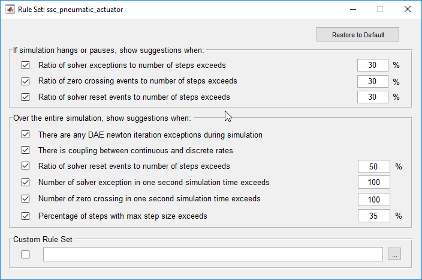
Click Rule Customization in the Solver Profiler to access the rule set. You can change the thresholds for most of these rules and also select which rules you want to apply selectively during a simulation run.
Develop Profiler Rule Set
You can override the settings on the Rule Set dialog box by specifying a custom rule set.
Create a rule set as a MATLAB script and specify the path to the script in the Custom Rule Set section of the Rule Set dialog box.
A simple rule set example looks as follows:
function diagnosticsString = customRule(profilerData)
		if isempty(profilerData.zcEvents)
			diagnosticsString{1} = 'No zero crossing event detected.';
		else
			diagnosticsString{1} = 'Zero-crossing events detected.';
		end
endprofilerData. This array of structures organizes all the
information that the Solver Profiler collects during a profiling run. It contains
the following substructures.
| Substructure | Fields |
|---|---|
stateInfo: Stores information on block
states |
|
blockInfo: Cross-reference of blocks and
state IDs |
|
zcSrcInfo: Stores information on blocks
causing zero crossing events |
|
zcEvents: Cross-reference of the time
stamps of zero crossing events and the corresponding state
IDs |
|
exceptionEvents: Cross-reference of
exception event timestamps, the ID of the corresponding state
that caused the event, and the cause. |
|
resetTime: Stores timestamps of solver
resets. | None |
tout: Stores simulation times. | None |

