Change Active Choice of Variant Parameters and Variant Parameter Banks During Simulation or Execution of Generated Code
R2026bYou can change the active choice of variant parameters (Simulink.VariantVariable) and variant parameter banks (Simulink.VariantBank) during simulation or execution of the generated code. To
enable run-time activation, set the ActivationTime property of the
associated Simulink.VariantControl object to runtime. Then, switch
the active variant by modifying the value of the variant control variable.
To write to the variant control variable, you can use either one of these options:
A Parameter Writer block.
The
setVariablefunction of aSimulationobject (while simulation is paused).
Switch Active Variant Parameter at Run Time by Using Parameter Writer Block
This example shows how to switch the active value of variant parameters during simulation and in generated code by using a Parameter Writer block to write to a Simulink.VariantControl variable at run time.
In this example, you:
Explore a model that uses Parameter Writer blocks inside Reset Function blocks to switch the variant control value at specific time steps.
Simulate the model and observe the variant parameter values change at run time.
Generate code and review the switching function that updates variant parameter values whenever the variant control changes.
Explore the Example Model
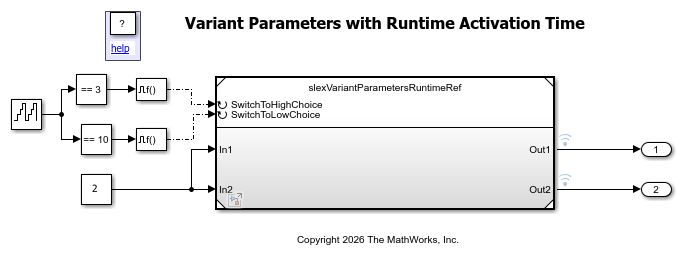
This model uses two variant parameters whose values can switch at run time. The top model slexVariantParametersRuntime controls when the switching happens, and the referenced model slexVariantParametersRuntimeRef contains the variant parameters and the switching logic.
open_system("slexVariantParametersRuntime")
open_system("slexVariantParametersRuntimeRef")
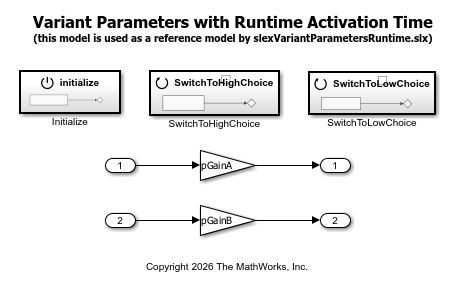
The referenced model contains two Gain blocks whose Gain values are the variant parameters pGainA and pGainB. These variant parameters and the variant control vCtrl are defined in the data dictionary dSlexVariantParametersRuntime.sldd. The valid values for vCtrl are defined by the VCtrlChoices enumeration class, which derives from Simulink.IntEnumType and defines three members: NEUTRAL, LOW, and HIGH.
vCtrlis aSimulink.VariantControlobject withActivationTimeset toruntime.pGainAis aSimulink.VariantVariablewith three choices:0.5whenvCtrl==VCtrlChoices.NEUTRAL,2.5whenvCtrl==VCtrlChoices.LOW, and5.5whenvCtrl==VCtrlChoices.HIGH.pGainBis aSimulink.VariantVariablewith three choices:1.0whenvCtrl==VCtrlChoices.NEUTRAL,3.5whenvCtrl==VCtrlChoices.LOW, and4.5whenvCtrl==VCtrlChoices.HIGH.
Both variant parameters use the Model default storage class.
The top model uses a counter with Compare To Constant blocks to trigger Function-Call Generator blocks at specific time steps. These function-call signals connect to the reset event ports of the referenced model.
The referenced model contains an Initialize Function block and two Reset Function blocks, SwitchToHighChoice and SwitchToLowChoice. Each block contains a Parameter Writer block that writes to vCtrl. At model initialization, the Initialize Function block sets vCtrl to VCtrlChoices.NEUTRAL. When the top model sends a reset event, the SwitchToHighChoice block writes VCtrlChoices.HIGH and the SwitchToLowChoice block writes VCtrlChoices.LOW to vCtrl. This action switches pGainA and pGainB to the corresponding choices.
Simulate the Model
out = sim("slexVariantParametersRuntime");
The output signals reflect the variant parameter changes at the time steps where the Parameter Writer blocks update vCtrl. Open the Simulation Data Inspector to view the output signal values at each switching point.
Generate Code from the Referenced Model
Generate code from the referenced model slexVariantParametersRuntimeRef using Simulink Coder® or Embedded Coder®.
slbuild("slexVariantParametersRuntimeRef");
### Searching for referenced models in model 'slexVariantParametersRuntimeRef'.
### Skipped unpacking from Simulink cache file "slexVariantParametersRuntimeRef.slxc" because the relevant build artifacts on disk are up to date.
### Total of 1 models to build.
### Starting top model code generation target build for: slexVariantParametersRuntimeRef
### Build folder for generated code: C:\Users\user\OneDrive - MathWorks\Documents\MATLAB\ExampleManager\user.Bdoc26b.10Aug\simulink_variants-ex99728643\slexVariantParametersRuntimeRef_ert_rtw
### Generated code for 'slexVariantParametersRuntimeRef' is up to date because no structural, parameter or code replacement library changes were found.
### Skipping makefile generation and compilation because C:\Users\user\OneDrive - MathWorks\Documents\MATLAB\ExampleManager\user.Bdoc26b.10Aug\simulink_variants-ex99728643\slexVariantParametersRuntimeRef.exe is up to date.
### Successful completion of build procedure for: slexVariantParametersRuntimeRef

Build Summary

0 of 1 models built (1 models already up to date)
Build duration: 0h 0m 1.7925s
Review the Switching Function
The generated source file slexVariantParametersRuntimeRef.c contains a switching function named slexVariantParametersRuntimeRef_prmWrite_vCtrl. The function name follows the pattern modelName_prmWrite_variantControlName. If the name conflicts with another function, the code generator mangles it.
cFile = fullfile("slexVariantParametersRuntimeRef_ert_rtw", ...
    "slexVariantParametersRuntimeRef.c");
coder.example.extractLines(cFile, ...
    "/* Variant Parameters runtime activation time */", ...
    "/* End of ParameterWriter", 1, 1)
  /* Variant Parameters runtime activation time */
  if (vCtrl == VCtrlChoices_HIGH) {
    slexVariantParametersRuntimeR_P.pGainA = 5.5;
    slexVariantParametersRuntimeR_P.pGainB = 4.5;
  } else if (vCtrl == VCtrlChoices_LOW) {
    slexVariantParametersRuntimeR_P.pGainA = 2.5;
    slexVariantParametersRuntimeR_P.pGainB = 3.5;
  } else {
    slexVariantParametersRuntimeR_P.pGainA = 0.5;
    slexVariantParametersRuntimeR_P.pGainB = 1.0;
  }

  /* End of ParameterWriter: '<S1>/Parameter Writer' */
The function contains if/else if branches for each variant condition and assigns the corresponding choice values to pGainA and pGainB.
Review How the Switching Function Is Triggered
The generated code contains a function for each Reset Function block that writes the new value to vCtrl and then calls the switching function.
coder.example.extractLines(cFile, ...
    "void slexVariantParametersRuntimeRef_SwitchToHighChoice", ...
    "}", 1, 1)
void slexVariantParametersRuntimeRef_SwitchToHighChoice(void)
{
  /* Outputs for Atomic SubSystem: '<Root>/SwitchToHighChoice' */
  /* ParameterWriter: '<S2>/Parameter Writer' incorporates:
   *  Constant: '<S2>/Constant1'
   */
  vCtrl = slexVariantParametersRuntimeR_P.Constant1_Value_f;
  slexVariantParametersRuntimeRef_prmWrite_vCtrl();

  /* End of Outputs for SubSystem: '<Root>/SwitchToHighChoice' */
}
The model initialization function follows the same pattern:
coder.example.extractLines(cFile, ...
    "void slexVariantParametersRuntimeRef_initialize", ...
    "slexVariantParametersRuntimeRef_prmWrite_vCtrl();", 1, 1)
void slexVariantParametersRuntimeRef_initialize(void)
{
  /* Outputs for Atomic SubSystem: '<Root>/Initialize' */
  /* ParameterWriter: '<S1>/Parameter Writer' incorporates:
   *  Constant: '<S1>/Constant1'
   */
  vCtrl = slexVariantParametersRuntimeR_P.Constant1_Value;
  slexVariantParametersRuntimeRef_prmWrite_vCtrl();
You can switch variant control values at run time without recompilation because the generated code calls the switching function when vCtrl changes.
Switch Active Variant Parameter at Run Time by Using Simulation Object
This example shows how to switch the active value of variant parameters during simulation and in generated code by using the setVariable function of a Simulation object.
In this example, you:
Explore a model that uses variant parameters with run-time activation.
Simulate the model using a
Simulationobject and switch the active variant parameter values at specific time steps by using thesetVariablefunction.Generate code and review how the switching logic appears in the model step function.
Explore the Example Model
open_system("slexVariantParametersRuntimeSimObj")
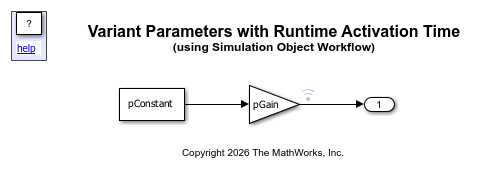
The model contains a Constant block whose Value is the variant parameter pConstant and a Gain block whose Gain is the variant parameter pGain. The variant parameters and the variant control variable are defined in the base workspace by the data script slexVariantParametersRuntimeData.m:
vCtrlis aSimulink.VariantControlobject withActivationTimeset toruntimeand an initialValueof1.pGainis aSimulink.VariantVariablewith two choices:2.5whenvCtrl==1and5.5whenvCtrl==2.pConstantis aSimulink.VariantVariablewith two choices:3.5whenvCtrl==1and4.5whenvCtrl==2.
Because vCtrl has ActivationTime set to runtime, you can change its value during simulation to switch the active choice of pGain and pConstant.
Simulate the Model Using a Simulation Object
Use a Simulation object to simulate the model and switch the active variant parameter values at specific time steps.
mdl = "slexVariantParametersRuntimeSimObj";
s = simulation(mdl);
setVariable(s,"vCtrl.Value",int32(2));
step(s,PauseTime=5);
setVariable(s,"vCtrl.Value",int32(1));
step(s,PauseTime=10);
out = stop(s);
The output signal reflects the variant parameter changes at the time steps where the setVariable function updates vCtrl. Open the Simulation Data Inspector to view the output signal values at each switching point.
Generate Code
Generate code from the model using Simulink Coder® or Embedded Coder®.
slbuild("slexVariantParametersRuntimeSimObj");
### Searching for referenced models in model 'slexVariantParametersRuntimeSimObj'.
### Total of 1 models to build.
### Starting top model code generation target build for: slexVariantParametersRuntimeSimObj
### Successful completion of build procedure for: slexVariantParametersRuntimeSimObj

Build Summary

Top model targets:

Model                               Build Reason                                                  Status                        Build Duration
==============================================================================================================================================
slexVariantParametersRuntimeSimObj  Target (slexVariantParametersRuntimeSimObj.c) did not exist.  Code generated and compiled.  0h 1m 40.433s

1 of 1 models built (0 models already up to date)
Build duration: 0h 1m 47.473s
Review the Switching Logic in the Step Function
The generated source file slexVariantParametersRuntimeSimObj.c contains the switching logic in the model step function, before the variant parameters are used.
cFile = fullfile("slexVariantParametersRuntimeSimObj_ert_rtw", ...
    "slexVariantParametersRuntimeSimObj.c");
coder.example.extractLines(cFile, ...
    "void slexVariantParametersRuntimeSimObj_step", ...
    "/* Model initialize function */", 1, 0)
void slexVariantParametersRuntimeSimObj_step(void)
{
  /* VariantControlBlock: '<Root>/vCtrl' */
  /* Variant Parameters runtime activation time */
  if (vCtrl == VCtrlChoices_HIGH) {
    slexVariantParametersRuntimeSimObj_P.pConstant = 4.5;
    slexVariantParametersRuntimeSimObj_P.pGain = 5.5;
  } else if (vCtrl == VCtrlChoices_LOW) {
    slexVariantParametersRuntimeSimObj_P.pConstant = 3.5;
    slexVariantParametersRuntimeSimObj_P.pGain = 2.5;
  }

  /* End of VariantControlBlock: '<Root>/vCtrl' */

  /* Outport: '<Root>/Out1' incorporates:
   *  Constant: '<Root>/Constant1'
   *  Gain: '<Root>/Gain'
   */
  slexVariantParametersRuntimeSimObj_Y.Out1 =
    slexVariantParametersRuntimeSimObj_P.pGain *
    slexVariantParametersRuntimeSimObj_P.pConstant;
}
The step function evaluates vCtrl at each time step. You can switch variant control values at run time without recompilation because the switching logic executes at every time step.
Run-time Switching for Variant Parameter Banks
Variant parameter banks (Simulink.VariantBank) also support run-time
activation. When the Simulink.VariantControl object associated with a
variant bank has ActivationTime set to
runtime, you can switch the active bank during simulation or
execution of generated code.
Whether you use a Parameter Writer block or a Simulation
object to change the active variant, the structure of the generated code is the same as the
code generated for variant parameters. However, the switching code updates the active
pointer variable used by the variant parameter bank instead of updating a parameter
value.

