ModelAdvisor.Table
R2026a创建表格以显示模型顾问结果
描述
使用 ModelAdvisor.Table 类创建和格式化表格以显示模型顾问结果。您可以定义表格中的行数和列数,并自定义标题、对齐方式和单元格内容。
创建对象
描述
输入参量
对象函数
getEntry | 从表中获取单元格内容 |
setColHeading | 为表格指定列标题 |
setColHeadingAlign | 指定列标题的水平对齐方式 |
setColHeadingValign | 指定列标题的垂直对齐方式 |
setColWidth | 为表指定列宽 |
setEntries | Specify content for all table cells |
setEntry | 指定表格中的内容单元格 |
setEntryAlign | 指定单元格内容的水平对齐方式 |
setEntryValign | 指定单元格内容的垂直对齐方式 |
setHeading | 指定表格标题 |
setHeadingAlign | 指定表格标题的水平对齐方式 |
setRowHeading | 指定表格的行标题 |
setRowHeadingAlign | 指定行标题的水平对齐方式 |
setRowHeadingValign | 指定行标题的垂直对齐方式 |
示例
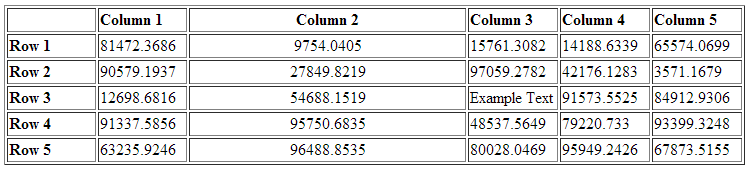
本示例展示了如何在模型顾问结果中创建一个包含五行五列的表格,用随机生成的数字填充它,并自定义其外观。这些步骤包括设置列标题和行标题、调整列对齐方式和宽度,以及将文本对象插入到特定单元格中。
matrixData = rand(5,5) * 10^5;

% Create the table
table1 = ModelAdvisor.Table(5,5);

% Set column headings
for n=1:5
    table1.setColHeading(n, ['Column ', num2str(n)]);
end

% Align and set width for column 2
table1.setColHeadingAlign(2, 'center');
table1.setColWidth(2, 3);

% Set row headings
for n=1:5
    table1.setRowHeading(n, ['Row ', num2str(n)]);
end

% Enter table content
for rowIndex=1:5
    for colIndex=1:5
        value = num2str(matrixData(rowIndex, colIndex));
        table1.setEntry(rowIndex, colIndex, value);

        if colIndex == 2
            table1.setEntryAlign(rowIndex, colIndex, 'center');
        end
    end
end

% Overwrite one entry with a text object
text = ModelAdvisor.Text('Example Text');
table1.setEntry(3,3, text)
版本历史记录
在 R2006b 中推出

