以编程方式收集模型度量
R2026a您可以使用模型度量 API 以编程方式收集模型度量,从而帮助评估模型的架构、复杂性和可读性。这些度量的结果可帮助您验证是否符合行业标准和规范。
此示例说明如何使用模型度量 API 以编程方式收集模型的子系统和模块计数度量。收集模型的度量后,您可以访问结果并将结果导出为文件。
示例模型
打开 vdp 模型。
model = 'vdp';
open_system(model);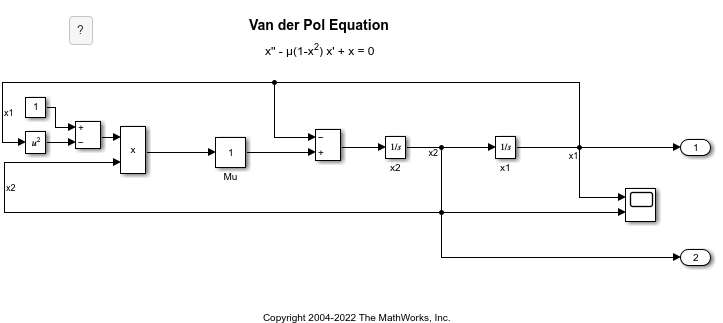
收集度量
要收集模型的度量数据,请创建一个 slmetric.Engine 对象并调用 execute。
metric_engine = slmetric.Engine();
Warning: The Metrics Dashboard and slmetric.Engine API will be removed in a future release.
For size, architecture, and complexity metrics, use the Model Maintainability Dashboard and metric.Engine API instead.
The Model Maintainability Dashboard and metric.Engine API can identify outdated metric results, analyze dependencies between files, and aggregate metrics across software units and components.
For more information, see <a href="matlab:helpview([docroot '/slcheck/collect-model-metric-data-1.html'])">Collect Model and Testing Metrics</a>
setAnalysisRoot(metric_engine,'Root','vdp','RootType','Model');
execute(metric_engine);
Updating Model Advisor cache...
Model Advisor cache updated. For new customizations, to update the cache, use the Advisor.Manager.refresh_customizations method.
访问结果
使用 getMetrics 方法指定您要收集的度量。对于此示例,请指定 vdp 模型的模块计数和子系统计数度量。getMetrics 返回 slmetric.metric.ResultCollection 对象数组。
res_col = getMetrics(metric_engine,{'mathworks.metrics.SimulinkBlockCount',...
'mathworks.metrics.SubSystemCount'});
存储和显示结果
创建一个名为 metricData 的元胞数组来存储度量结果的 MetricID、ComponentPath 和 Value 属性。MetricID 属性是度量的标识符,ComponentPath 属性是计算度量时针对的组件的路径,Value 属性是度量值。编写一个循环来显示结果。
metricData ={'MetricID','ComponentPath','Value'};
cnt = 1;
for n=1:length(res_col)
    if res_col(n).Status == 0
        results = res_col(n).Results;

        for m=1:length(results)
            disp(['MetricID: ',results(m).MetricID]);
            disp(['  ComponentPath: ',results(m).ComponentPath]);
            disp(['  Value: ',num2str(results(m).Value)]);
            metricData{cnt+1,1} = results(m).MetricID;
            metricData{cnt+1,2} = results(m).ComponentPath;
            metricData{cnt+1,3} = results(m).Value;
            cnt = cnt + 1;
        end
    else
        disp(['No results for:',res_col(n).MetricID]);
    end
    disp(' ');
end
MetricID: mathworks.metrics.SimulinkBlockCount
ComponentPath: vdp
Value: 12
MetricID: mathworks.metrics.SubSystemCount
ComponentPath: vdp
Value: 0
导出结果
要将 MetricID、ComponentPath 和 Value 导出到电子表格,请使用 writetable 将 metricData 的内容写入到 MySpreadsheet.xlsx。
filename = 'MySpreadsheet.xlsx';
T=table(metricData);
writetable(T,filename);
要将度量结果导出到 XML 文件,请使用 exportMetrics 方法。对于每个度量结果,XML 文件都包括 ComponentID、ComponentPath、MetricID、Value、AggregatedValue 和 Measure。
filename='MyMetricResults.xml';
exportMetrics(metric_engine,filename)
关闭 vdp 模型。
bdclose(model);
限制
当收集度量数据时,这些数据会存储在仿真缓存文件夹内的数据库文件 Metrics.db 中。您不能在一个平台上收集度量数据,然后将数据库文件移动到另一个平台,再继续在该数据库文件中收集额外的度量数据。例如,如果您在 Windows 计算机上收集了度量数据,然后将数据库文件移动到 Linux 计算机,则无法在该数据库文件中收集和存储额外的度量数据。不过,您能够在度量仪表板中查看该数据。
另请参阅
slmetric.Engine | slmetric.metric.Result | slmetric.metric.ResultCollection

