update
R2026b根据模型中的结构性更改来更新工作点对象
语法
update(op)
描述
update(op) 更新工作点对象 op,以反映关联 Simulink® 模型中的任何更改,例如状态的添加或删除。
示例
打开 magball 模型。
openExample("magball")为模型创建一个工作点对象。
op = operpoint("magball")
 op =

 Operating point for the Model magball.
 (Time-Varying Components Evaluated at time t=0)

States:
----------
   x
_______

(1.) magball/Controller/PID Controller/Filter/Cont. Filter/Filter
   0
(2.) magball/Controller/PID Controller/Integrator/Continuous/Integrator
14.0071
(3.) magball/Magnetic Ball Plant/Current
7.0036
(4.) magball/Magnetic Ball Plant/dhdt
   0
(5.) magball/Magnetic Ball Plant/height
 0.05

Inputs: None
----------
向模型添加 Integrator 模块,如下图所示。
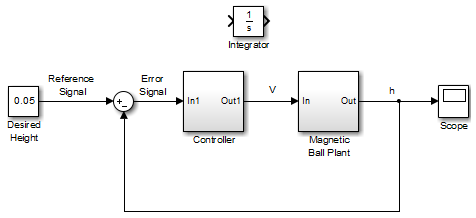
更新工作点以包含此新状态。
update(op)
查看更新后的工作点,该工作点现在包含积分器的状态。
op
 op =

 Operating point for the Model magball.
 (Time-Varying Components Evaluated at time t=0)

States:
----------
   x
_______

(1.) magball/Controller/PID Controller/Filter/Cont. Filter/Filter
   0
(2.) magball/Controller/PID Controller/Integrator/Continuous/Integrator
14.0071
(3.) magball/Magnetic Ball Plant/Current
7.0036
(4.) magball/Magnetic Ball Plant/dhdt
   0
(5.) magball/Magnetic Ball Plant/height
 0.05
(6.) magball/Integrator
   0

Inputs: None
----------
备选方法
作为 update 函数的备选方法,您可以使用模型线性化器中的与模型同步按钮来更新工作点对象。
版本历史记录
在 R2006a 之前推出

