Deployment
R2026bBuild, deploy, and run Simulink® models on AMD® SoC devices by generating executables and transferring them to the target hardware.
Apps
| Run on Hardware Board - AMD Zynq Board | Build, deploy, and run models on connected hardware boards |
Model Settings
Topics
- Set Up AMD SoC Devices and Software
Install AMD SoC device software and set up the hardware.
- Build and Run Executable on AMD SoC Devices
Build and run executable on AMD SoC devices.
- Stop or Restart Executable Running on AMD SoC Devices
Stop or restart an executable running on AMD Zynq board.
- Host-Target Communication with External Mode Simulation
Tune parameters and monitor signals through the communication channel between development computer and target hardware.
- External Mode Simulation by Using XCP Communication
Run external mode simulations that use an XCP communication channel.
- External Mode Simulation with TCP/IP
Run external mode simulations that use a TCP/IP or serial communication channel.
Troubleshooting
Command-Line Session for AMD SoC Devices
Open a serial command-line session with AMD SoC platform.
Send PING Request to AMD SoC Devices
Process to PING an AMD SoC devices connected to your development computer.
Featured Examples
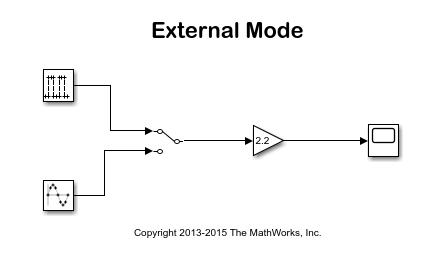
Parameter Tuning with External Mode Simulation
Run a Simulink® model in external mode on an ARM® Cortex®-A processor on an AMD Zynq® board.
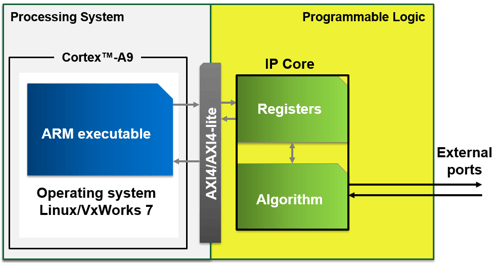
Communicate with the Programmable Logic IP Core on AMD Zynq Board by Using AXI4-Lite Protocol
Communicate with the programmable logic IP core on an AMD Zynq® board by using the Advanced eXtensible Interface 4 Lite (AXI4®-Lite) protocol.
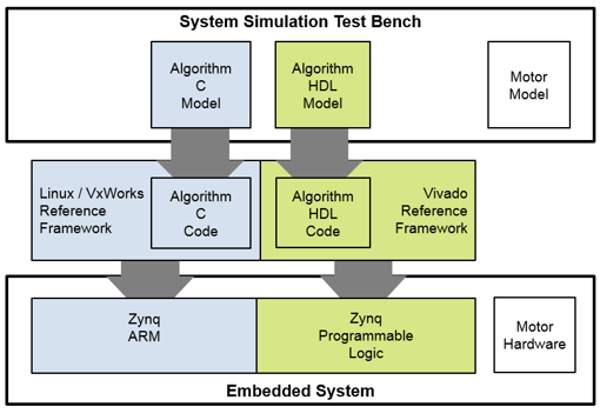
Basic Control Algorithm Partitioned into FPGA and ARM
Model a field-oriented controller (FOC) for a permanent magnet synchronous machine (PMSM) on the Zynq® UltraScale+™ MPSoC target.
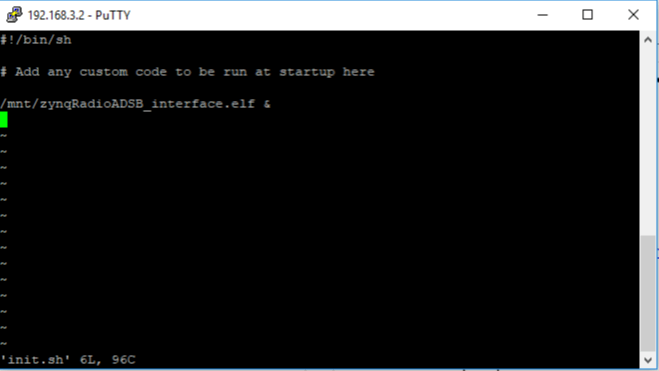
Deploy Standalone Application to Zynq Board for Run on Startup
Manually deploy the ARM® software executable that you generate from a Simulink® model to your Zynq® board (for example, Zedboard, ZC702, ZC706, ZCU102, or others). After manual deployment, you can run the executable without a connection to Simulink on your development computer.

