Construct Decision Points by Using Junctions
R2026bYou can use decision points, or junctions, in Stateflow® charts to create branching logic that determines the execution path execution. Use junctions to implement complex conditional logic and create flow patterns.
A junction represents a decision point in a transition path. With junctions you can:
Create paths from a single source to multiple destinations.
Create paths from multiple sources to a single destination.
Build complex decision patterns like
if-then-elsestructures.Implement iterative patterns like
forloops andwhileloops.
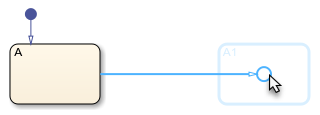
To quickly add a junction to a chart, add a transition by clicking and dragging from the side of a state. Click the circular cue to create a junction.
Alternatively, to add an isolated junction to a chart:
In the object palette, click the Junction icon
 .
.On the chart canvas, click the location for the new junction.
To change junction size, right-click the junction and select Junction Size.
When to Use Junctions or States
Use junctions when:
You need a momentary decision point with no persistent behavior.
You want to implement conditional or loop logic within a transition path.
You need to create complex transition paths with multiple segments.
Use states when:
You need to maintain state information.
You need to execute entry, during, or exit actions.
You want to represent a mode or condition that persists over time.
Build If-Then-Else Decision Patterns
You can use decision points to create an if-then-else pattern where
the chart execution follows different paths based on different conditions.
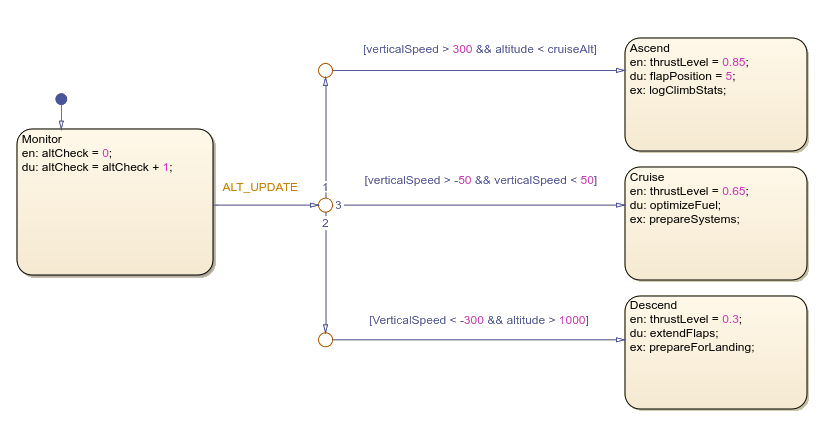
In this chart, an aircraft flight phase management system with an
if-then-else pattern uses junctions to evaluate conditions and route
the chart execution. After the ALT_UPDATE event occurs, the chart exits
the Monitor state and transitions to the first junction. The first
junction checks flight parameters and determines which branch to follow. When specific
altitude and vertical speed conditions match, the chart transitions to either
Ascend, Cruise, or
Descend.
Implement Loop and Switch-Case Decision Patterns
You can also use junctions to create loop and switch-case structures.
For Loop Pattern
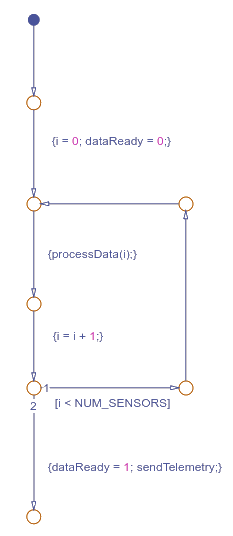
This example models a satellite sensor data processing loop in Stateflow. The chart initializes a counter, processes data from the sensors, and increments the counter until it processes the data from all sensors. The conditions on the transitions control the execution flow and prevent backtracking.
While Loop Pattern
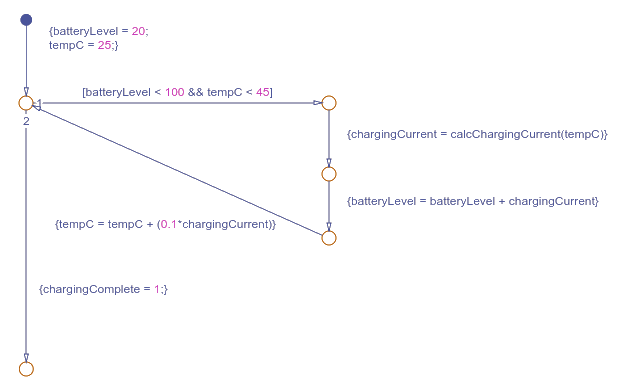
This example models a battery charging controller while loop pattern. The controller monitors battery level and temperature. When the temperature exceeds 40 degrees Celsius, the controller reduces the charging current. When the battery reaches 100 percent or temperature exceeds 45 degrees Celsius, the controller stops the charge cycle.
Switch-Case Pattern
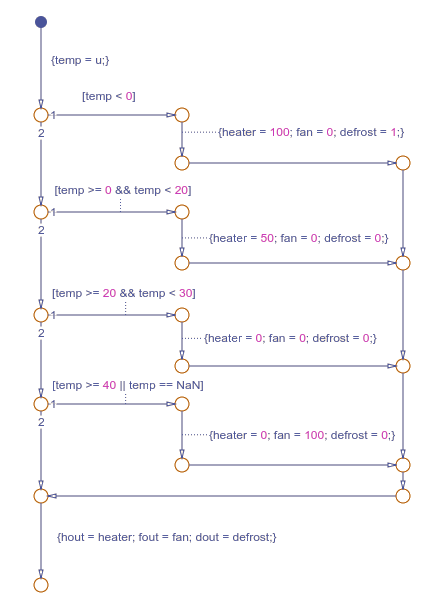
This example models a switch-case pattern that controls temperature by using a heater, a fan, and defrost settings. The chart evaluates temperature input and routes execution through different paths based on five temperature ranges. Each execution path sets specific control values before the flow loops back to evaluate the next input.