Use Complex Data Types
R2026bYou can use complex data types to represent values that have both real and imaginary components. You can perform calculations that involve complex numbers directly in your state charts.
Complex data consists of two components:
A real part
An imaginary part multiplied by i or j
You can define local data, inputs, or outputs as complex data types. The syntax and operations available depend on whether your chart uses MATLAB or C as the action language. For more information, see Operations for Complex Data in Stateflow.
Define Complex Data in Stateflow
To define complex data in a Stateflow chart, create a new data object in your chart. In
the Property Inspector, in the Advanced section, set the Complexity property
to On. For more information, see Set Data Properties.
Complex Data Syntax
In charts that use MATLAB as the action language, you can use standard complex number notation. For example, this creates a complex number with real part 3 and imaginary part 4.
z = 3 + 4i;
In charts that use C as the action language, you must use the complex function. For example, this creates a complex number with real part 3
and imaginary part 4.
z = complex(3, 4);
The complex function works in charts that use MATLAB or C as the
action language.
Extract Real and Imaginary Components
To extract the real or imaginary parts of a complex number, use the real
and imag functions.To extract the real part, use the
syntax:
r = real(z);
To extract the imaginary part, use the syntax:
i = imag(z);
These operators work in both MATLAB and C charts.
Monitor Electrical System Outputs
In this chart, an electrical circuit switches between the Open and
Closed states based on the SWITCH_ON or
SWITCH_OFF events.
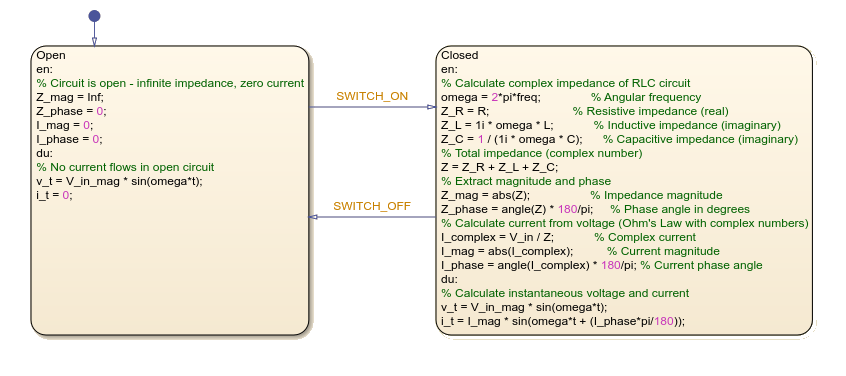
The Open state represents an infinite impedance condition where no
current flows through the circuit. The Closed state calculates the
complex impedance of an RLC circuit. The Closed state also determines
current magnitude and phase using Ohm's Law.

