UDP Receive
R2026bReceive UDP packets from UDP host
UDP Receive for Nucleo block

To add a block to a model, double-click the canvas and start typing the block name. Then, select the block from the list.
Libraries:
STM32 Microcontroller Blockset /
STM32F7
STM32 Microcontroller Blockset /
STM32H7
Description
The UDP Receive block receives UDP packets from a UDP host. Use the block for stateless and connectionless data transmission.
With each sample, the block outputs the contents of a UDP packet as a (Nx1) array.
The block receives the packets on the port number specified in the
Local IP Port parameter from the IP address
specified in the Remote IP address (0.0.0.0 for accepting
all) parameter. To receive packets from all the sending
hosts, specify the remote IP address as 0.0.0.0. Match
the port number specified in the Local IP Port
parameter with the remote port number of the sending host.
You can choose to receive the UDP packets in blocking or non-blocking mode.
Note
If you are having trouble using UDP to communicate with a computer, investigate if antivirus or firewall software is blocking UDP traffic. If so, try to configure the software to allow the traffic for a specific IP port number.
Ports
Output
Parameters
Specify the port number of the application from which you want to receive the packets. Match the local port number with the remote port number of the sending host.
Specify the IP address of the remote host from which
the block receives packets. To receive packets from
all the sending hosts, specify
0.0.0.0.
Select the data type in which the block receives the elements from the sending host. The size of each element depends on its data type.
Specify the number of elements that you want to receive in each packet. The data size must be scalar values.
on— When you select this parameter, the read operation runs in the Blocking mode. The read operation is blocked while waiting for the requested data to be available. If data is available, theDataport outputs data. If data is not available, theDataport waits for data.A task overrun occurs if the target hardware is still waiting for the data to be available when the next read operation is scheduled to begin.
To fix overruns:
Increase the time step by using the Sample time parameter.
Reduce the length of data requested by using the Data size (N) parameter.
off— When you clear this parameter, the read operation runs in the Non-blocking mode. When reading data, if data is not available, theDataport contains the packet received in the previous time step. In this mode, the block does not wait for the requested data to be available.
Select this option to display the error status during data transmission.
When you select the Output error status parameter, the block configures an output port. The port on the block is labeled as Status, indicating that the block outputs the status of the read operation at the output port.
When you specify this parameter
as-1, Simulink® determines
the best sample time for the block based on the
block context within the model.
Receive UDP Packets
This example describes the values at the output ports when the length of the packets received is less than, greater than, or equal to the length of requested data.
Length of UDP packet received = Data size (N): The
Dataport outputs the packet as a data vector of the size specified in the Data size (N) parameter.The
Statusport outputs0, indicating that the requested data is received.Suppose that the Data size (N) parameter specified is 4 and the length of the packet received is also 4.
In this case, the
Dataport outputs a data vector of size 4 filled with the elements of the packet.The value at the
Statusport is0.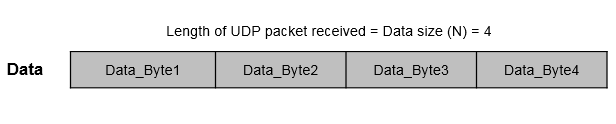
Length of UDP packet received < Data size (N): The
Dataport outputs the packet as a data vector of the size specified in the Data size (N) parameter. All the empty spaces in the vector are filled with random values.The
Statusport outputs a nonzero value, indicating that no new data is received.Suppose that the Data size (N) parameter specified is 4 and the length of data received is 3 bytes.
In this case, the
Dataport outputs a data vector of size 4. The first three elements in the vector are the elements from the received packet. The remaining space is filled with a random value.The
Statusport outputs a nonzero value.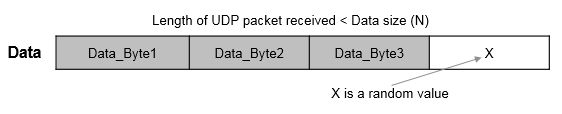
Length of UDP packet received > Data size (N): The
Dataport outputs a data vector of the size specified in the Data size (N) parameter. The vector contains only the first N elements from the packet. The remaining elements are dropped.The
Statusport outputs0, indicating that the requested data is received.Suppose that the Data size (N) parameter specified is 4 and the length of data received is 5 bytes. In this case, the
Dataport outputs a data vector of size 4. The vector contains only the first four elements from the received packet. The remaining element is dropped. The value at theStatusport is0.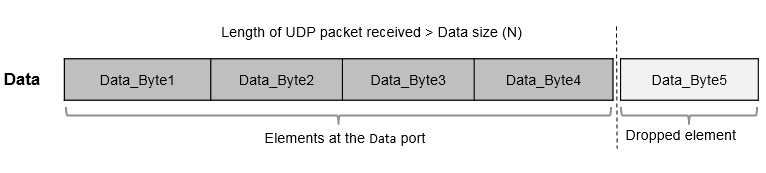
Extended Capabilities
Version History
Introduced in R2017a

