ArbitraryFiniteGapFeed
R2026bDescription
Use the ArbitraryFiniteGapFeed object to specify the
FeedDefinitions property in a parent pcbStack
object.
The ArbitraryFiniteGapFeed object defines a lumped feed across arbitrarily shaped
finite gaps between multiple metal regions, enabling the specification of potential
relationships among the conductors.
Creation
Description
f1 = ArbitraryFiniteGapFeed creates a default
ArbitraryFiniteGapFeed object.
f1 = ArbitraryFiniteGapFeed(
sets object properties using one or more name-value arguments.
PropertyName=Value)PropertyName is the property name, and Value is
the corresponding value. You can specify several name-value arguments in any order as
PropertyName1=Value1,...,PropertyNameN=ValueN. Properties that you
do not specify retain their default values.
Properties
Examples
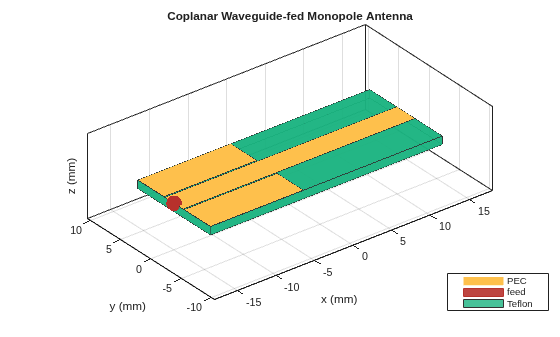
Define the strip width, the strip-to-ground spacing, and the substrate thickness. Derive the board and ground-plane dimensions from the strip width so that the geometry scales consistently. The ground planes occupy only the lower feed region; the strip continues past them to form the monopole.
w = 3e-3;
s = 0.2e-3;
t = 1e-3;
boardWidth = 4*w;
boardLength = 10*w;
Lg = 4*w;
Wg = boardWidth/2 - (w/2 + s);
Define the substrate as a Teflon dielectric and set its thickness to match the board.
d = dielectric("Teflon");
d.Thickness = t;
Create the conductor layer from three rectangles. The central strip spans the full board length: its lower portion is the CPW signal line, and the upper portion, which extends beyond the ground planes, is the radiating monopole. Place a coplanar ground plane on each side of the strip, confined to the feed region so the strip radiates freely where the ground planes end. Combine the three shapes with to form a single conductor layer.
strip = antenna.Rectangle(Length=boardLength, Width=w);
yG = (w/2 + s) + Wg/2;
xG = -boardLength/2 + Lg/2;
gndR = antenna.Rectangle(Length=Lg, Width=Wg, Center=[xG,  yG]);
gndL = antenna.Rectangle(Length=Lg, Width=Wg, Center=[xG, -yG]);
conductor = strip + gndR + gndL;
Create the pcbStack object, set its board outline and thickness, and assign the conductor and dielectric as the layer stack.
p = pcbStack;
p.BoardShape = antenna.Rectangle(Length=boardLength, Width=boardWidth);
p.BoardThickness = t;
p.Layers = {conductor, d};
To enable the FeedDefinitions property, set the FeedFormat property to FeedDefinitions. Define a single ArbitraryFiniteGapFeed at the bottom edge of the board. The feed uses two rows: the first row references the signal strip against the right ground plane, and the second references it against the left ground plane. Assigning a single feed object, rather than an array of feeds, produces a single port.
p.FeedFormat = 'FeedDefinitions';
xf = -boardLength/2;
f1 = ArbitraryFiniteGapFeed(SignalLocations=[xf 0; xf 0], ...
    GroundLocations=[xf, (w/2+s+Wg/2); xf, -(w/2+s+Wg/2)], ...
    SignalWidths=[w; w], GroundWidths=[Wg; Wg], ...
    SignalLayers=[1; 1], GroundLayers=[1; 1]);
p.FeedDefinitions = f1;
figure
show(p)
title("Coplanar Waveguide-fed Monopole Antenna")
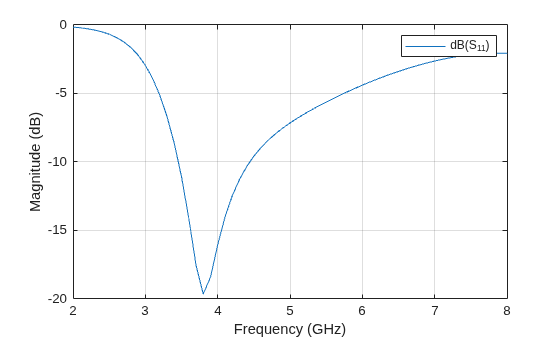
Compute and plot the reflection coefficient. The monopole resonates near 3.8 GHz.
s = sparameters(p, linspace(2e9, 8e9, 61));
figure
rfplot(s)
Version History
Introduced in R2026b

