DeltaGapFeed
R2026bDescription
Use the DeltaGapFeed object to specify the
FeedDefinitions property in a parent pcbStack
object.
The DeltaGapFeed object applies an idealized lumped excitation across an
infinitesimally small gap between the two conductors.
Creation
Description
f1 = DeltaGapFeed creates a default
DeltaGapFeed object.
f1 = DeltaGapFeed( sets
object properties using one or more name-value arguments.
PropertyName=Value)PropertyName is the property name, and Value is
the corresponding value. You can specify several name-value arguments in any order as
PropertyName1=Value1,...,PropertyNameN=ValueN. Properties that you
do not specify retain their default values.
Properties
Examples
Define the dipole length, the conductor width, and the spacing between the two arms.
L  = 0.15;
Wc = 2e-3;
sp = 6e-3;
Create the folded dipole from four rectangles using the antenna.Rectangle object: two parallel arms and two shorting bars that join them at each end. Keep both arms continuous. The DeltaGapFeed forms the feed gap in the lower arm. Combine the rectangles to create a single conductor region.
topArm = antenna.Rectangle(Length=L, Width=Wc, Center=[0,  sp/2]);
botArm = antenna.Rectangle(Length=L, Width=Wc, Center=[0, -sp/2]);
endL = antenna.Rectangle(Length=Wc, Width=sp, Center=[-(L/2 - Wc/2), 0]);
endR = antenna.Rectangle(Length=Wc, Width=sp, Center=[ (L/2 - Wc/2), 0]);
dipole = topArm + botArm + endL + endR;
Define a Rogers RO4725JXR laminate from the dielectric catalog and set its thickness. This low-loss material is well suited to printed antennas.
d = dielectric("RO4725JXR");
d.Thickness = 1.6e-3;
Create the pcbStack object with a board outline larger than the dipole. Assign the conductor and the dielectric as a two-layer stack with no ground plane beneath.
p = pcbStack;
p.BoardShape = antenna.Rectangle(Length=L*1.2, Width=sp*3);
p.BoardThickness = d.Thickness;
p.Layers = {dipole, d};
To enable the FeedDefinitions property, set the FeedFormat property to FeedDefinitions.
p.FeedFormat = 'FeedDefinitions';Create the DeltaGapFeed object and orient it at the center of the lower arm. Use the SignalLocations property to set the feed position. Use the SignalWidths property to set the conductor width, and SignalLayers property to place the feed on the conductor layer.
 f = DeltaGapFeed(SignalLocations=[0 -sp/2], ...
     SignalWidths=Wc, SignalLayers=1);
 p.FeedDefinitions = f;
Display the structure to confirm the folded geometry, the substrate, and the feed location.
figure
show(p)
title("Printed Folded Dipole Antenna with Delta-Gap Feed")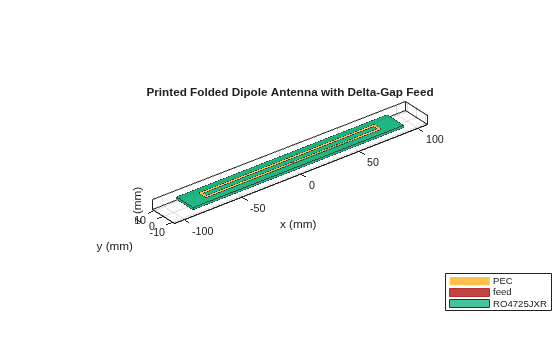
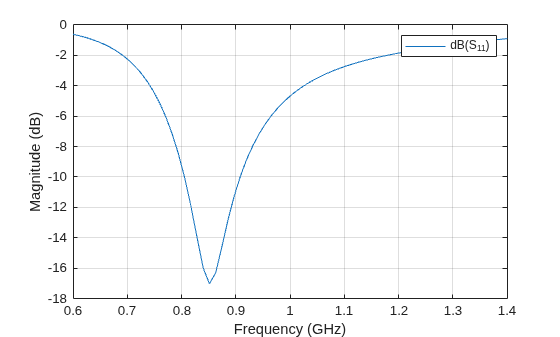
Compute the reflection coefficient. Because a folded dipole presents a high input impedance, reference the S-parameters to 200 Ω rather than the default 50 Ω. On the RO4725JXR substrate, the antenna resonates near 850 MHz.
s = sparameters(p, linspace(0.6e9, 1.4e9, 71), 200);
figure
rfplot(s)
Version History
Introduced in R2026b

