主要内容

removeElements

R2026b

Remove array elements for better sizing

Since R2026b

    Description

    removeElements(obj) opens an interactive window to select and remove elements from the phased array layout. To get the element number, click on the element in the interactive window.

    example

    removeElements(obj,ElementNumber=Value) programmatically removes the specified elements from the phased array layout.

    Examples

    collapse all

    Create a default phased array and run the removeElements function. Running this function opens an interactive figure window showing the array layout.

    p = phasedArrayCalculator;
    removeElements(p)
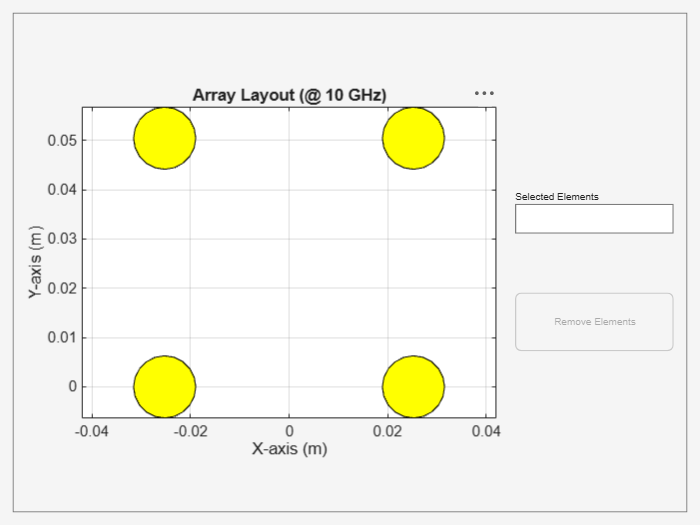
    Figure contains an axes object and an object of type uigridlayout. The axes object with title Array Layout (@ 10 GHz), xlabel X-axis (m), ylabel Y-axis (m) contains 8 objects of type patch.

    Select two corner elements to remove and click Remove Elements button.
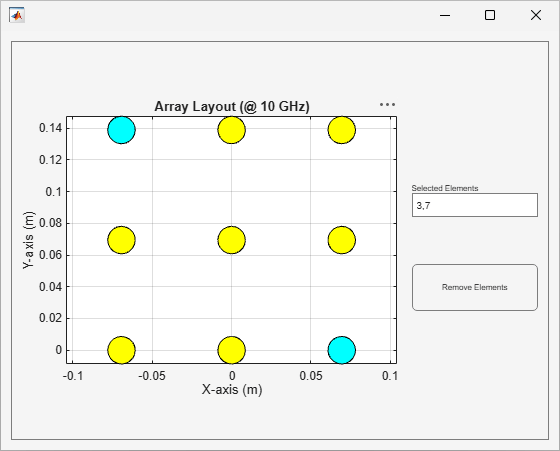
    3-by-3 grid of antenna elements on a labeled X–Y plot with two cornr elements selected for removal.

    The figure window now shows updated array layout with removed corner elements.
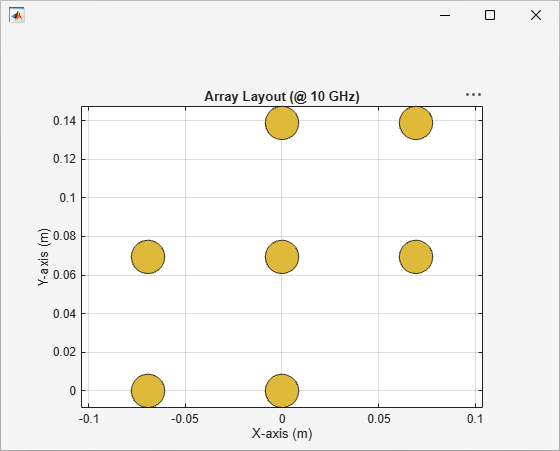
    3-by-3 grid of antenna elements on a labeled X–Y plot with two cornr elements removed.

    Input Arguments

    collapse all

    Phased array performance parameters, specified as a phasedArrayCalculator object.

    Index of element to remove, specified as a scalar integer for a single element or a vector of integers for multiple elements.

    Example: [1,2]

    Data Types: double

    Version History

    Introduced in R2026b

    See Also

    Objects