Simulate Five-Cycle Energy Consumption Tests Using Virtual Vehicle Model
R2026bThis example shows you how to use the Virtual Vehicle Composer app to configure an electric vehicle model and run drive cycles that generate energy data for the five- and two-cycle energy tables used in the SAE J1634 [1] adjustment factor calculations. See Calculate Five-Cycle Electric Vehicle Range Adjustment Factor.
This example uses the first of four testing options listed in SAE J1634 Appendix B.3.6 to generate five-cycle data by simulating these standalone drive cycle tests:
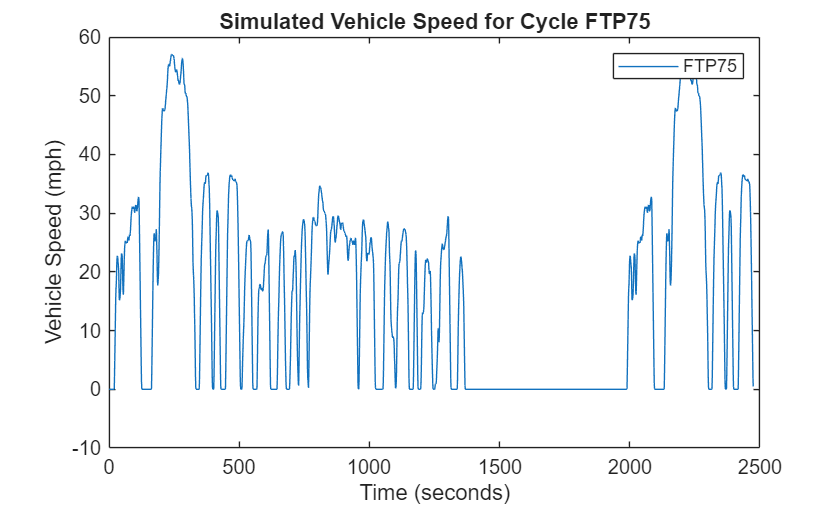
Federal test procedure (FTP-75)
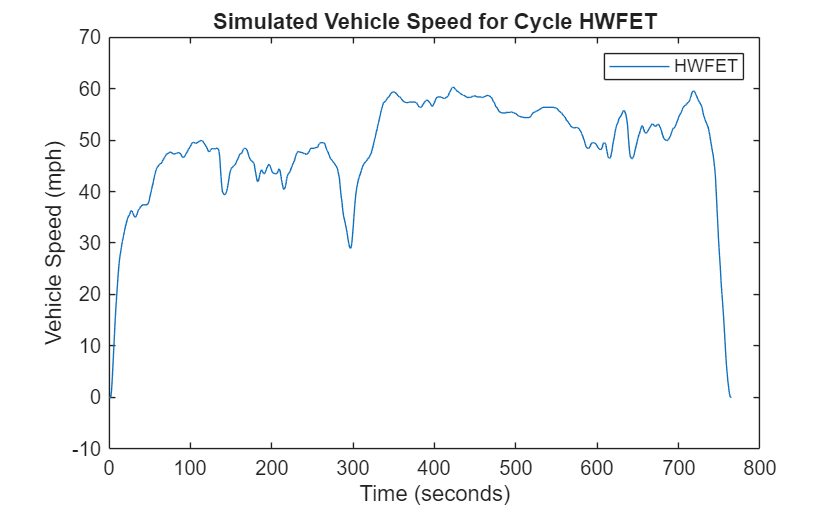
Highway fuel economy test (HWFET)
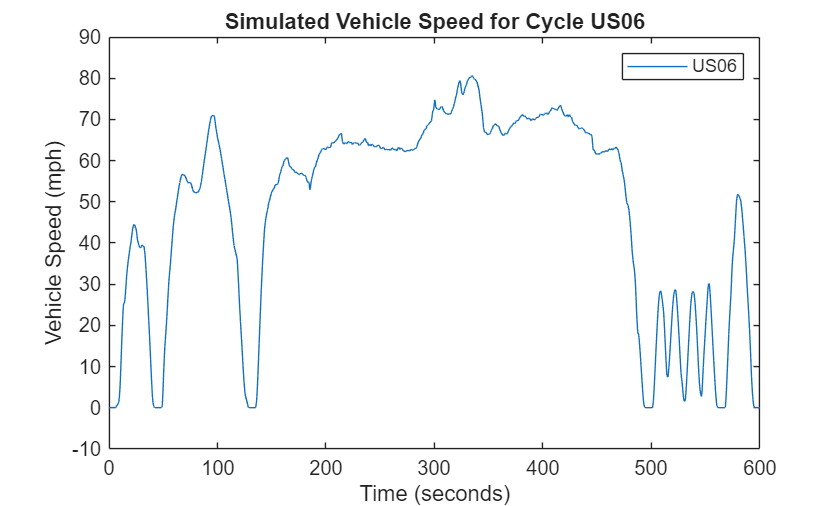
Supplemental Federal Test Procedure (SFTP) US06
Supplemental Federal Test Procedure (SFTP) SC03
The FTP-75 drive cycle is available in the Drive Cycle Source block by default. To install the additional drive cycles, see Install Drive Cycle Data.
Note that this example uses a representative one-motor electric vehicle model. Adjust the configured model to fit your vehicle specifications.
Add Example Folder to Path
Add the example folder to the MATLAB® path.
addpath(genpath(pwd));
Build Virtual Vehicle Model
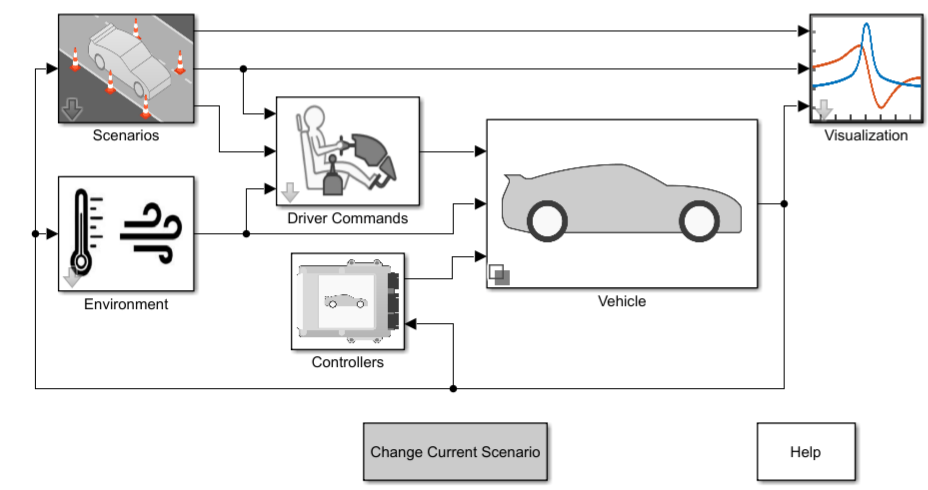
Open a working copy of the Electric Vehicle (EV) Reference Application. For more information, see Build Full Electric Vehicle Model.
autoblkEvStart
Set Up Simulation Inputs
Specify the drive cycles to run and get the simulation length of each drive cycle. The simulation lengths are needed to configure the simulations at a later step. The cold FTP test is not simulated in this example.
mdlName = "ConfiguredEv1EmVirtualVehicle";
cyclesToRun = ["FTP75", "HWFET", "US06", "SC03"];
cycleSrcBlk = mdlName + "/Scenarios/Reference Generator/Drive Cycle/Drive Cycle Source";
battBlkName = mdlName + "/Vehicle/ConfiguredSimulinkPlantModel/Battery/BatteryMapped/Lithium Ion Battery Pack";

numSims = length(cyclesToRun);
load_system(mdlName)
cycleSimTime = strings(numSims, 1);
for i = 1:numSims
    set_param(cycleSrcBlk, "cycleVar", cyclesToRun(i))
    simLengthTime = split(get_param(cycleSrcBlk, "tfinal"));
    cycleSimTime(i) = string(simLengthTime{1});
end
close_system(mdlName, 1);
Create Simulink.SimulationInput Object
To create a set of simulation configurations to simulate each drive cycle, initialize a Simulink.SimulationInput object for the model.
simIn = Simulink.SimulationInput(mdlName);
Define a presimulation function to run before each simulation using the setPreSimFcn function. The presimulation function uses the function setPwrLogging to turn on data logging for each power accounting bus.
simIn = setPreSimFcn(simIn, @(simIn) setPwrLogging(simIn.ModelName, "on"));Define a postsimulation function to run after each simulation using the setPostSimFcn function. The postsimulation function uses the function getBattPwrInfo to turn off data logging and constructs the power analysis.
simIn = setPostSimFcn(simIn, @(simOut) getBattPwrInfo(simOut, battBlkName));
Enable data logging for the vehicle speed signal VehSpd.
Simulink.sdi.markSignalForStreaming('ConfiguredEv1EmVirtualVehicle/Visualization/Signal Specification6',1,'on');
speedph = get_param('ConfiguredEv1EmVirtualVehicle/Visualization/Signal Specification6','PortHandles');
speedlh = get_param(speedph.Outport,'Line');
set_param(speedlh,'Name','VehSpd')
save_system('ConfiguredEv1EmVirtualVehicle');
Configure Simulations
Duplicate the simulation object to create one object for each drive cycle to simulate.
simIn = repmat(simIn, 5, 1);
Specify the drive cycle and simulation time for each simulation object.
for i = 1:numSims
    simIn(i) = setBlockParameter(simIn(i), cycleSrcBlk, "cycleVar", cyclesToRun(i));
    simIn(i) = setModelParameter(simIn(i), "StopTime", cycleSimTime(i));
end
Run Simulations
Run the simulations in parallel using the parsim function.
simOut = parsim(simIn);
[09-Oct-2025 11:41:38] Checking for availability of parallel pool...
Starting parallel pool (parpool) using the 'Processes' profile ...
09-Oct-2025 11:43:17: Job Queued. Waiting for parallel pool job with ID 2 to start ...
Connected to parallel pool with 10 workers.
[09-Oct-2025 11:43:51] Starting Simulink on parallel workers...
[09-Oct-2025 11:44:43] Loading project on parallel workers...
[09-Oct-2025 11:44:44] Configuring simulation cache folder on parallel workers...
[09-Oct-2025 11:45:11] Loading model on parallel workers...
[09-Oct-2025 11:46:41] Running simulations...
[09-Oct-2025 12:02:42] Cleaning up parallel workers...
Save Simulation Data
Extract the simulation data and save the data to the variable CycleSimData.
simData = dictionary(string.empty, struct);
for i = 1:numSims

    vehSpdSignal = simOut(i).logsout.find("VehSpd");
    dataStruct = struct("VehSpd", vehSpdSignal.Values, ...
        "BattPwr", simOut(i).BattPwr);
    simData(cyclesToRun(i)) = dataStruct;
end
save("CycleSimData", "simData");
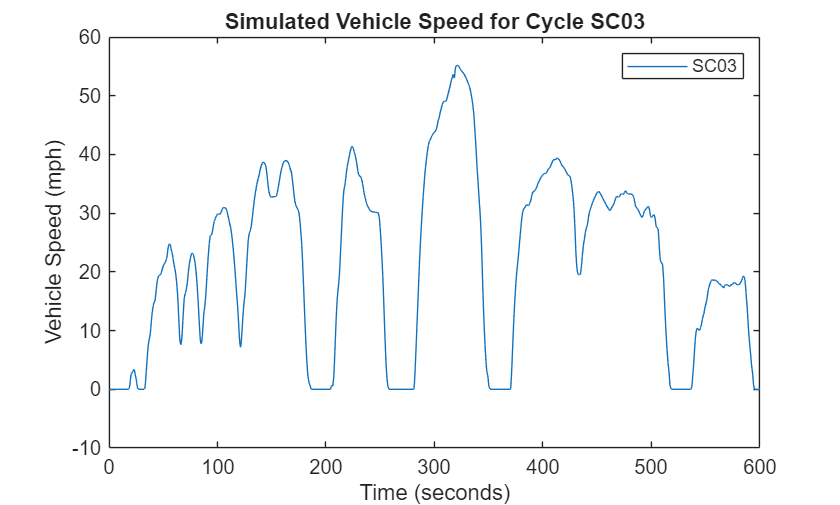
Plot Drive Cycles
Plot the drive cycles to view the simulation results.
for i = 1:length(cyclesToRun)
    cycleData = simData(cyclesToRun(i));
    figure; % Create a new figure for each cycle
    plot(cycleData.VehSpd)
    title("Simulated Vehicle Speed for Cycle " + num2str(cyclesToRun(i)))
    ylabel("Vehicle Speed (" + cycleData.VehSpd.DataInfo.Units.Name + ")")
    legend(cyclesToRun(i))
end
References
[1] SAE J1634. "Battery Electric Vehicle Energy Consumption and Range Test Procedure". Warrendale, PA: SAE International, revised April 2021, issued May 1993. https://doi.org/10.4271/J1634_202104.
See Also
Calculate Five-Cycle Electric Vehicle Range Adjustment Factor

