Configure and Export ARXML from AUTOSAR Adaptive Software Architectures
R2026bThis example shows how to generate and optionally package AUTOSAR XML descriptions and C++ code from AUTOSAR software architectures. If you have Simulink® Coder™, Embedded Coder®, and System Composer™, from an AUTOSAR Adaptive software architecture model, you can:
Export composition and component AUTOSAR XML (ARXML) descriptions and generate component C++ code.
Generate service implementation code for integration with the AUTOSAR Runtime for Adaptive (ARA).
Build software components referenced by the software architecture model, and create out of the box executables.
Create a ZIP file to package build artifacts from the model hierarchy for relocation and integration.
Export composition ARXML descriptions and generate ASAP2 (.a2l) files. For more information, see Generate ASAP2 File for AUTOSAR Architecture Models.
You can export an entire architecture model, a nested composition, or a single software component. If you initiate an export that includes a composition, the export includes XML descriptions of the composition, component prototypes, and composition ports and connectors. For more information about importing AUTOSAR software compositions, see
Configure the XML options of an AUTOSAR Adaptive software architecture model.
Export ARXML descriptions from an AUTOSAR Adaptive software architecture model and generate a descriptive report of the exported files.
Configure AUTOSAR Adaptive Composition XML Options
To prepare your software architecture for ARXML file export, examine and modify your XML options. XML options set for a software architecture model are inherited by each software component and composition in the software architecture.
To view XML options for an AUTOSAR Adaptive software architecture select XML Options in the Share section of the Modeling tab. For example, open example AUTOSAR Adaptive software architecture adaptive_EnergyManager.
open_system("adaptive_EnergyManager");From the Modeling tab, in the Share section, select XML Options. The XML Options dialog box opens. Modifications you make to the XML options are inherited by the software components and compositions included in the software architecture.
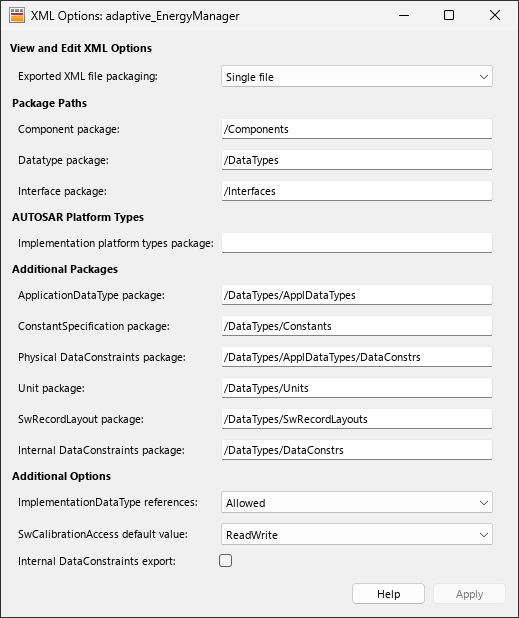
Setting the Exported XML File Packaging option allows you to specify the granularity of XML file packaging for AUTOSAR elements created in Simulink. Selecting Single file exports the ARXML into a single file. Selecting Modular exports the ARXML into multiple files, named according to the type of information contained in the file. For this example set Exported XML File Packaging to Modular.
arProps = autosar.api.getAUTOSARProperties("adaptive_EnergyManager");
set(arProps,"XmlOptions","ArxmlFilePackaging","SingleFile");
For more information about the options available for configuring ARXML export, see:
Configure AUTOSAR XML Options for models configured for the AUTOSAR Classic Platform.
Configure AUTOSAR Adaptive XML Options for models configured for the AUTOSAR Adaptive Platform.
Configure AUTOSAR XML Options in Architectural Data Section for configuring ARXML export for interfaces, types, and constants stored in the Architectural Data section of a data dictionary.
Export Composition ARXML and Generate Architecture Export Report
In this example you export ARXML files and generate an architecture export report for an AUTOSAR software architecture configured for the AUTOSAR Adaptive Platform.
To export the architecture model, on the Modeling tab, in the Share section, select Share > Generate Code and ARXML. In the Export Composition dialog box select Open report and Package Code and ARXML. Click OK.
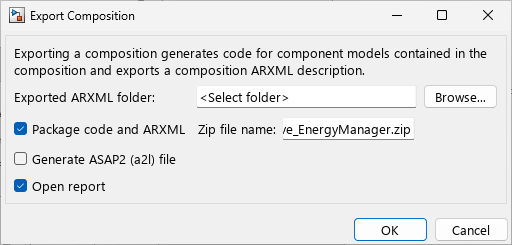
ARXML files are exported for compositions referenced by the architecture model and any linked data dictionaries. The architecture export report opens. Generated code and ARXML files for referenced component models are not included in the report.
Alternatively, to programmatically export and generate packaged ARXML files for an AUTOSAR Adaptive software architecture model use the slbuild function.
evalc('slbuild("adaptive_EnergyManager")');Note: When exporting an architecture model, the AUTOSAR schema versions of the architecture model and component models in the hierarchy must match.
Inspect Exported ARXML and Architecture Export Report
After exporting ARXML files with the Open report option enabled, you can explore the exported ARXML files by using the architecture export report. The architecture export report details generated ARXML files for any compositions in the architecture model and architectural data in any linked data dictionaries.
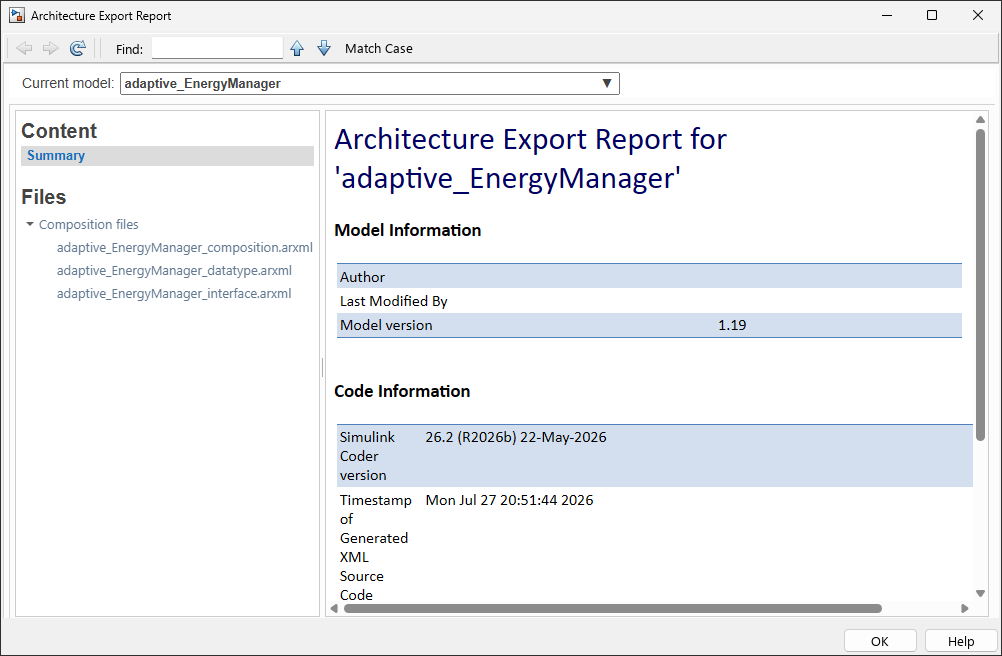
Inspect the generated ARXML files in exported adaptive_EnergyManager folder. The export produces modular ARXML files that separate composition, data type, interface, component, execution manifest, and service instance manifest descriptions.
The exported ARXML files are organized by content type:
adaptive_EnergyManager_composition.arxml— Defines theEnergyManagercomposition, including three component prototypes:ProcessSensorData,EnergyAlgorithm, andProcessAlgorithmOutputs, composition ports, and assembly and delegation connectors that define internal data flow.adaptive_EnergyManager_datatype.arxml— Contains data type definitions shared across the architecture, including primitive types, structure types, and enumerations and their computation methods.adaptive_EnergyManager_interface.arxml— Defines the AUTOSAR Adaptive service interfaces used by the composition ports, including both sender-receiver and client-server interfaces.
For each AUTOSAR Adaptive software application, the software exports:
modelName
_component.arxml— Defines theADAPTIVE-APPLICATION-SW-COMPONENT-TYPEwith its required and provided ports and communication specifications.modelName_ExecutionManifest.arxml— Describes the executable, process design, process-to-machine mapping, startup configurations, and function group state dependencies.modelName_ServiceInstanceManifest.arxml— Contains middleware (DDS or SOME/IP) service interface deployments, event deployments with event IDs, event groups, provided and required service instances, service-instance-to-port mappings, and service-instance-to-machine mappings.
The stub sub-folder contains a shared MachineManifest.arxml that defines machine states, machine resource configuration, and Diagnostic Log and Trace (DLT) logging for each component process.
To create code generation reports for exported component models in an AUTOSAR architecture, select configuration parameter Create code generation report for the referenced software component models.

