根据 ARXML 更新数据字典的“架构数据”分区
R2026b在 Simulink® 中,您可以从 AUTOSAR XML (ARXML) 文件导入 AUTOSAR 架构数据,例如接口和数据类型。您使用 ARXML 导入器,它是作为 arxml.importer 对象实现的。有关详细信息,请参阅AUTOSAR ARXML 导入器。
要将 ARXML 软件描述文件导入 Simulink,请首先调用 arxml.importer 函数。例如:
ar = arxml.importer("ThrottlePositionController.arxml")为了支持 AUTOSAR 元素在 AUTOSAR 编写工具 (AAT) 与 Simulink 基于模型的设计环境之间的来回处理,ARXML 导入会保留导入的 AUTOSAR XML 文件结构、元素和通用唯一标识符 (UUID) 以用于 ARXML 导出。有关详细信息,请参阅AUTOSAR XML 文件结构和元素信息的双向保留。
要配置 ARXML 导出选项,请参阅Configure AUTOSAR XML Options。
从 ARXML 将架构数据导入数据字典
将架构数据(例如接口和数据类型)的 AUTOSAR XML 描述导入现有数据字典中。将更新后的数据字典链接到组件或组合模型。您可以持续使用来自 ARXML 文件的内容更新数据字典的“架构数据”分区,而无需将 Simulink 模型链接到该数据字典。
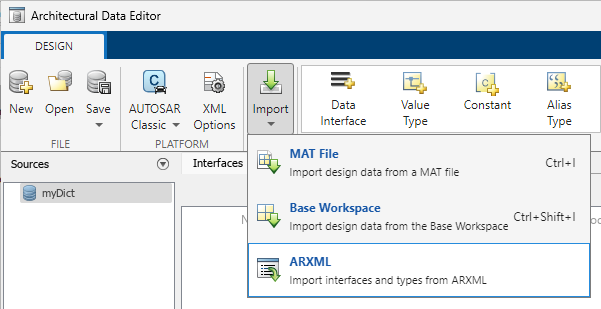
您可以通过在架构数据编辑器中打开数据字典,点击架构数据编辑器工具条上的导入按钮  ,然后选择 ARXML 来导入接口和数据类型的 AUTOSAR XML 描述。
此示例以编程方式创建并更新数据字典,使其中包含来自导入的 ARXML 文件的架构数据。
创建一个数据字典和
Simulink.dictionary.ArchitecturalData对象archDataObj。dictName = "myDictionary.sldd"; archDataObj = Simulink.dictionary.archdata.create(dictName)archDataObj = ArchitecturalData with properties: DictionaryFileName: 'myDictionary.sldd' Interfaces: [0×0 Simulink.dictionary.archdata.DataInterface] DataTypes: [0×0 Simulink.dictionary.archdata.DataType] Constants: [0×0 Simulink.dictionary.archdata.Constant]使用
arxml.importer导入 ARXML 文件ThrottlePositionController.arxml。arxmlObj = arxml.importer("TPCInterfacesAndDatatypes.arxml")arxmlObj = The file "C:\work\TPCInterfacesAndDatatypes.arxml" contains: 1 Application-Software-Component-Type: '/Company/Components/Controller'向数据字典添加 AUTOSAR Classic 平台映射。保存字典,然后使用
updateArchitecturalData函数更新内容。autosarMap = addPlatformMapping(archDataObj,"AUTOSARClassic"); save(archDataObj) updateArchitecturalData(arxmlObj,dictName)### Saving original dictionary as myDictionary_backup.sldd ### Creating HTML report myDictionary_update_report.html
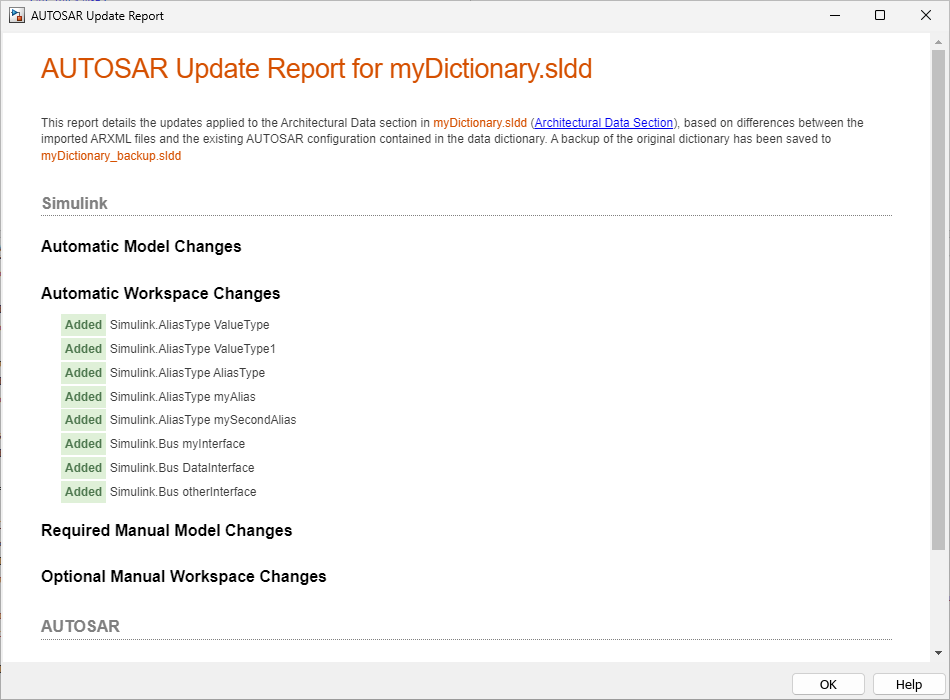
AUTOSAR 更新报告将打开,并显示对数据字典的“架构数据”分区的更改。
另请参阅
arxml.importer | Simulink.dictionary.ArchitecturalData

