Generate Code for Segmentation and Object Detection Using YOLO v11 LiteRT Model
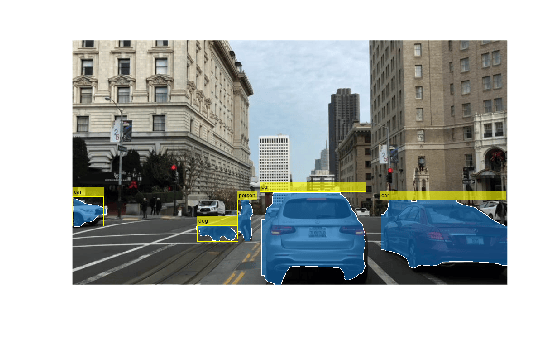
R2026bThis example shows how to generate a CUDA® executable for a You Only Look Once v11 (YOLO v11) model. The generated CUDA code does not contain dependencies to the NVIDIA® cuDNN or TensorRT™ deep learning libraries. This example uses a YOLO v11 model that was trained by Ultralytics on the COCO data set. YOLO v11 is one of the best performing real-time object detectors and is considered as improvement to the existing YOLO variants such as YOLO v8, YOLO v9 and YOLO v10. The instance segmentation variation of the YOLO v11 model provides masks or contours that outline each detected object that helps in segmenting the objects from the rest of the image.
Third-Party Prerequisites
This example requires a CUDA-enabled NVIDIA® GPU and a compatible driver.
For non-MEX builds, such as static, dynamic libraries or executables, this example also requires:
The NVIDIA CUDA toolkit.
Environment variables for the compilers and libraries. For more information, see Third-Party Hardware (GPU Coder) and Setting Up the Prerequisite Products (GPU Coder).
Verify GPU Environment
To verify that the compilers and libraries for this example are set up correctly, use the coder.checkGpuInstall (GPU Coder) function.
envCfg = coder.gpuEnvConfig('host');
envCfg.DeepCodegen = 1;
envCfg.Quiet = 1;
coder.checkGpuInstall(envCfg);
Download Pretrained Model
This example uses a pretrained YOLO v11 instance segmentation model trained on the COCO data set. The model can detect and identify 80 different objects. Use this code to download YOLO v11 model in LiteRT format from the YOLO v11 GitHub directory. The file is approximately 39MB in size.
filename = 'yolo11s-seg_float32.tflite';

if ~isfile(filename)
    url = ['https://raw.githubusercontent.com/' ...
        'matlab-deep-learning/'...
        'pretrained-yolo-v11-litert-model-for-segmentation-and-object-detection-with-matlab/'...
        'main/'...
        'yolo11s-seg_float32.tflite'];

    disp("Downloading 39 MB yolov11 model file...");
    websave(filename, url);
end
Downloading 39 MB yolov11 model file...
Examine the yoloSegmentImage Entry-Point Function
The yoloSegmentInvoke entry-point function runs the forward inference of the LiteRT model on an image. The function loads the model in the yolo11s_seg_float32.tflite file into a LiteRTModel object named yoloSegModel. The function then calls the invoke method on the object and runs a forward inference pass on the model.
Prepare the Input
Because the model expects the input image to be of size [640 640 3], the function resizes the image data by using the imresize function. It then casts the resized image to single data type and normalizes the pixel values to [0 1]. Finally, because MATLAB orders the height (H), width (W), number of channels (C), and number of images (N) using the order HWCN and LiteRT uses the order NHWC, the function permutes the image data.
Run Inference on the Input
After loading the model, the function runs the invoke method. The invoke method returns the raw predictions from the model. The raw prediction is a cell array that contains two outputs. The first output has shape of [batchSize, 4+numClasses+numMasks, numAnchors] and the second output has shape of [batchSize, 160, 160, numMasks], where:
numAnchors specifies the number of anchors
numClasses specifies the number of classes
numMasks specifies the number of masks
The second dimension of the first input contains information of detected bounding boxes coordinates, probabilities of the 80 classes, and mask coefficients. Bounding box are represented by their center coordinates (x_ctr, y_ctr), and width (w) and height (h) of the bounding boxes.
Postprocess the Output
After scaling to the original image size, boxes with confidence scores below 0.5 are discarded. To postprocess the outputs, the entry-point function performs these steps:
Use the
convertCenterBboxesToTopLefthelper function to convert the bounding boxes from[x_ctr, y_ctr, w, h]to [x_left, y_top, w, h]format, wherex_leftandy_topspecify the upper-left corner of the rectangle.Use
selectStrongestBboxMulticlassfunction to further process the predictions and select the strongest multiclass bounding boxes from overlapping clusters using nonmaximal suppression (NMS) algorithm.Generate masks at the generated coordinates and inserts them into the image.
Add annotations to the bounding boxes in the image.
type('yoloSegmentImage.m')function out = yoloSegmentImage(in)
% Copyright 2026 The MathWorks, Inc.
%#codegen
coder.gpu.kernelfun;
origSize = size(in, 1:2);
inputSize = [640 640];
img = im2single(imresize(in, inputSize));
persistent yoloSegModel
if isempty(yoloSegModel)
yoloSegModel = loadLiteRTModel("yolo11s-seg_float32.tflite");
end
outs = cell(1, 2);
[outs{:}] = invoke(yoloSegModel,permute(img, [4 1 2 3]));
outputs = permute(outs{1}, [3 2 1]);
masks = squeeze(outs{2});
bboxIndices = 1:4;
scoresIndices = 5:84;
allBboxes = outputs(:, bboxIndices);
[allScores, allLabels] = max(outputs(:, scoresIndices), [], 2);
keep = allScores > 0.5;
bboxes = allBboxes(keep, :);
bboxes(:, [1 3]) = bboxes(:, [1 3]) * origSize(2);
bboxes(:, [2 4]) = bboxes(:, [2 4]) * origSize(1);
% boxes are in [xctr, yctr, w, h] form -> convert to format expected by NMS
% in MATLAB
bboxes = convertCenterBboxesToTopLeft(bboxes);
scores = allScores(keep);
labels = allLabels(keep);
[bboxesNMS, ~, labelsNMS, nmsIndices] = selectStrongestBboxMulticlass(bboxes, scores, labels,...
'RatioType', 'Min', 'OverlapThreshold', 0.8);
classes = createCOCOClasses(labelsNMS);
maskCoeffs = outputs(keep, scoresIndices(end)+1:end);
maskCoeffs = maskCoeffs(nmsIndices, :);
binaryMasks = processMasks(masks, maskCoeffs, topLeftBboxToXYXY(bboxesNMS), origSize);
RGB = insertObjectMask(in,binaryMasks,LineColor=[1 1 1],LineWidth=1);
out = insertObjectAnnotation(RGB, 'rectangle', bboxesNMS, classes);
end
Display the Test Image
Load the test image for segmentation and object detection.
I = imread("downtownScene.jpg");
imshow(I);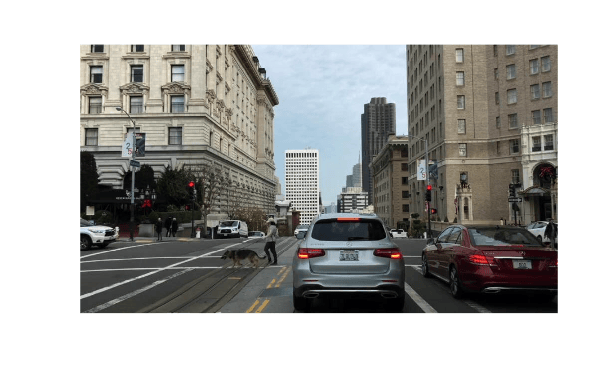
Generate Executable
To generate the CUDA executable code for the entry-point function, create a GPU code configuration object. Then, run the codegen command. Specify the name of the entry-point function as an input argument.
cfg = coder.gpuConfig;
codegen -config cfg yoloSegmentImage -args {I} -report
Code generation successful: View report
Execute Code
Visualize the segmented image by running the generated executable.
out = yoloSegmentImage_mex(I);
imshow(out);
References
[1] Lin, Tsung-Yi, Michael Maire, Serge Belongie, et al. “Microsoft COCO: Common Objects in Context.” In Computer Vision – ECCV 2014, edited by David Fleet, Tomas Pajdla, Bernt Schiele, and Tinne Tuytelaars, vol. 8693. Springer International Publishing, 2014. https://doi.org/10.1007/978-3-319-10602-1_48.

